If you're reading this, you're probably wasting money.
Not because your marketing campaigns are bad or your sales team isn't working hard enough. You're wasting money because 95% of your target market isn't ready to buy right now, and you're spending resources trying to convert them anyway.
This is the 95-5 rule in B2B markets: at any given moment, only about 5% of your potential buyers are actively in-market. The other 95% aren't thinking about your product, reading your emails, or clicking your ads—because they already have what you sell and won't need a new one for months or years.
According to research from LinkedIn and the Ehrenberg-Bass Institute, 75% of companies buy computers once every four years. 80% change banking services once every five years. If you sell B2B software with a 2-year average purchase cycle, that means only about 13% of your market is in-buying-mode in any given quarter.
So the question is: how can you actually find them?
This is where buying intent data comes in. And where most companies get it completely wrong.
What Is Buying Intent Data (And Why It Actually Matters)
Buying intent data is behavioral information that reveals when a company or individual is actively researching solutions in your category—before they fill out a form, before they book a demo, before they even land on your website.
It answers one critical question: Who is in-market right now?
Not "who fits our ICP" or "who downloaded our ebook six months ago." Who is actively evaluating vendors today.
Here's why this matters:
Most B2B buyers complete 70-80% of their research before ever talking to a salesperson. They're reading reviews on G2, comparing vendors, consuming content across publisher networks, asking questions in Slack communities, and browsing competitor websites.
If you're only tracking what happens on your website, you're seeing 20-30% of the buyer journey. You're blind to the rest.
Intent data fills that gap.
It tells you:
- Which companies are researching topics related to your product
- How intensely they're researching (is this casual browsing or active evaluation?)
- What stage of the buying journey they're in (awareness, consideration, or decision)
- When their research activity spikes (indicating urgency)
The promise: stop wasting time on cold prospects and focus on the accounts that are actually ready to buy.
The reality: most companies buy intent data, plug it into their CRM, and then... nothing changes.
Why? Because they're optimizing for the wrong thing.
The Types of Buying Intent Data (And Which Ones Actually Matter)
Not all intent data is created equal. Here's the breakdown:
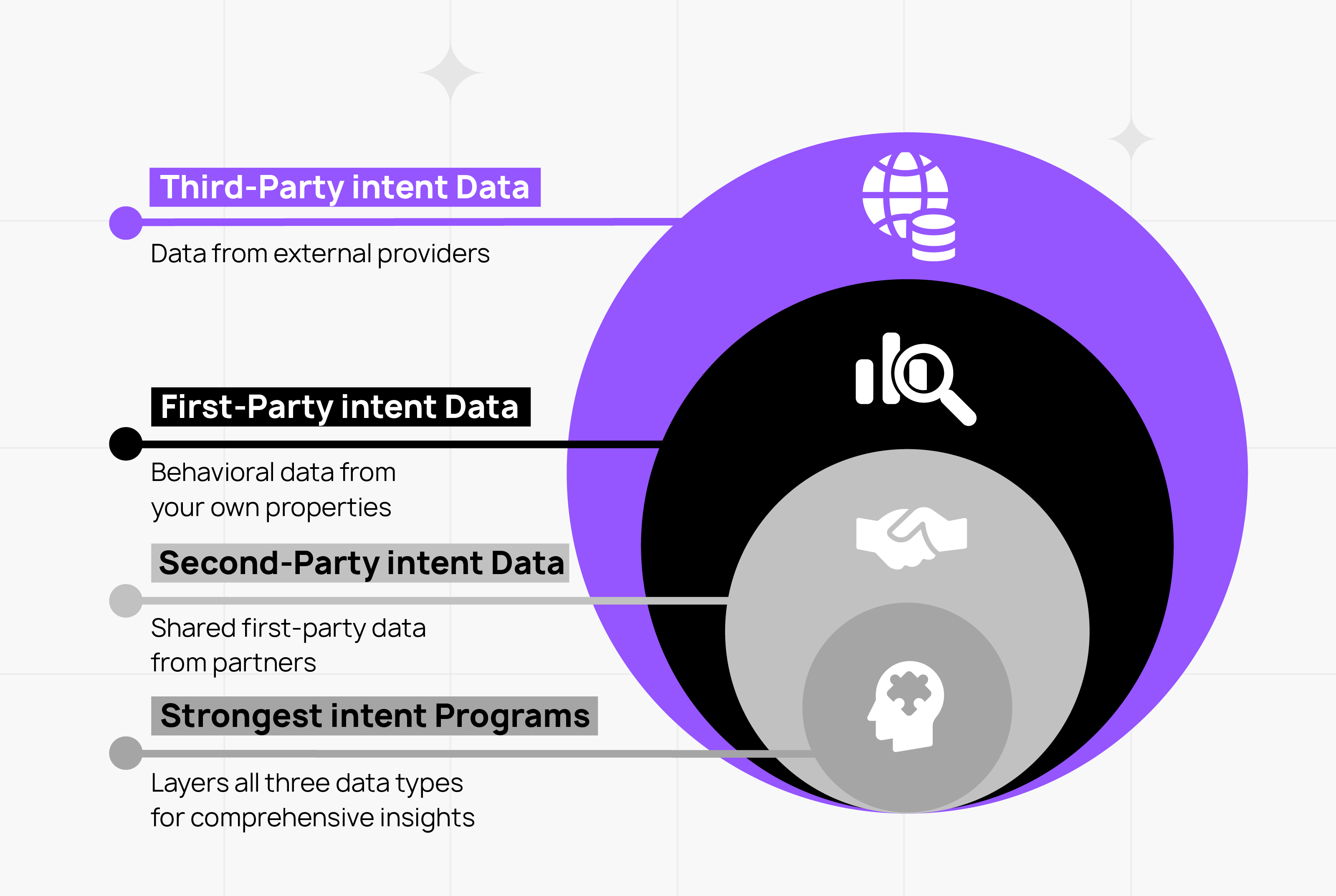
First-Party Intent Data
This is behavioral data you collect directly from your own digital properties: your website, email campaigns, product usage, CRM interactions.
Examples:
- Pricing page visits
- Case study downloads
- Product demo requests
- Repeat visits to specific feature pages
- Email engagement (opens, clicks, replies)
- In-product behavior (if you have a freemium or trial model)
Why it's valuable: First-party data is the most accurate. You know exactly who these people are, what they're looking at, and how they're engaging with your brand.
The limitation: You only see people who already know about you. If someone is researching "best CRM for SaaS companies" across the web but hasn't visited your site yet, you have zero visibility.
Third-Party Intent Data
This is data collected by external providers who track browsing behavior across thousands of websites, publisher networks, and content platforms.
Examples:
- Keyword research activity (e.g., company searching "revenue operations platform")
- Content consumption on industry publications
- Engagement with competitor content
- Topic surges (when a company's research activity on a topic spikes above their baseline)
Providers: Bombora, 6sense, Demandbase, ZoomInfo
Why it's valuable: Third-party data catches buyers before they know about you. It shows you which accounts are researching your category right now, giving you a chance to reach them early.
The limitation: Lower precision. A "surge" in research activity around "marketing automation" might mean they're evaluating vendors, or it might mean an intern is writing a blog post. You need to layer it with other signals to separate real intent from noise.
Second-Party Intent Data
This is another company's first-party data that they share with you (usually for a fee).
Examples:
- G2 Buyer Intent (shows when prospects are reading reviews, comparing vendors, viewing pricing)
- TrustRadius review activity
- TechTarget content engagement
Why it's valuable: Second-party data is the highest-fidelity intent signal available. If someone is on G2 comparing you vs. your competitors, that's not casual browsing—that's active vendor evaluation.
The limitation: Narrow scope. Only captures behavior on those specific platforms.
Here's what actually works: The strongest intent programs layer all three types. Use third-party data to identify accounts entering research mode. Use second-party data to confirm they're in active evaluation. Use first-party data to understand exactly what they care about and when to engage.
Types of Intent Signals (And What They Actually Mean)
Intent data providers track different types of signals that indicate where a buyer is in their journey:
Behavioral Signals
- Page visits: Which pages are they viewing? (Homepage = early stage. Pricing page = late stage.)
- Content downloads: Whitepapers and guides = consideration. Case studies and ROI calculators = decision.
- Return visits: One-time visitor = curious. Five visits in two weeks = actively evaluating.
- Time on page: 10 seconds = bounce. 5 minutes = engaged.
Engagement Signals
- Email behavior: Opens, clicks, replies, forwards
- Webinar attendance: Registered but didn't attend vs. stayed for full session vs. asked questions
- Social media activity: Liking a post vs. commenting vs. sharing with their network
Context Signals
- Topic surges: Research activity on specific keywords spikes above baseline
- Competitive research: Viewing competitor pages, comparison content
- Technology stack changes: Job postings for roles that indicate buying (e.g., "Salesforce Admin" suggests CRM evaluation)
Timing Signals
- Recency: Activity from yesterday vs. activity from six months ago
- Frequency: One visit vs. daily visits for two weeks
- Velocity: Research activity accelerating or decelerating
Here's the thing most companies miss:
A single signal means almost nothing. Someone downloading a whitepaper doesn't mean they're ready to buy. Someone visiting your pricing page once doesn't mean they're evaluating.
It's the pattern that matters.
If a company visits your pricing page three times in one week, downloads a case study, compares you vs. competitors on G2, and has job postings for a role related to your product—that's a buying signal.
Real-World Example: How Salesforge Turned Website Traffic Into 200+ Qualified Calls/Month
Before we get into the theory of how to use intent data, let's look at what this actually looks like in practice.
Salesforge is a sales engagement platform—similar to Salesloft or Outreach. They're good at cold outbound. That wasn't the problem.
The problem: Thousands of people were visiting their website every month, researching sales tools, comparing alternatives, reading pricing pages. High-intent buyers were slipping through the conversion funnel because there was no way to engage them in real time.
Sound familiar?
Here's what they did:
They installed Captiwate (took 4 minutes). Set up proactive triggers on high-intent pages:
- Pricing page (visitor scrolls 50%+)
- Integration pages (comparing with alternatives)
- Competitor comparison pages
- Post-lead magnet pages (after downloading resources)
They created a dedicated Slack channel owned by their AE and SDR. Rule: one of them has to answer. If one is busy, the other picks up.
They only show the widget during working hours aligned with buyer timezones (2pm CET for Europe, 9am PST for US).
Read more about how Salesforge increased their demo volumes by 30%.
And Here's Where First-Party Data + Speed Actually Wins
Quick detour to talk about something nobody else will tell you:
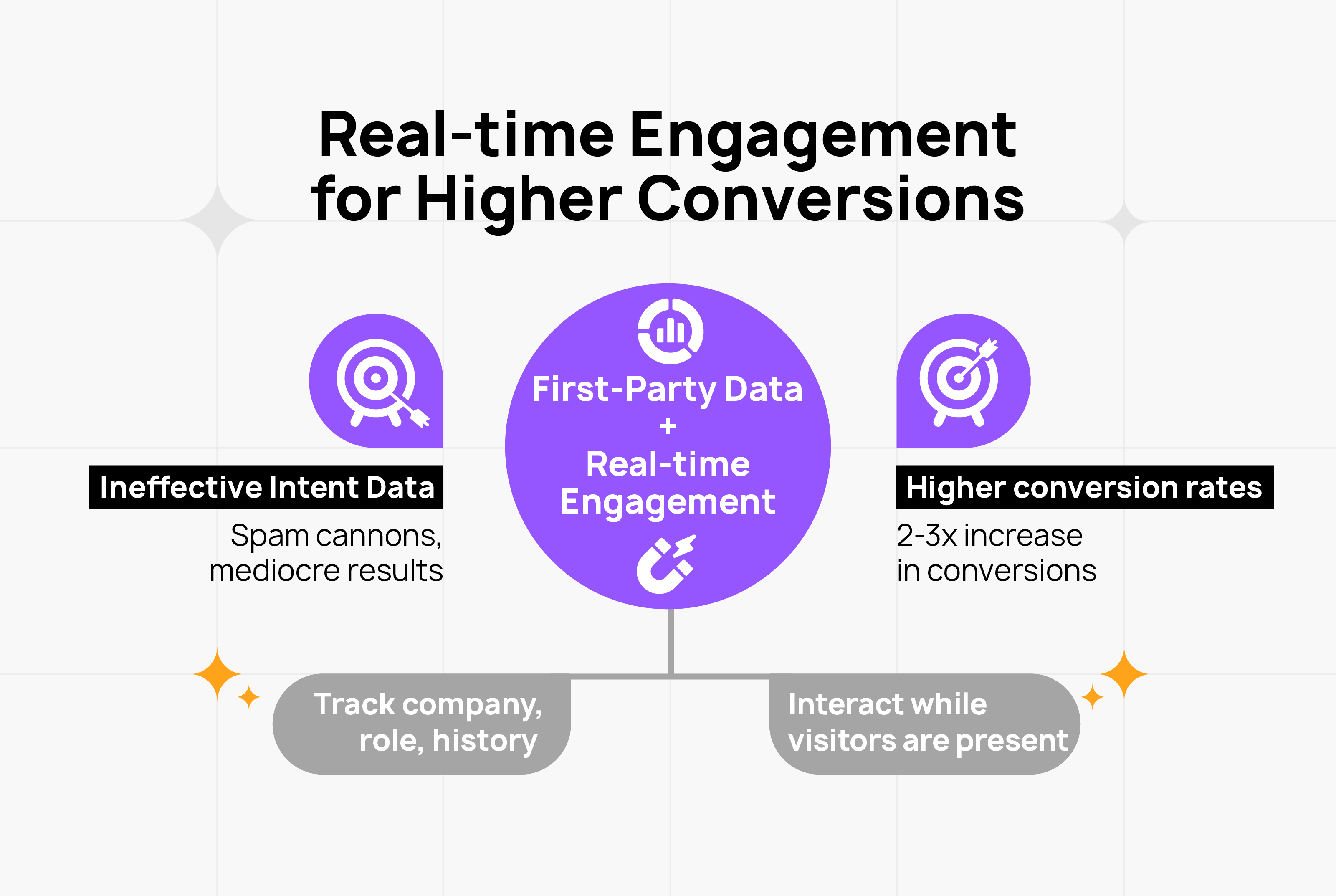
Most intent data programs turn into very sophisticated spam cannons.
Here's what happens:
- Company buys intent data from Bombora or 6sense
- Intent data shows "Acme Corp is researching 'revenue operations platforms'"
- SDR gets alert, sends cold email: "Hi, saw you're researching RevOps solutions..."
- Prospect deletes email (they were researching for a blog post, not evaluating vendors)
- Repeat 1,000 times
The problem: Third-party intent data is a leading indicator, not a buying signal.
It tells you someone is researching your category. It doesn't tell you if they're actually in-market, who the decision-makers are, or when they'll buy.
Here's what actually works better:
First-party intent data (what happens on YOUR website) + real-time engagement = highest conversion rates.
Why? Because when someone is on your pricing page right now, you know:
- They're actively evaluating (not just researching)
- They're on your site at this exact moment (intent is highest)
- You can engage them immediately (before they leave and forget about you)
At Captiwate, we see this play out constantly: companies spending $50K/year on third-party intent data with mediocre results, while missing the highest-intent visitors already on their website because they're not set up to engage them in real-time.
Your website traffic is first-party intent data. And if you can identify who's visiting (company, role, previous engagement history) and engage them while they're still there, your conversion rates will be 2-3x higher than email outreach based on third-party signals.
Buying Intent Stages (And the Intent Window You're Probably Missing)
Intent data isn't binary (in-market vs. not). There are stages:
Stage 1: Awareness (Problem Identification)
What they're doing: Reading educational content, blog posts, industry trends Intent signals: Researching broad topics ("what is revenue operations"), downloading guides What to do: Provide helpful content, build brand awareness, don't pitch
Stage 2: Consideration (Solution Research)
What they're doing: Comparing categories, exploring different approaches Intent signals: Reading vendor comparisons, attending webinars, downloading case studies What to do: Position your approach, show how you solve the problem differently
Stage 3: Decision (Vendor Evaluation)
What they're doing: Comparing specific vendors, reading reviews, viewing pricing Intent signals: G2 activity, pricing page visits, demo requests, ROI calculator usage What to do: Remove friction, answer objections, make it easy to buy
Here's the part everyone gets wrong:
Most companies treat all intent signals the same. Someone downloads a whitepaper → SDR reaches out with a pitch.
But a whitepaper download in the awareness stage is fundamentally different from a pricing page visit in the decision stage.
And here's the part that's even more important:
The Intent Window Is Measured in Minutes, Not Days
When someone hits your pricing page, their intent is highest right now. In this exact moment, they're actively evaluating. They have questions. They're comparing you vs. competitors.
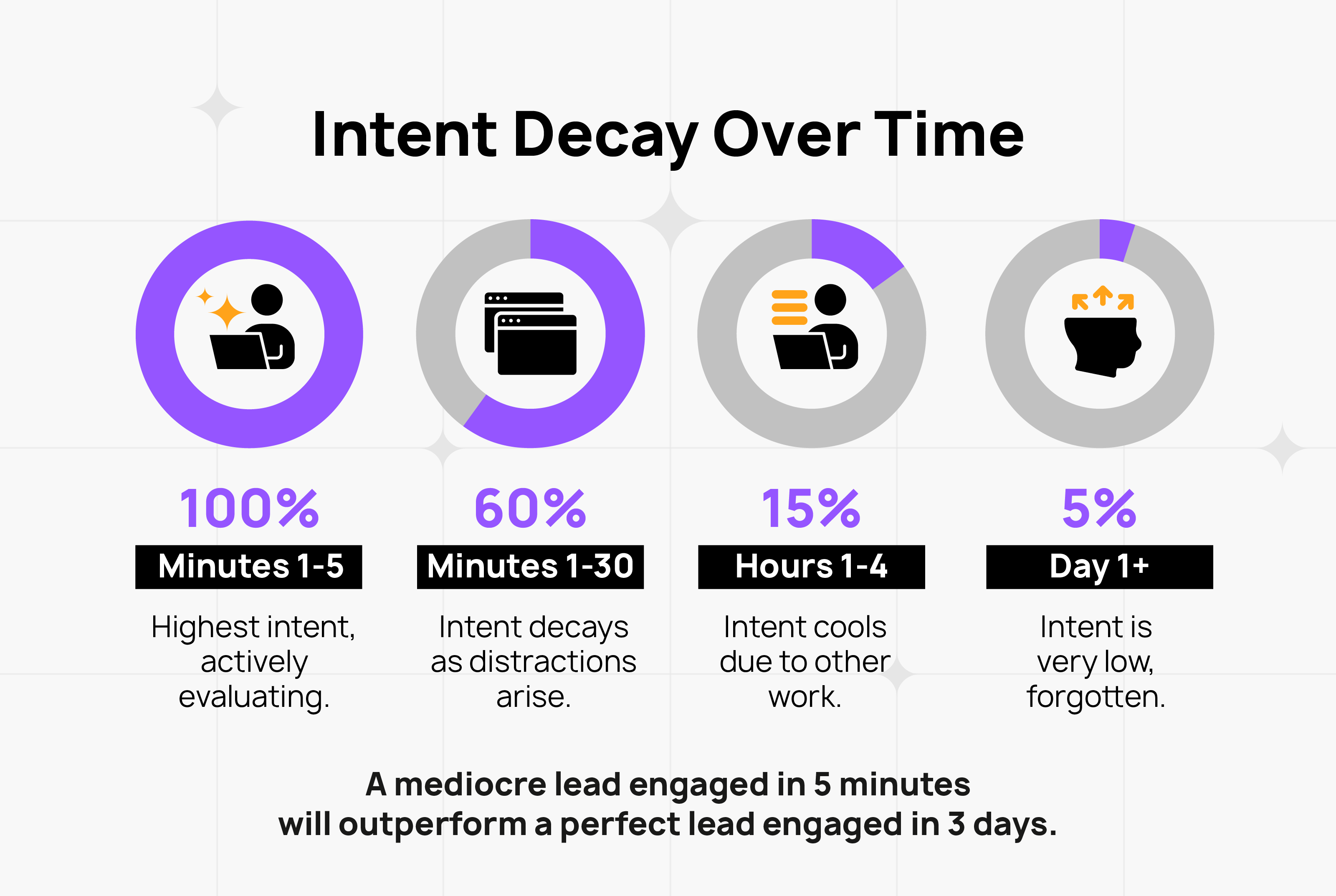
Intent decays fast:
- Minutes 0-5: 100% (they're on your site actively evaluating)
- Minutes 5-30: 60% (they've opened competitor tabs, gotten distracted)
- Hours 1-4: 15% (pulled into other work, intent cooling)
- Day 1+: 5% (have they heard of you?)
Most companies treat intent data as a weekly report. "Here are the accounts that showed intent this week—let's add them to a nurture sequence."
By the time your SDR sends an email three days later, the window is closed.
This is why speed to lead matters more than lead sophistication.
A mediocre lead engaged in 5 minutes will outperform a perfect lead engaged in 3 days.
"But My Sales Team Won't Respond in Real-Time" (And Other Objections You're Already Thinking)
Let's address the elephant in the room.
You're reading this thinking: "This sounds great in theory, but my AEs are in back-to-back meetings. They're not going to drop everything to respond to a Slack alert."
Fair. Here's how this actually works operationally (using Salesforge as the model):
The Setup:
Dedicated Slack channel owned by specific reps (not the whole sales team). At Salesforge, it's 1 AE + 1 SDR. Rule: if one is busy, the other answers.
Widget only shows during working hours matched to buyer timezones. Salesforge runs coverage 2pm–6pm CET (Europe) and 9am–5pm PST (US). No alerts when your team is offline. No dropped leads.
Proactive triggers on high-intent pages only. Not every page view. Only:
- Pricing page (scrolled 50%+)
- Competitor comparison pages
- Integration pages
- Post-resource download pages
This filters out random browsers. You're only getting alerted when someone from a target account is actively evaluating.
Reps prefer these calls over cold outreach. Why? Because intent is already there. The visitor is on your pricing page comparing plans. They have questions. They're ready to talk.
Compare that to cold email where you're interrupting someone who doesn't know you exist.
Salesforge's SDRs close deals at "significantly higher rates" from widget calls vs. cold outreach. Once reps see the close rates, they stop treating this like "another tool to ignore" and start fighting over who gets the next alert.
The Math:
- Small team (1 AE + 1 SDR)
- 200 calls/month = ~10 calls/business day
- Average call: 30 minutes
- Most turn into scheduled demos or close micro-deals on the spot
Time investment: ~5 hours/week per rep
Output: 30% more demos, 50%+ of ARR attributed to these calls
That's not "drop everything constantly." That's "take 2-3 calls per day from buyers who are already hot."
What If My Traffic Is Too Low?
Salesforge isn't running millions of visitors/month. They're a Series B SaaS company with typical inbound volume.
If you're getting 1,500+ website visits/month from your ICP, this will work. Here's the math:
- 1,500 visits/month
- ~150 from target accounts (10% match rate)
- ~20 high-intent page views (pricing, comparisons)
- ~8 conversations (40% engagement rate when offered)
- ~3 qualified demos (38% conversion from conversation to demo)
That's 36 additional demos/year. At 20% close rate with $30K ACV = $216K additional ARR from a $15K/year tool.
How to Actually Identify Buying Intent Signals (Without Building a Data Science Team)
You don't need a $200K intent data platform to start. Here's what works:
1. Set up proper website analytics
Use Google Analytics 4 or similar to track:
- Which pages high-value visitors are viewing
- How long they're spending on each page
- Return visit frequency
- Conversion paths (what sequence of pages leads to demo requests)
2. Implement visitor identification
Tools like Clearbit, 6sense, or Captiwate can de-anonymize website visitors, showing you which companies are on your site even if they haven't filled out a form.
This turns anonymous traffic into actionable data: "Acme Corp visited your pricing page three times this week."
3. Track engagement across channels
- Email: Who's opening, clicking, replying?
- Social: Who's engaging with your content?
- Product (if you have free/trial): Who's using which features?
4. Layer in third-party signals (if you have budget)
Platforms like Bombora or G2 Buyer Intent show you:
- Which accounts are researching your category elsewhere
- Topic surges (when research activity spikes)
- Review site activity (who's comparing you vs. competitors)
5. Build a scoring model (simple version)
Not every signal is equal. Weight them:
- Pricing page visit: 10 points
- Case study download: 7 points
- Blog post view: 2 points
- Email open: 1 point
When an account crosses a threshold (say, 20 points), alert sales.
6. Act fast
This is the step everyone misses.
Intent data is worthless if it sits in a dashboard. You need:
- Real-time alerts (Slack, CRM notifications)
- Clear ownership (which rep handles which account)
- Engagement playbooks (what to say, when to reach out)
Better yet: Enable real-time engagement while visitors are still on your site.
If someone from a target account is on your pricing page right now, why wait 3 days to send an email? Give them the option to chat with sales or hop on a quick call immediately.
(This is literally what Captiwate does—we show you who's on your site right now and let you engage them via chat or video call before they leave.)
Top Buying Intent Use Cases for Marketing and Sales Teams
Here's how teams actually use intent data (when they use it well):
For Marketing:
1. Account prioritization for ABM Instead of targeting all 500 accounts in your TAM, focus on the 50 showing active intent signals right now.
2. Retargeting campaigns Someone visited your pricing page but didn't convert? Retarget them with ads addressing common objections or showing customer success stories.
3. Content personalization If you know an account is in the consideration stage, show them comparison guides. If they're in decision stage, show pricing and ROI calculators.
4. Lead scoring and routing Intent signals feed into lead scores, ensuring sales works the hottest leads first.
For Sales:
1. Outbound prioritization Your SDRs have a list of 1,000 accounts. Intent data tells them which 50 are actively researching right now. Start there.
2. Contextual outreach Instead of generic cold emails, reference what they've been researching: "Saw you were exploring revenue operations platforms—happy to show you how we're different from [competitor]."
3. Account expansion/upsell Existing customer starts researching topics related to your premium features? Their account manager should know and reach out proactively.
4. Competitive displacement Intent data shows when a company is researching alternatives to their current vendor. Perfect time to reach out.
The One Thing That Matters Most:
All of this only works if you can actually act on the data.
Too many companies:
- Buy intent data
- Plug it into their CRM
- Generate reports
- Do nothing with it
The intent data sits there. Sales doesn't check it. Marketing doesn't act on it. Nothing changes.
What actually works:
- Real-time alerts when high-intent accounts show up
- Clear playbooks for how to engage based on intent stage
- Speed — engage while intent is hot, not days later
- First-party prioritization — the people on your site right now are more valuable than anyone researching your category elsewhere
The Honest Truth About Intent Data
Here's what nobody in the intent data industry wants to admit:
Intent data is a leading indicator, not a crystal ball.
It tells you someone is researching. It doesn't tell you:
- If they have budget
- If they have authority to buy
- If they're actually serious or just doing market research
- When they'll make a decision
Most intent data programs fail because companies treat intent signals like MQLs and throw them at sales, who then waste time on accounts that aren't actually ready to buy.
What works better:
Use third-party intent data to identify accounts entering research mode (top of funnel awareness). Use second-party data (G2, review sites) to confirm they're in active evaluation (consideration/decision). Use first-party data (your website, product, email) to understand exactly what they care about and engage them while they're hot.
And most importantly: prioritize speed over sophistication.
A company that can engage buyers in real-time (while they're on your pricing page right now) will always outperform a company with perfect intent scoring but slow follow-up.
At the end of the day, first-party intent + speed to lead is what actually drives revenue.
Otherwise, you're just building a very sophisticated spam cannon.
Want to see who's on your website right now? Captiwate shows you which companies are visiting your site, what they're looking at, and lets you engage them via chat or video call before they leave. See how it works, or book a demo today.