
98% of B2B website traffic leaves without filling out a form or otherwise identifying itself, leaving only about 2% visible through traditional lead capture, according to Artemis GTM’s benchmark on the anonymous visitor revenue leak. That doesn’t mean the other visitors are irrelevant. In one median-company dataset, roughly 4,800 monthly visitors remained anonymous, and an estimated 12–18% of them still matched the company’s ideal customer profile.
That gap changes how a marketing team should think about B2B website visitor identification. The question isn’t whether a tool can turn an anonymous pageview into a name. The useful questions are more practical: which company is browsing, what are they researching, and what action should follow?
A visitor record becomes valuable only when it helps marketing prioritize an account, helps sales choose a relevant next step, or helps revenue operations measure demand that forms never captured. The best programs don’t chase identity for its own sake. They find the traffic segments where identification is accurate enough, legally appropriate, and economically useful.
Table of Contents
- The Anonymous Traffic Problem
- How Visitor Identification Actually Works
- Company-Level Versus Person-Level Resolution
- Turning Identified Visits Into Intent Signals
- Using Identification for ABM and Sales Routing
- Why Match Rate Is the Wrong Number to Chase
- Privacy, Consent, and Region-Aware Defaults
- A Practical Checklist Before You Deploy
The Anonymous Traffic Problem
98% of B2B website traffic leaves without filling out a form or otherwise identifying itself, according to the Artemis GTM data brief. Traditional lead capture therefore exposes only about 2% of visits, while the rest remains outside the CRM’s known-lead view.
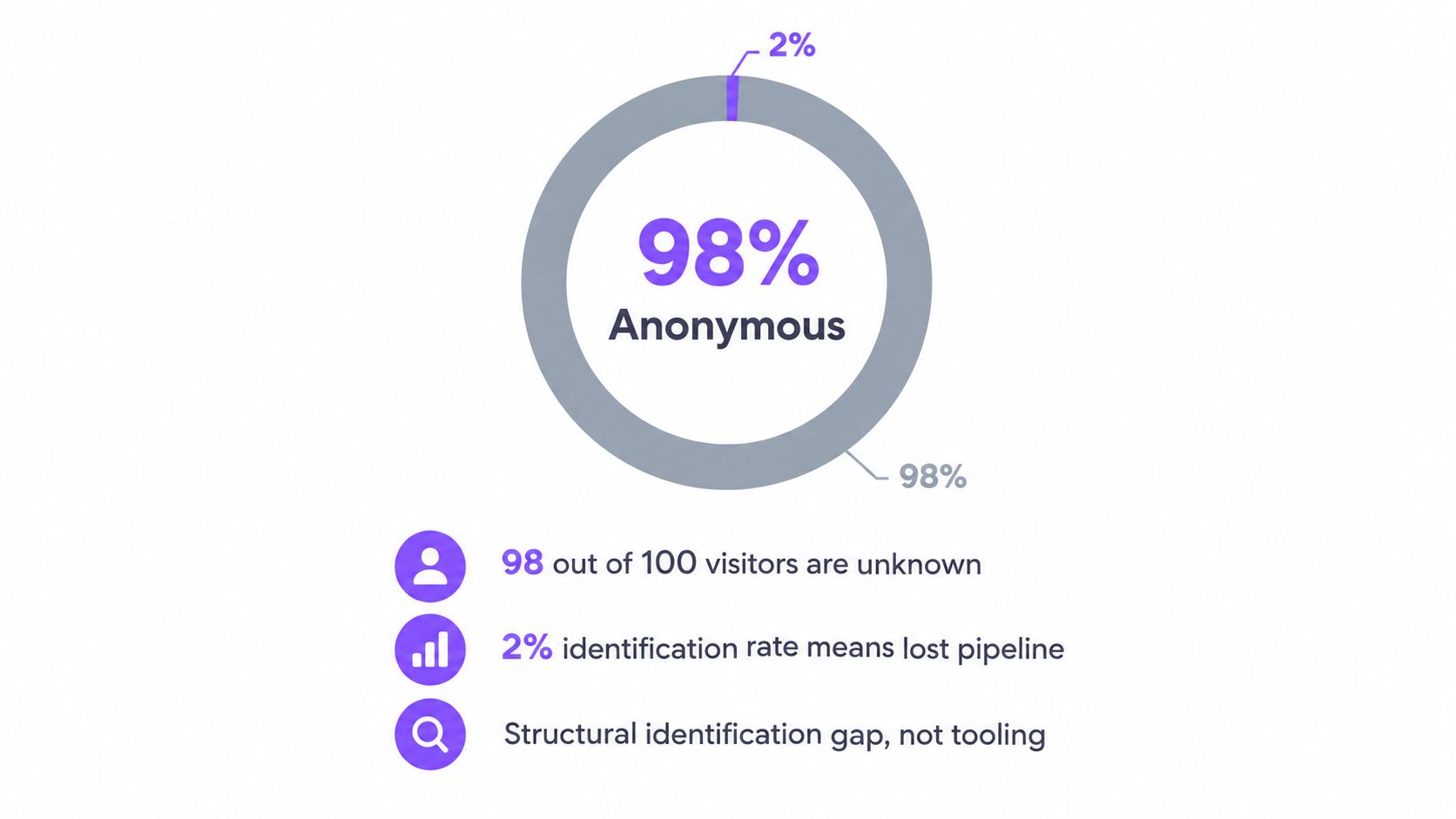
That anonymous group can include people reading product pages, comparing integrations, reviewing security details, checking pricing, or returning after discussing a vendor internally. Their research may be serious even when they are not ready to exchange contact information. A form submission is a clear signal, but it arrives late and represents only visitors willing to identify themselves.
What disappears from the revenue system
After an unidentified visitor leaves, aggregate analytics may retain the session, source, pageviews, and conversion context. The account behind that activity remains hidden. Sales will not see it in a territory queue, and the opportunity will not enter pipeline reporting unless someone later submits a form or otherwise becomes known.
Four consequences follow:
- Pipeline visibility weakens: A qualified account can research a solution without appearing in the CRM.
- Campaign evaluation narrows: Teams assess acquisition through the small group that converts, while missing the larger group that engages anonymously.
- Account prioritization suffers: Marketing cannot easily separate a target account reviewing security documentation from a casual reader browsing a blog post.
- Timing gets lost: A form fill may occur after the buyer has already completed much of the research process.
The problem is structural, not merely a missing marketing-automation feature. Buyers can gather meaningful information without volunteering their identity, while revenue systems often begin acting only after identification.
Three questions to ask
A useful visitor identification workflow follows three questions:
- Who is on the site? Begin with the strongest resolvable identity, often a company rather than an individual.
- What are they reading? A pricing visit has different meaning from a careers-page visit or a general educational article.
- What does the signal change? The result might update an ABM audience, create an account alert, influence routing, or improve measurement.
A resolved company is not automatically a lead. Treat it as context until fit, behavior, timing, and a suitable next action align.
The practical goal of B2B website visitor identification is to find economically useful traffic segments, not to turn every pageview into a verified person. Company-level context can support prioritization even when person-level resolution is unavailable, and a lower match rate may still be valuable when the identified accounts are relevant and actionable.
How Visitor Identification Actually Works
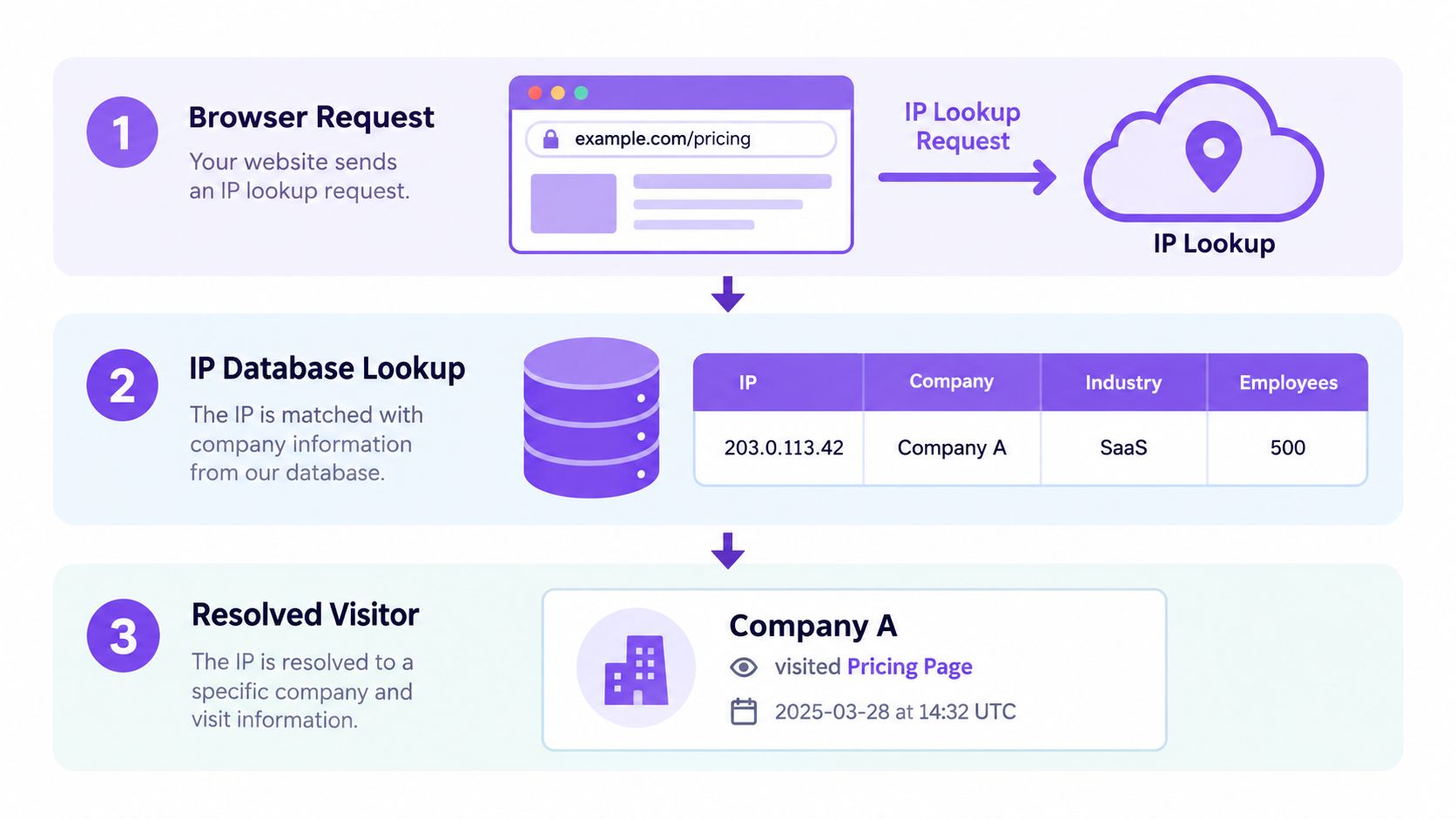
Start with one pageview. A visitor requests a pricing page, and the website receives technical information needed to deliver the page. A visitor identification script can send selected event data to a vendor, which then attempts to connect the request to business and behavioral records.
Step one starts with the network
The most defensible technical baseline is reverse-IP company matching. The visitor’s network address is compared with known business ranges and registry information. If the request comes from a corporate office network with dedicated address space, the system may associate the visit with a company record.
This approach is strongest for on-premises traffic from larger organizations. It becomes less reliable when the visitor works remotely, uses a VPN, connects through a mobile network, or browses from a residential internet service. Independent coverage places realistic company-level resolution at roughly 30–65% of US B2B traffic, while person-level identification is closer to 5–20% in realistic conditions, as described by Common Room’s analysis of website visitor identification.
Step two adds probabilistic signals
Some vendors use browser or device signals to fill gaps left by network matching. These can include cookies, browser characteristics, device patterns, and other signals connected to an identity graph. Fingerprinting may help a platform recognize a returning browser or associate activity across sessions, but it also raises greater privacy and consent questions.
A technical match isn’t the same as proof of a person’s identity. Shared devices, blocked cookies, privacy tools, VPNs, and changing network conditions can all create false positives or prevent a match entirely.
Step three uses first-party evidence
The strongest person-level resolution usually comes from a first-party event. A form submission, gated-content exchange, chat interaction, logged-in product session, webinar registration, or verified work email can connect earlier anonymous activity to a known contact.
That stitching process might show that a previously company-level visit belongs to a known contact. It doesn’t mean every earlier pageview should be attributed to that person automatically. Teams should understand the vendor’s matching logic, confidence labels, retention rules, and source hierarchy.
Before deploying a script, document where the payload goes and how identity is validated. For teams building identity-aware workflows, integrate identity verification provides useful technical context on connecting identity checks to application flows. You can also compare implementation patterns in this guide to website visitor tracking software.
Different vendors combine these sources differently. That’s why the same visitor can produce a company record in one platform, a person suggestion in another, and no match in a third.
Company-Level Versus Person-Level Resolution
The difference is simple to state but easy to blur in vendor demonstrations.
Company-level identification might tell you that Acme Corp visited the pricing page. Person-level identification might associate that activity with Jane Smith, Vice President of Engineering at Acme Corp. The first is an account signal. The second is an individual identity claim that requires stronger evidence and carries greater privacy sensitivity.
Company-level resolution is often sufficient for ABM, account prioritization, advertising suppression, and territory routing. Person-level resolution can support direct outreach and contact enrichment, but teams shouldn’t assume that a named contact was the person who browsed unless the matching evidence supports that conclusion.
Independent guidance commonly places company-level resolution at about 30–65% of B2B traffic, while realistic person-level resolution is typically only 5–20%, as summarized in the Factors.ai guide to anonymous website visitor identification. The gap exists because business networks are easier to associate with organizations than individual browsers are to associate with people.
| Dimension | Company-Level | Person-Level |
|---|---|---|
| Typical output | Company name, domain, industry, location, and other firmographic context | Name, role, contact details, and individual activity where supported |
| Primary evidence | Corporate network and business IP matching | First-party identity, cookies, device signals, or identity-graph matching |
| Best use cases | ABM tiers, account alerts, routing, campaign analysis | Contact enrichment, personalized outreach, individual workflow rules |
| Reliability challenge | Shared offices, outdated mappings, remote access | Shared devices, VPNs, privacy controls, and inferred identity |
| Privacy sensitivity | Lower when used as a company-level signal | Higher because data is connected to an individual |
| Operational decision | Which account deserves attention? | Which contact, if any, should receive outreach? |
The common mistake is asking a person-level tool to solve a company-level business problem. If the decision is whether to alert an account owner, company-level data may be enough. If the decision is whether to send a message to a specific employee, require a higher confidence threshold and a clear lawful basis.
The right resolution level is the one that supports the decision. Deeper identity isn’t automatically better identity.
Turning Identified Visits Into Intent Signals
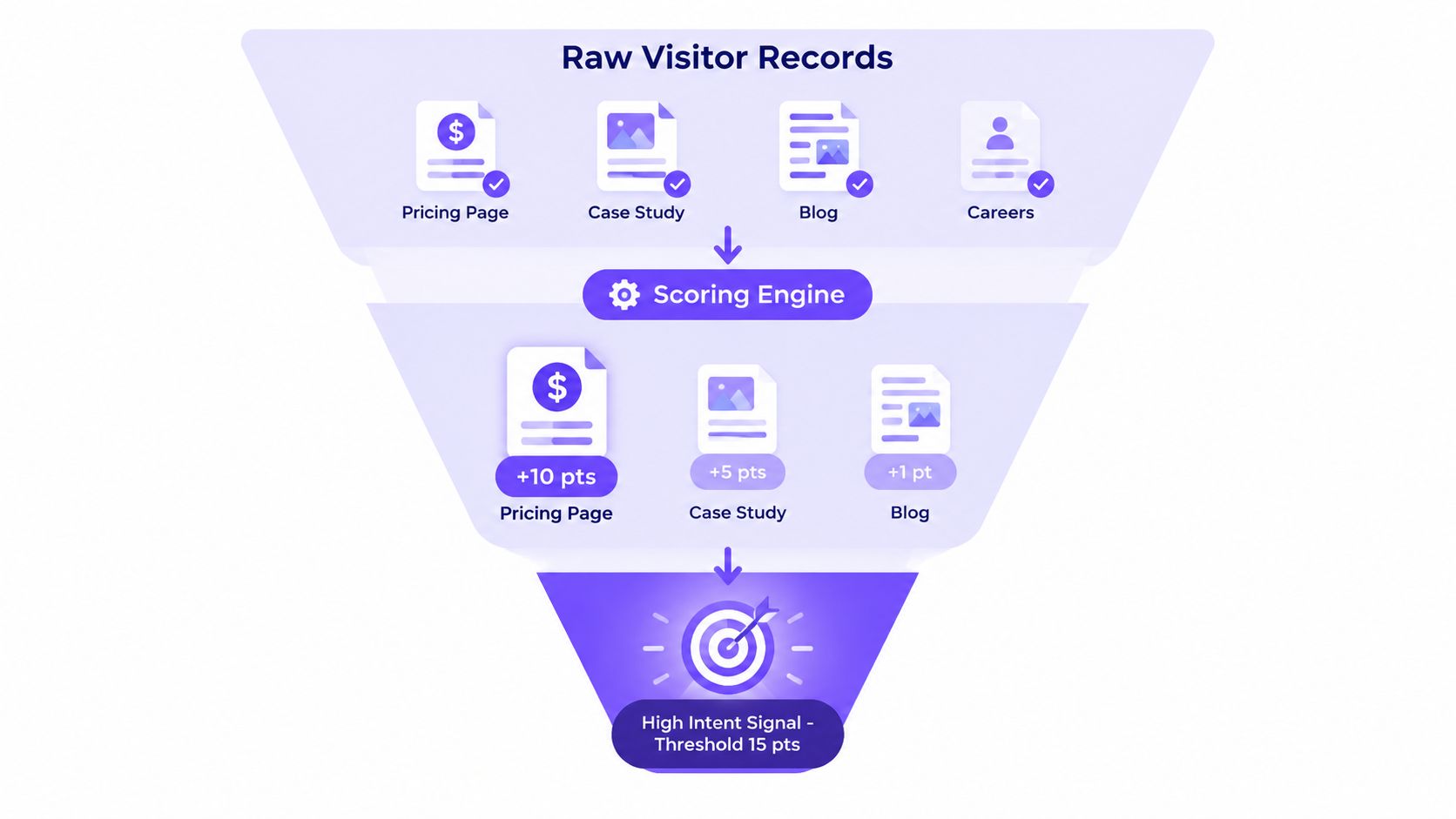
A raw record containing a company, page, and timestamp isn’t intent by itself. It becomes useful after the team interprets the page context, recency, repetition, account fit, and exclusions.
A pricing page usually deserves more attention than a general blog article because it sits closer to a commercial decision. Integration, security, implementation, and competitor-comparison pages can also indicate active evaluation. A careers page, support article, or recruiting visit may be meaningful for another purpose, but it shouldn’t automatically trigger sales outreach.
Build a scoring model around decisions
A practical scoring model starts with the action you want to trigger. For example:
- Page context: Weight commercial and evaluation pages more heavily than broad educational content.
- Recency: Give recent activity more influence than an old visit.
- Frequency: Treat repeated research differently from a single accidental pageview.
- Fit: Combine behavior with industry, company size, geography, and account status.
- Negative signals: Exclude employees, competitors, customers, job seekers, and known non-buying traffic.
The model shouldn’t produce a huge list for sales to inspect manually. It should reduce the stream to accounts that meet a defined threshold and have a clear owner.
Use fit to prevent false urgency
Consider two records. One is a repeat visit to a security page within a short buying window from a 500-employee SaaS company that matches the ICP. The other contains many homepage visits from a 50-person agency outside the ICP. The first account may deserve a review even with fewer visits because the page and firmographic fit carry more economic meaning.
The second account may be curious, researching for someone else, or browsing. Counting pageviews without context would reverse the priority.
A team can connect these rules to its broader intent-based marketing workflow, but the score should remain explainable. A sales representative should be able to see why an account crossed the threshold, not just that a vendor labeled it “hot.”
The deliverable isn’t a dashboard full of visitors. It’s a short list of accounts with a defensible reason to act.
Using Identification for ABM and Sales Routing
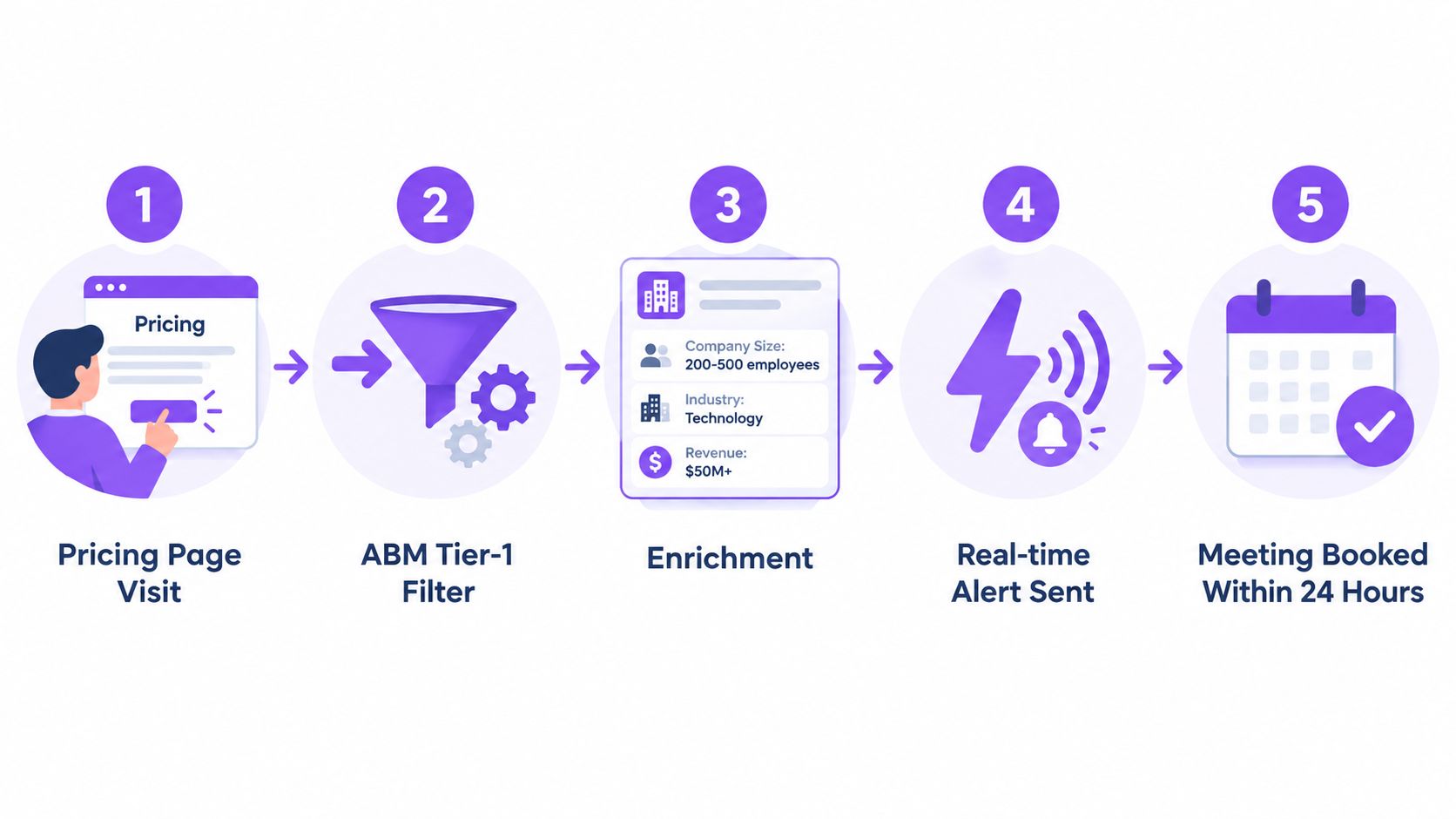
Identification creates value only when it changes what someone does next. A useful workflow turns a meaningful visit into an account review, enrichment step, alert, outreach decision, and logged outcome.
Suppose an account matching the ICP visits the pricing page. The system first checks whether the company belongs in the target account universe. If it does, marketing can place it in a high-priority ABM segment, while revenue operations checks whether the account already has an owner, an open opportunity, or a recent sales conversation.
Route by account tier
Use the account tier to decide how much human attention the signal receives:
- 1:1 ABM: Named strategic accounts can receive coordinated research, advertising, executive involvement, and customized sales follow-up.
- 1:few ABM: Similar accounts can share messaging and content while owners review the strongest signals individually.
- 1:many ABM: Broader segments can receive automated nurture, retargeting, or contextual website experiences without creating manual work for sales.
Automatic routing works best when the rule is narrow. A pricing-page visit from an unowned, high-fit account may create a Slack alert for the account owner. A single blog visit shouldn’t interrupt a representative’s day.
Close the loop with a worked workflow
The account owner reviews the activity and sees visits to pricing, integrations, and a competitor-comparison page. That context supports a relevant message about implementation or an integration question, rather than a generic note that says someone was “seen” on the website.
If the account is already in an active opportunity, the system should suppress the new-business alert and add the activity to the existing record. If it’s a customer, route the signal to customer success or expansion rather than sales development. After outreach, log the response, meeting, or dismissal so the team can evaluate whether the signal deserved its priority.
Teams building a wider account-based marketing process should define these suppression and ownership rules before enabling real-time alerts. A visitor signal without routing logic creates noise faster than it creates pipeline.
Why Match Rate Is the Wrong Number to Chase
A match rate tells you how much traffic a vendor claims to resolve. It doesn’t tell you whether the resolved traffic belongs to accounts your sales team can win.
One 2026 benchmark covering more than 850 B2B companies reported an average identification rate of 38%, while another benchmark describes common company-level reverse-IP resolution at 40–70% of B2B traffic, with stronger performance on office networks than on remote or mobile connections, according to the Artemis GTM deanonymization ROI benchmark. These figures illustrate why vendor numbers need context, not why one percentage should become the universal target.
A broad match across low-fit blog traffic can be less useful than a narrower match concentrated among target accounts reviewing pricing or security content. Independent commentary also notes that vendors generally don’t publish independently audited accuracy benchmarks, so teams should test both coverage and precision against their own traffic mix, as discussed in this analysis of B2B website visitor tracking.
| Metric | What It Measures | Why It Misleads |
|---|---|---|
| Raw match rate | Share of traffic assigned to a company or person | It ignores account fit, page context, and false positives |
| Identified visitor volume | Number of resolved records | A larger pool can increase review burden without improving pipeline |
| Person-level coverage | Share of visits linked to individuals | A name may be inferred rather than verified |
| Alert count | Number of visitors meeting workflow rules | More alerts can overwhelm sales and reduce response quality |
| Pipeline influence | Opportunities connected to identified account activity | This is closer to economic value, but requires disciplined attribution |
The better question is: which economically identifiable segments produce useful action? Measure whether identified target accounts receive better follow-up, enter the right ABM tier, influence opportunities, or improve campaign interpretation. Match rate is a diagnostic. It shouldn’t be the north-star metric.
Privacy, Consent, and Region-Aware Defaults
Visitor identification sits close to privacy boundaries because the same technical event can be used for a company-level account signal or an inferred person-level profile. The risk increases when a team loads identification scripts before consent, uses fingerprinting, or passes person-level data into sales systems without a clear purpose.
Recent guidance recommends treating European and UK traffic conservatively, especially where fingerprinting or covert tracking may constitute personal-data processing. Cookiebeam’s 2026 guidance on B2B visitor deanonymization and consent recommends a company-level reveal by default in Europe because it can support ABM and routing without requiring the same depth of individual profiling.
Separate passive resolution from active tracking
An IP-based company lookup may create a lower-risk company signal than a persistent cookie or device fingerprint, but “passive” doesn’t mean automatically exempt from privacy obligations. Your legal basis, notice, consent design, vendor role, data retention, and downstream use all matter.
Before launch, ask:
- Does the script load before the visitor makes a consent choice?
- Does the platform set cookies or create a persistent identifier?
- Does fingerprinting occur?
- Are person-level fields sent to the CRM?
- Can visitors opt out or request access and deletion?
- Does the privacy notice describe the activity accurately?
A region-aware setup can keep company-level attributes available for approved ABM use while withholding person-level enrichment until the visitor provides an explicit first-party signal or the organization has confirmed a permitted workflow for that jurisdiction.
| Region | Default reveal level | Consent requirement | Notes |
|---|---|---|---|
| EU and UK | Company-level where appropriate | Review consent requirements before loading identification or fingerprinting scripts | Person-level enrichment requires stronger governance and a documented basis |
| California | Use the minimum necessary level | Provide applicable privacy choices and review opt-out obligations | Confirm how business-contact data is treated for the specific use case |
| Other regions | Start with company-level | Check local requirements before enabling deeper tracking | Don’t assume a US workflow transfers unchanged |
Privacy should shape the architecture from the beginning. It’s safer and more useful to collect only the resolution level that supports the business decision.
A Practical Checklist Before You Deploy
Treat deployment as a data-governance and workflow project, not a script-installation task. The script is only the first point in a chain that includes identity resolution, enrichment, CRM writes, alerts, retention, and human follow-up.
Validate the data path
Before sending live traffic, document:
- Script behavior: Record when the script loads, what events it captures, and whether consent controls it.
- Payload fields: List the company, behavioral, and person-level fields that leave the website.
- Downstream systems: Identify every CRM, data warehouse, Slack channel, advertising platform, and enrichment service receiving the payload.
- Identity source: Ask whether the vendor relies on reverse-IP, first-party data, cookies, fingerprinting, or a combination.
- Freshness controls: Test how the vendor handles stale company mappings, changed ownership, shared networks, and corporate offices.
Test the decisions, not just the dashboard
Run employee traffic through the site and check whether visits appear under the correct company. Review the page, timestamp, account owner, industry, size, and suppression status. Then test remote, mobile, VPN, and residential browsing conditions so the team understands where resolution degrades.
Confirm that EEA and California consent behavior works before sales receives any alerts. Person-level fields should remain blocked when the visitor hasn’t met the applicable consent or governance requirement.
Define success economically
Don’t make raw match rate the deployment target. Track whether the identified segments lead to better account prioritization, more relevant routing, cleaner campaign analysis, and measurable pipeline influence. Keep the first workflow narrow, review false positives with sales, and refine the rules before expanding coverage.
Set a recurring review for data quality, vendor performance, suppression logic, retention, and regional defaults. The most valuable system isn’t the one that identifies the greatest volume. It’s the one that helps your team act on the right accounts without overstating what the data proves.
Captiwate helps B2B teams turn identified website activity into live sales conversations through visitor identification, intent detection, AI chat, in-browser video, routing, scheduling, and CRM sync. Review the workflow at Captiwate and decide whether it fits the account-prioritization and real-time engagement process you want to build.