The most popular advice on how to identify anonymous website visitors is still too optimistic. It implies that the right tool can tell you exactly who every person is, when it is closer to account-level prioritization than perfect person-level discovery. In B2B, that distinction matters because roughly 97% to 98% of visitors stay anonymous in the first place, and person-level match rates are still limited by mobile traffic, VPNs, cookie consent, and non-corporate IPs (anonymous website visitor identification guide).
The better question isn’t whether you can name every visitor. It’s whether you can recover enough company signal to route the right accounts, score the right intent, and avoid wasting SDR time on low-confidence matches. That’s the workflow that creates pipeline.
Table of Contents
- Understanding Anonymous Website Traffic
- How Reverse IP Lookup Works
- Layering Behavioral Intent Signals for Accuracy
- Enriching and Routing Identified Accounts
- Navigating Privacy and Compliance Boundaries
- Building Your Visitor Identification Workflow
Understanding Anonymous Website Traffic
Most B2B teams start with the wrong expectation. They want a clean list of names from pricing-page traffic, as if website identity were a switch a vendor could flip on demand. In practice, anonymous traffic is the default state of the modern web, and any serious workflow for how to identify anonymous website visitors has to start there.
Why person-level certainty is the wrong target
Person-level identification is much weaker than company-level identification. Industry explainers commonly describe individual contact match rates in the 5% to 20% range, while company-level matching is often cited around 30% to 65% for B2B traffic (Factors.ai). That gap is not a marketing problem. It comes from how people connect to the web.
Mobile traffic, VPNs, remote work, and shared networks all blur the line between visitor and identity. A buyer may browse from home one day, from the office the next, and from a travel connection after that. If you expect deterministic identity resolution, you will over-trust vendor dashboards and underperform on follow-up.
Practical rule: treat the first identified signal as a probabilistic account cue, not a verified person record.
What good identification delivers
The useful outcome is not “this is Jane Smith.” It is, “this account is here, they are showing intent, and someone on that team is worth a response.” That is a different operating model, and it holds up under real traffic conditions.
Account-level visibility is usually enough to move pipeline. Sales does not need perfect certainty to prioritize a warm account over a cold one. Marketing does not need a named contact to trigger an ABM workflow. RevOps does not need a full profile to compare source quality across segments.
A better mental model is signal recovery. You will not recover every visitor, but you can recover enough high-value accounts to make outreach smarter, routing faster, and attribution cleaner. That is the difference between chasing novelty and building a repeatable revenue process.
How Reverse IP Lookup Works
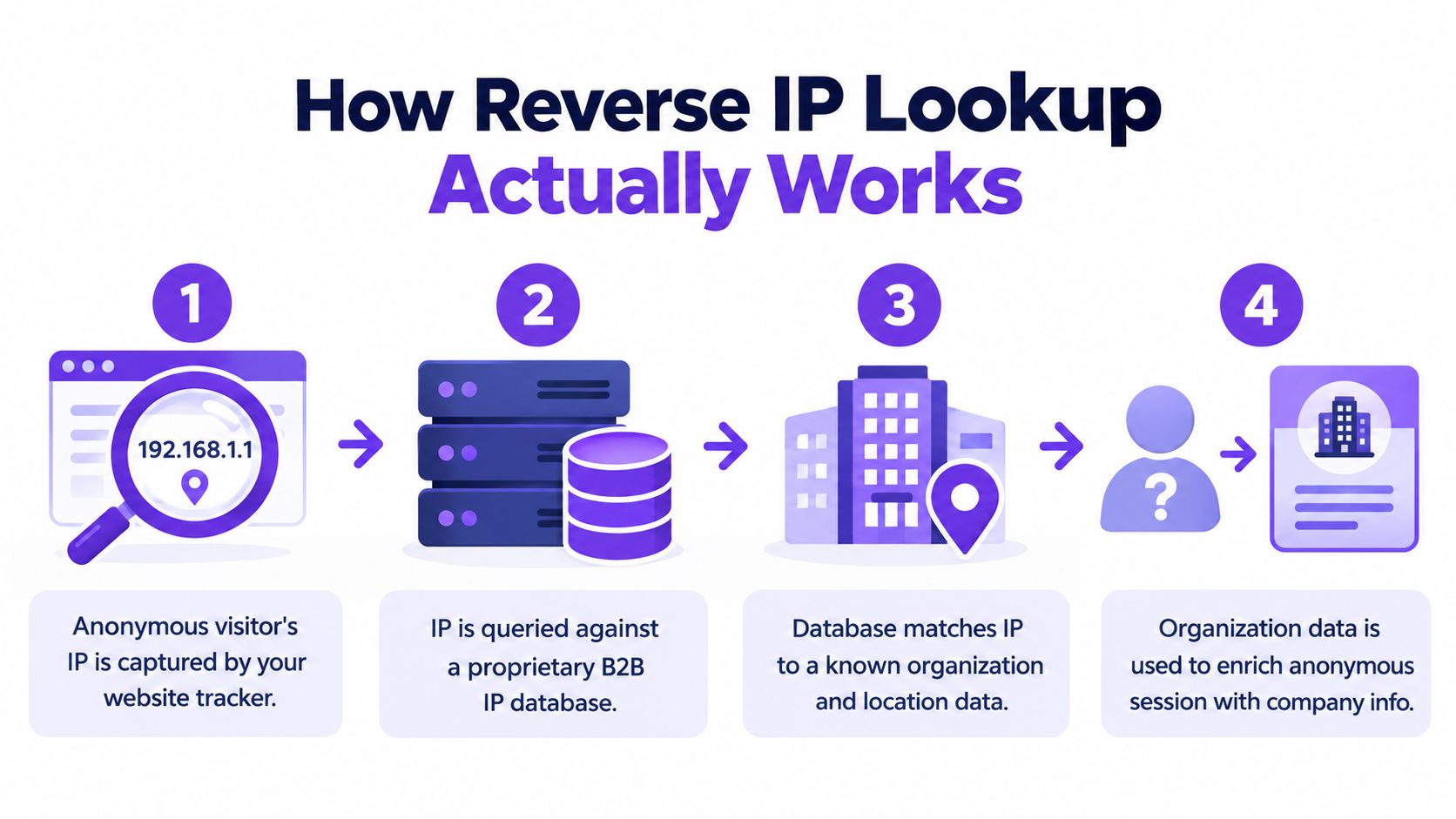
Reverse IP lookup is the first pass because every session exposes an IP address. The workflow starts with that signal, maps it to an organization, then enriches the result with context. The hard part is separating coverage from correctness.
The technical path from IP to company
The cleanest sequence is staged. Capture the visitor IP, filter out bots and known consumer or mobile networks, query an IP-to-organization database, then apply firmographic and behavioral filters before anything reaches sales (Bullseye glossary).
That order matters because raw IP matching is noisy. Office-network traffic can reach roughly 70% to 90% company resolution, while consumer or mobile traffic often falls near 10% to 30%. If your site attracts remote workers, field teams, or mobile sessions, the match rate drops fast.
Why coverage is not the same as accuracy
Independent 2026 benchmarks show reverse IP lookup typically resolves about 30% to 60% of total traffic to a company, but one large analysis of 1,204,258 B2B sessions reported 46.8% company-level resolution, and only 20.9% of those matches were high-confidence. That is enough to improve prioritization, but not enough to treat every match as a sales-ready lead.
The failure points are predictable. Residential ISPs, VPNs, mobile carriers, cloud egress, and remote-work traffic all reduce confidence. Corporate static IPs still perform better than the rest, but many buyers do not browse from one stable network.
For a useful adjacent primer on masking network identity, the practical guide to digital privacy shows how common IP obfuscation has become outside the B2B marketing bubble.
What not to do
Do not push every resolved company straight into a sales queue. Do not assume that a company match means an active buyer. Do not compare raw match rates across tools without checking how each vendor filters bots, home networks, and mobile traffic.
Reverse IP lookup is useful because it gives you a first-pass company hypothesis. Used that way, it helps filter traffic. Used as a certainty engine, it creates false confidence and bad routing.
Layering Behavioral Intent Signals for Accuracy
IP resolution only gives you a company guess. Behavior shows whether the account is worth a rep’s time. The teams that get better results do not treat identification as the finish line, they layer intent signals onto company matches so a casual visit does not get the same treatment as an active buying account.
Start with the pages that signal buying intent
High-intent pageviews do the heavy lifting. Pricing pages, product comparison pages, integration pages, and demo paths usually say more about buying interest than blog traffic does. When the same account keeps returning to those pages, the signal is stronger than one session on a generic homepage.
Repeat visits matter too. Session clustering by domain and behavior helps separate a company that is actively evaluating from one that just passed through. A team that visits once and leaves is not the same as a team that comes back, reads the same solution content, and checks pricing again.
Build a scoring model around behavior, not just fit
Static fit data still matters, but it does not tell you whether the timing is right. The practical comparison is intent signals versus static lists, because the question is whether the account is merely targetable or engaged.
A simple scoring model can combine page type, repeat visits, session depth, and recency. That gives RevOps and SDR leadership a way to route accounts with real momentum instead of pushing every match into the same follow-up motion. If you want a practical next step after the signal is captured, the internal guide on what to do with buyer intent data next fits here.
Operational insight: a weak company match with strong behavioral intent is often more useful than a clean company match with no repeat engagement.
Avoid low-intent noise
Visitor-ID programs fail when they flood reps with accounts that matched technically but never behaved like buyers. That burns trust fast. SDRs stop using the alerts when half of them are vague, stale, or irrelevant.
Suppress low-value traffic early. Use the company signal to narrow the field, then use behavior to decide whether the account deserves human attention, nurture, or silence. That keeps the team focused on accounts that are active now, not accounts that only fit a profile.
In practice, selective workflows win. They protect attention, and they make routing more credible.
Enriching and Routing Identified Accounts
Identification only matters if the result reaches the right system fast enough to influence follow-up. That means turning a company match into a usable record, then routing it into the same motion your sales team already trusts. Without that handoff, visitor ID becomes another orphaned dashboard.
What enrichment should add
Once a company is identified, the next step is firmographic enrichment. Sales needs enough context to know whether the account belongs in enterprise, mid-market, or self-serve motion, and whether the visit lines up with an active territory or open opportunity. That’s where CRM sync matters more than another standalone report.
The practical use case is continuity. A visitor who lands on pricing, then books a call later, shouldn’t feel like a brand-new lead in your stack. The account, session, and meeting should flow into the same record trail so the rep can see the full path from anonymous visit to conversation.
Routing should follow account value and intent
| Identification Signal Routing Matrix | |
|---|---|
| Account Tier | Recommended Action |
| Enterprise account with repeated high-intent pageviews | Route immediately to live sales engagement or direct rep alert |
| Mid-market account with product and pricing interest | Trigger qualified SDR follow-up and CRM task creation |
| Smaller account with light browsing | Send to nurture and monitor for repeat intent |
That routing logic keeps high-value accounts from sitting in a queue while lower-fit traffic gets the appropriate automation. It also protects reps from being asked to respond manually to every match.
Some teams connect this motion directly into HubSpot through the HubSpot integration, then extend the same handoff into their other CRM and collaboration systems. Captiwate is one platform that combines visitor identification with in-browser video, chat, and automated routing, so the identified account can move from signal to conversation without a separate engagement layer.
Why speed and record hygiene matter
The more fragmented the handoff, the more signal you lose. If routing happens late, the account may already be cold. If enrichment is messy, the rep wastes time validating basic company data before outreach.
Good routing is boring in the best way. It’s consistent, transparent, and tied to the same account definitions sales already uses. That’s what turns anonymous traffic into an operational asset instead of a curiosity.
Navigating Privacy and Compliance Boundaries
The legal question isn’t a side issue. It’s the core implementation constraint, because IP addresses and other online identifiers can be personal data, and company-level identification can still fall under regulation depending on how it’s collected and used (Leadfeeder guidance). The teams that do this well don’t ask whether they can track everything, they design for lawful, minimal, and explainable tracking from the start.
Build around lawful basis and minimization
Privacy-safe visitor identification starts with a lawful basis for tracking, not with a vendor feature. It also requires data minimization, meaning you only collect what you need to identify the account and route the right action. That’s especially important in the EU and UK, where the line between business intelligence and personal data handling can be stricter than many marketers expect.
The recent shift in guidance is subtle but important. The conversation is moving away from invasive cross-site tracking and toward first-party trackers, EU hosting, and architectures that avoid individual profiling. That doesn’t eliminate the compliance burden, but it does make the model easier to defend.
The safest posture is simple, collect less, disclose clearly, and use the signal for account prioritization, not personal surveillance.
Handle objections and opt-outs cleanly
CCPA-style opt-out rights and similar data-rights regimes mean your process has to support objections, disclosure, and deletion requests. If your workflow can identify accounts but can’t suppress or honor a request correctly, it’s brittle. That’s a brand risk as much as a legal one.
Privacy documentation matters operationally. A vendor like privacy for API users can be useful reading for teams that want to compare how privacy language is structured around API-driven systems and data handling. The point isn’t legal theater, it’s to understand what a serious privacy posture looks like in practice.
Keep the use case narrow
The best privacy-safe models are narrow by design. They prioritize company-level identification, route interest to sales, and avoid stretching into individual profiling unless the legal basis is clear and the disclosure is explicit. That restraint usually improves trust with buyers too.
If the architecture is transparent, the sales motion can still be fast. If it’s opaque, you’ll spend more time defending the system than using it.
Building Your Visitor Identification Workflow
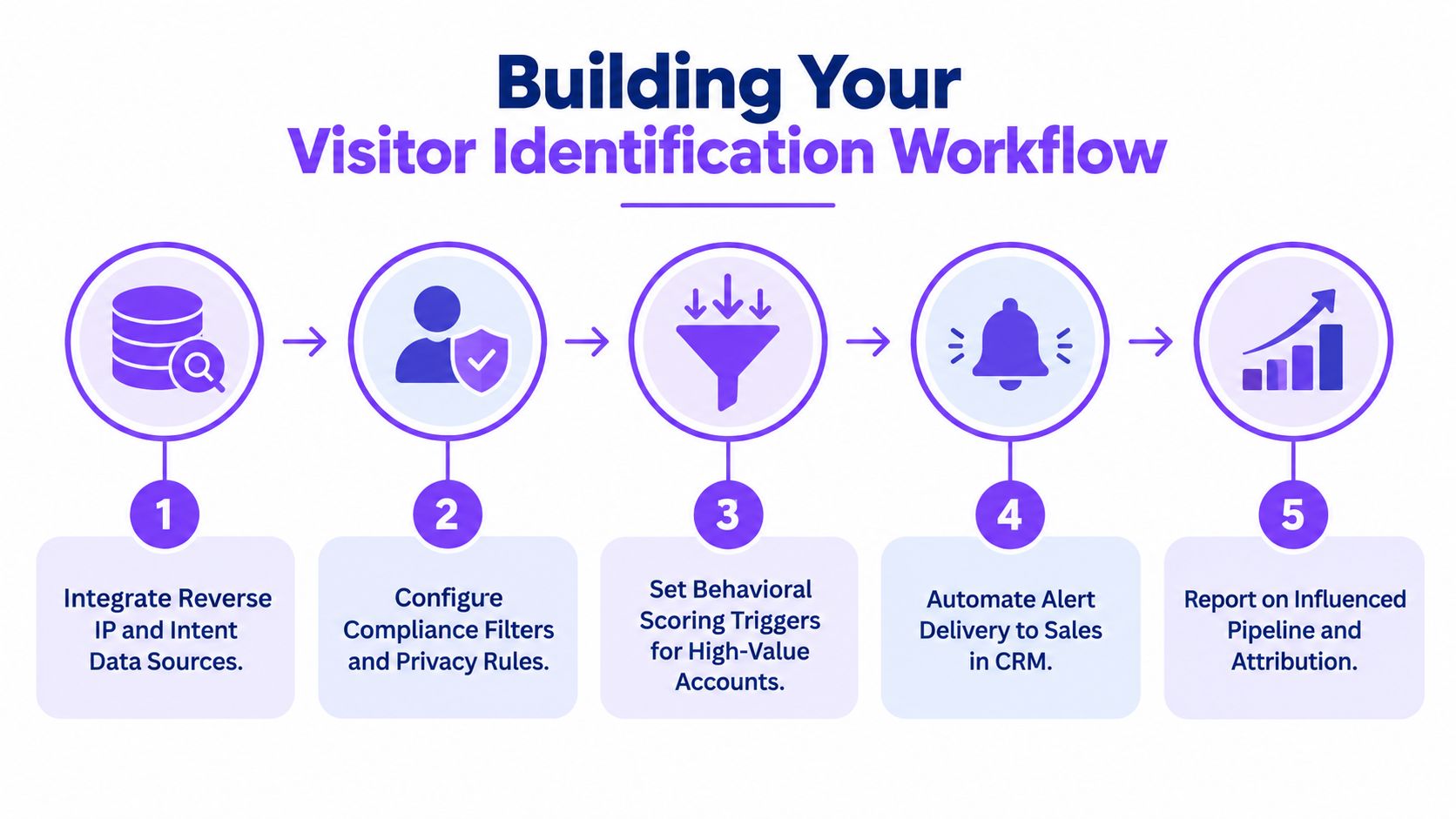
A reliable workflow starts with a clean audit, not with more vendor demos. Before turning on alerts, review where your current traffic comes from, what counts as high-intent behavior, and which systems need the signal first. That keeps the program focused on pipeline impact instead of noisy visibility.
A practical operating sequence
-
Integrate reverse IP and intent sources. Start by combining company-level resolution with the pages and sessions that imply buying activity. That gives you a narrower, more meaningful feed.
-
Configure privacy filters. Suppress internal traffic, known consumer networks, and any segment that shouldn’t trigger outreach. Compliance has to be part of the workflow, not an afterthought.
-
Set behavioral scoring triggers. Prioritize repeat visits, pricing interest, and product exploration over shallow browsing.
-
Automate routing into CRM. Push qualified accounts into the right owner, queue, or engagement flow so the signal doesn’t age out before anyone sees it.
-
Report on influenced pipeline. Track whether the alerts improve follow-up quality and deal progression, not just how many companies were identified.
The reason to validate this sequence manually is simple. Vendor dashboards can overstate confidence, especially when traffic includes mobile or remote-work connections. A practical audit method is to hand-check a random sample of 50 matches in LinkedIn or company directories before you activate broad alerts (Vector benchmarks).
Keep validation ongoing
The first month of clean setup doesn’t guarantee the next six months will stay clean. Traffic mix changes, team behavior changes, and vendor match quality drifts. Your workflow needs periodic review so false positives don’t creep back into the queue.
Operational takeaway: if reps don’t trust the alerts, the system is already failing.
The best programs treat visitor identification as a living process. They refine the filters, update routing rules, and check whether the identified accounts are contributing to meetings and opportunities. That discipline is what makes anonymous traffic useful over time.
For teams that want a single place to turn that workflow into live engagement, Captiwate combines visitor identification, intent detection, in-browser video, and automated routing so identified accounts can move from signal to conversation without extra handoffs. If your current stack stops at detection, it’s worth comparing how much faster your team could respond when the identification and engagement layers sit together.