Businesses using LiveChat handled 1,676,529,825 live-chat conversations in 2024, according to LiveChat’s Customer Service Report. That figure settles the adoption argument. Your visitors already type questions into a corner of a screen and expect a useful answer back.
The open questions sit inside the conversation. What happens at the moment a visitor stops typing and wants to speak to someone? What are they told about whether the chat is recorded, who reads it and where it ends up? Those two moments, the handoff and the disclosure, decide whether a live chat call leaves a buyer with a booked meeting or a closed tab.
A live chat call is a sales conversation that starts as text in the browser tab the visitor is already in, then moves to voice or video with the same person when typing stops being enough. No download, no dial-in, no waiting for a calendar slot to open. The mechanics are worth taking in order, because each step has a threshold that changes the outcome.
Table of Contents
- What Live Chat Calls Are and Why Buyers Expect Them
- How a Live Chat Call Starts on Your Website
- Why Minutes Decide Whether a Visitor Becomes a Lead
- Keeping Video Calls Smooth on Real Networks
- Handing Off From AI Chat to a Human Rep
- Telling Visitors What Is Recorded and Shared
- Set Up Your First Live Chat Call Workflow
What Live Chat Calls Are and Why Buyers Expect Them
Forrester research found that 42% of U.S. online adults considered it important for retailers to offer live online chat on their websites in 2021, up from 27% in 2019, a 15-point jump in two years (live chat support statistics). A 2023 estimate put actual use higher than stated intent: 53% of U.S. online adults had used live chat to get help from a company, and 58% of those users had used it specifically for customer service.
Preference points the same way. In 2024, 41% of consumers named live chat as their preferred support channel, against 32% for phone, according to Velaro’s compilation of live chat statistics. Buyers aren’t waiting to be persuaded that chat belongs on a website.
So what separates a live chat call from the chat box most sites already have? Three working parts, and all three have to be in place:
- The visitor signal. A pricing page view, a second visit inside the same week, or a company match on the visitor’s network. Without a signal, chat is a queue nobody joins.
- The chat that opens. Text first, because typing a question is the lowest-effort way to start a conversation with a stranger.
- The call a rep can start from it. Audio or video in the same window, camera optional for both sides, so the visitor never installs anything.
That combination isn’t the same channel as the alternatives, and picking between them is mostly a question of how long the buyer is willing to wait.
| Channel | Response time | Visitor effort | Best for |
|---|---|---|---|
| Web form then email | Hours to days | High, fill in fields and wait | Low-urgency questions |
| Scheduled demo booking | Days, depending on calendars | Medium, pick a slot | Buyers ready to commit to a time |
| Live text chat | Often under a minute to first reply | Low, type a question | Quick answers and routing |
| AI chat | Immediate, around the clock | Low, type a question | Qualification and after-hours cover |
| Live video call | Immediate when a rep is free | Low, no install and camera optional | High-intent buyers who want a conversation |
One limit matters here. These figures measure consumer use and preference, not sales conversion, so they don’t promise a revenue lift. Live chat calls earn their place through speed and fit, not through a guaranteed uplift.
A short rule for routing buyers: if the question is “what does this cost and can I do it myself”, a form or self-serve page works. If the question needs a human to answer while the buyer is still looking at the screen, that’s a live chat call.
How a Live Chat Call Starts on Your Website
A high-intent page visit can be the beginning of a sales conversation, rather than a form submission that waits in a queue. In Captiwate, a live video call can be launched when a visitor lands on the pricing or product page. The trigger starts the process; the next steps determine whether the right person responds and whether the visitor is comfortable continuing.
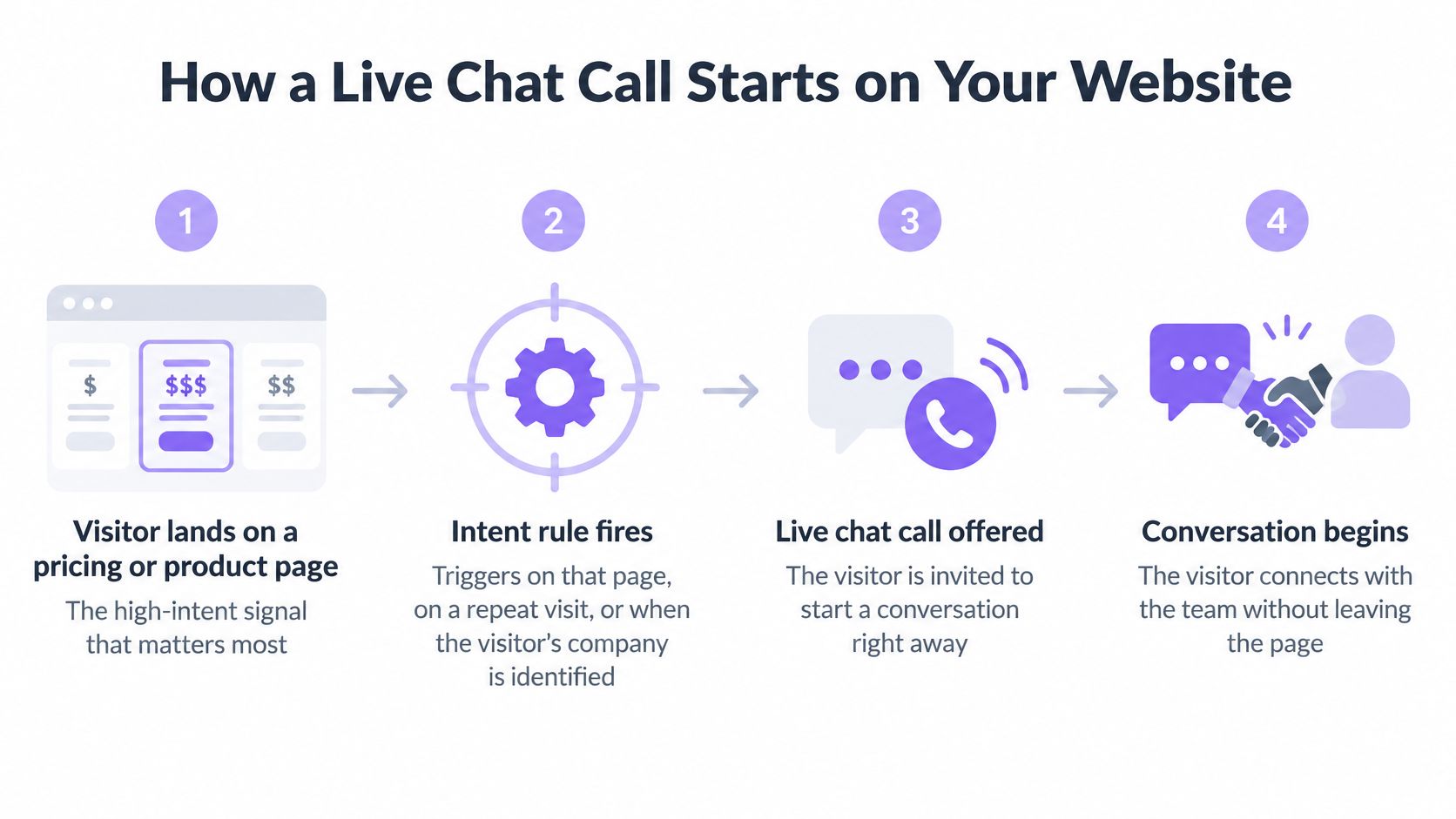
The six stages of a call that starts on the page
- The visitor lands on a page that signals interest. Pricing and product pages are useful starting points because visitors there may be evaluating whether the offer fits. The right trigger depends on where buyers show intent, not only on which page attracts the most traffic.
- An intent rule identifies the visit. A pricing visit, a repeat visit or a match to the intended customer profile can prompt action. This is a way to prioritize attention using what the visitor does, rather than waiting for a form fill.
- A routing rule directs the conversation. Automation flows can route the visitor to the right rep through Slack, Microsoft Teams or the website widget, based on pricing visits, profile matches or repeat visits. The goal is a clear handoff, so a signal does not arrive without someone responsible for it.
- The conversation begins in the browser. The visitor can start in chat, then move to a call with or without a camera. No installation is required. The visitor can still speak with a rep without sharing video, which helps keep consent separate from access to a conversation.
- Co-browsing supports a product walkthrough. When a buyer needs help understanding what is on the page, a rep can guide them through the product in the visitor’s browser, without downloads. It gives both people a shared view rather than requiring the visitor to explain what they see.
- The conversation has a defined next step. AI Chat can answer questions, qualify visitors and hand a hot prospect to a live rep or book a demo. With click-to-meet, a meeting invite with a Zoom link syncs to both calendars. CRM sync can also keep conversation and meeting details with the sales record.
The handoff is where a fast trigger can still fail. A visitor may receive an alert, but if no rep owns the response, the conversation stalls. Set the routing rule so the right person receives the inquiry, and decide how AI Chat should cover periods when a live rep is unavailable. Captiwate lets teams configure AI Chat for after-hours coverage, as a first responder with human backup, or for 24/7 coverage.
The visitor’s choice matters just as much as the routing. Chat can move to a call with or without a camera, and the visitor does not need to install anything. That keeps the conversation available without making video a condition for getting help.
The video below shows the process in a browser.
Before enabling the workflow, check that the trigger reflects meaningful buying intent and that every alert has an owner. Then test what happens when AI Chat identifies a prospect who needs a human: the handoff should be clear, and the visitor should be able to choose whether to continue by chat or call. For a practical explanation of response timing, see Speed to lead.
Why Minutes Decide Whether a Visitor Becomes a Lead
A buyer’s interest can fade while a form waits in a queue. In the 2007 Lead Response Management study, organizations that contacted a lead within 5 minutes were approximately 21 times more likely to qualify it than those that waited 30 minutes, according to the key live chat statistics. The practical lesson is about timing: respond while the visitor’s question and buying signal are still fresh.
A separate study of 2,241 U.S. companies found that contacting a lead within one hour was associated with nearly seven times the likelihood of qualification compared with responding later. Yet 37% of companies responded within an hour, while 23% never responded.
| Response window or benchmark | Reported effect or value | Context |
|---|---|---|
| Within 5 minutes versus 30 minutes | About 21 times more likely to qualify the lead | 2007 Lead Response Management study, key live chat statistics |
| Within one hour versus after one hour | Nearly 7 times more likely to qualify the lead | Study of 2,241 U.S. companies |
| Share of companies that responded within one hour | 37% | Study of 2,241 U.S. companies |
| Share of companies that never responded | 23% | Study of 2,241 U.S. companies |
| Average first live chat agent reply | Replies typically arrive within seconds | General live chat guidance |
| Average live chat session | Sessions usually close within minutes | General live chat guidance |
These findings are not a forecast that your team will qualify leads at the same rate. Lead quality, staffing, the offer, and how your team defines qualification all affect outcomes. Use the figures as a reason to examine response delays, not as a promise of a particular result.
Speed only helps if the visitor agrees to engage and the conversation reaches someone who can act. A fast automated message that leaves a hot prospect stranded is still a failed handoff. Make the next step clear, let the visitor choose whether to continue by chat or call, and ensure a human rep can take over when needed.
Track time to first response, whether that response comes from AI or a person, and check that each conversation has a clear owner. For a practical framework, see this guide to measuring speed to lead.
Keeping Video Calls Smooth on Real Networks
A browser call can connect successfully and still be unusable. The audio breaks, the video freezes on a half-built slide, and the buyer politely ends a meeting that was going well in text. Connection success is the wrong test.
Four measures tell you what the call felt like. Round-trip time is how long a packet takes to reach the visitor and come back. Packet loss is the share of data that never arrives. Jitter is how unevenly packets arrive, which matters more than raw speed for voice. Reconnects tell you how often the call fell over and had to be rebuilt.
A large measurement dataset found that about 90% of monitored calls had a 95th-percentile round-trip time below 400 ms, approximately 85% of sessions had a 95th-percentile packet-loss rate of zero, and about 95% stayed below 5% packet loss (WebRTC measurement study). Distance shows up plainly in independent tests, which averaged 77.74 ms for an Oregon call and 214.86 ms for a Sydney call. The worst video appeared when bursty loss combined with long round-trip times.
| Metric | Reference value | Action when worse |
|---|---|---|
| Round-trip time at the 95th percentile | Below 400 ms for about 90% of monitored calls | Lower video quality first and keep audio and chat |
| Packet loss at the 95th percentile | Zero for about 85% of sessions, below 5% for about 95% | Reduce bitrate or switch the call to audio |
| Jitter | Under 30 ms at the 95th percentile, as an operating target | Check the visitor’s connection and smooth the playout buffer |
| Reconnect rate | Under 1 in 20 calls, as an operating target | Auto-reconnect once, then log the failure |
| Setup failure rate by browser and region | Under 2% for each segment you track | Track by browser, device and region and fix the worst segment first |
The fix that protects the sales conversation is graceful degradation. Adaptive bitrate drops video resolution before it drops audio, and if conditions keep sliding, video goes off while audio and chat keep running. A rep who can still hear the buyer and see their typed question can finish the call. A frozen video with clean audio loses far less than a dropped session.
Before launch, instrument setup success rate, p50 and p95 round-trip time, jitter, packet loss, reconnects and failures broken out by browser, device and region. In-browser video calls covers how those numbers behave once real visitors, not test accounts, are on the line.
Handing Off From AI Chat to a Human Rep
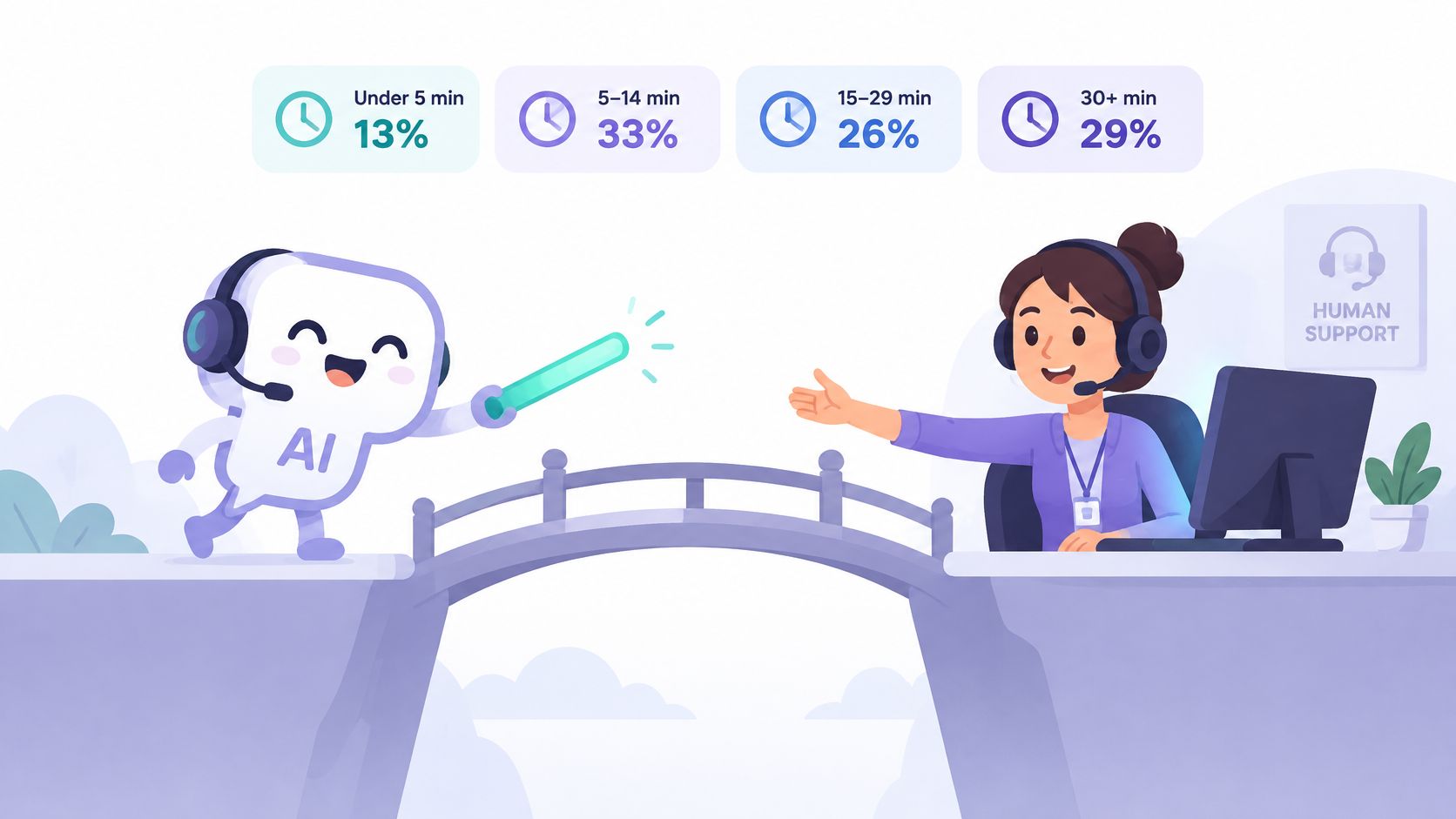
Ask consumers how long they wait to reach a service agent and the answers are bleak. Only 13% said less than five minutes, while 33% waited 5 to 14 minutes, 26% waited 15 to 29 minutes and 29% waited at least 30 minutes, according to The State of Customer Experience. Separately, 33% said they had been unable to reach an agent directly from a chatbot, and 40% found it especially frustrating when they couldn’t move from a chatbot to a human.
Adding automation to the front of the queue doesn’t shorten the wait. It moves the wait behind a menu, where the visitor can no longer see it.
That’s the contrarian point about 24/7 AI coverage. Availability is not access, and a bot that traps a ready buyer is worse than a phone line that rings out, because the buyer believes help is one message away.
What should happen when the visitor asks for a person
The answer needs a sequence, not a “talk to sales” button. Build it in this order:
- Carry the context across. Send the transcript and the intent signals to the rep, so the visitor doesn’t retype the question they already answered.
- Say who is typing. Label the AI assistant and announce the moment a human takes over, so nobody feels tricked mid-conversation.
- Offer the call immediately when a rep is free. A hot visitor who asks for a person and gets one in ten seconds rarely asks twice.
- Offer a precise booking when nobody is free. Named owner, fixed time, invite on both calendars. A vague “we’ll be in touch” undoes the qualification the AI just did.
Coverage deserves a deliberate choice rather than a default. AI Chat can run after hours only, as a first responder with human backup, or as 24/7 coverage, and the right setting depends on when your best buyers show up rather than on what the vendor suggests. Teams that also run phone or voice agents face the same transfer problem in another medium, and the guía de agentes de voz IA from Ploot walks through when a voice agent should hand over instead of pressing on.
Publish four standards where your team can find them: the escalation trigger, the maximum queue time before a booking is offered instead, what the transcript carries across, and how fallback scheduling works when nobody is on shift. AI lead qualification covers the rules that make the trigger itself reliable.
Telling Visitors What Is Recorded and Shared
54% of consumers believe their trust in companies’ proper use of personal data has declined over the past two years, and 41% say they still experience privacy violations, according to the 2025 CX annual insights report. That makes transparency part of the live chat call itself, not a detail to leave for a privacy policy.
Recognizing a company or inferring buying intent can help a rep prioritize a conversation. The risk is that personalization feels invasive when visitors cannot tell what information was collected, why it was used, or what choices they have. The AI-to-human handoff deserves the same clarity: visitors should know who is responding as the conversation changes.
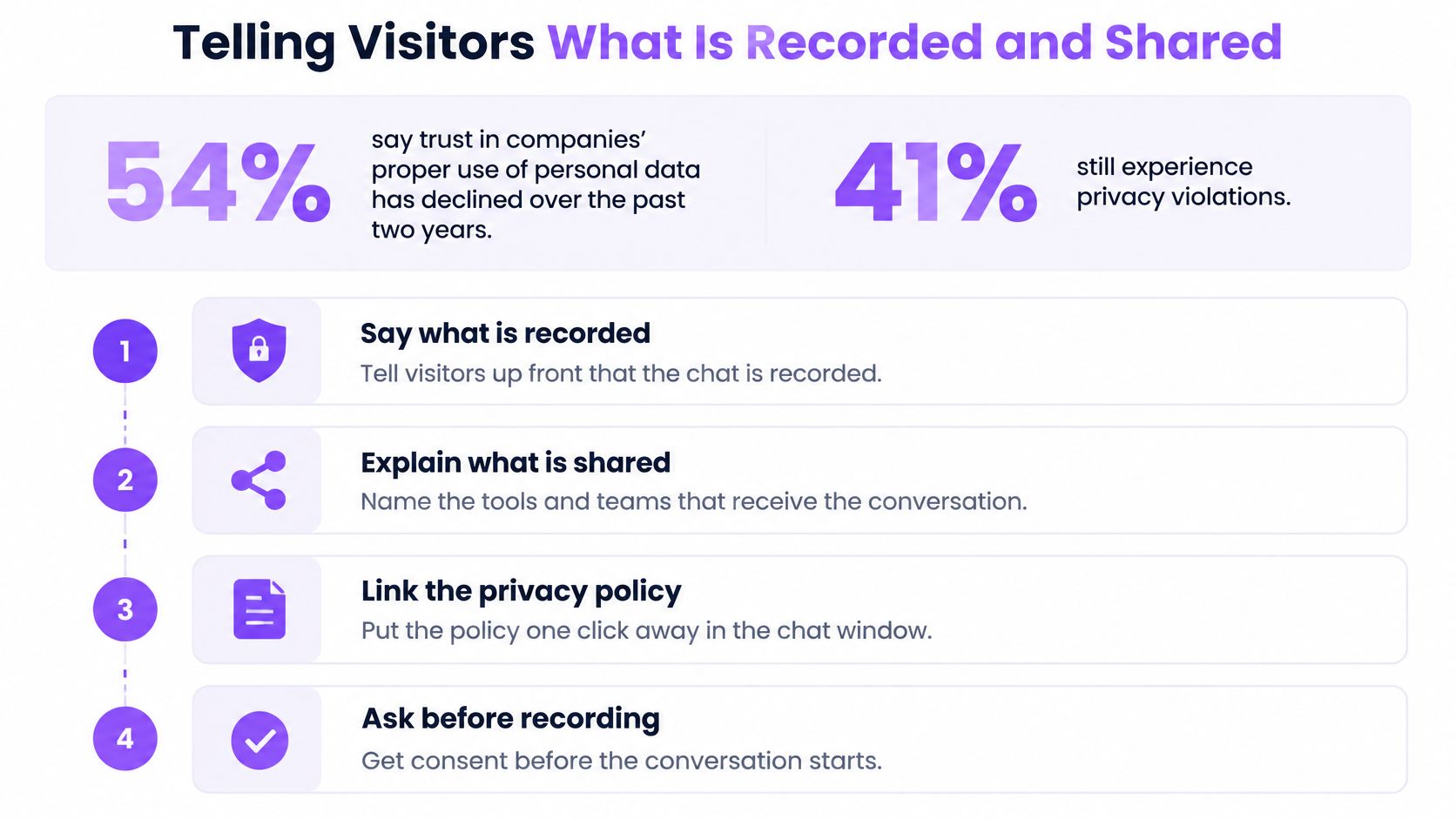
The consent sequence
Before a call goes live, check that the visitor can understand each step. Test the sequence on a staging page, not with a real buyer.
- Name the assistant. Say when AI is answering and when a person joins.
- State what is recorded. Audio, video, and transcript are separate categories. Saying “the chat is logged” does not explain which applies.
- Explain screen sharing before asking. Co-browsing lets a rep guide a buyer through the product in their browser without downloads. Explain what the visitor will see and how to end the session.
- Collect only what sales uses. Extra fields can create hesitation at the moment a visitor is deciding whether to continue.
- Make regional choices visible. Give visitors covered by GDPR or CCPA a clear way to exercise their choices, rather than leaving them to search the footer.
- Sync outcomes only. Send the meeting or qualified note to the CRM, not the full behavioural trail.
A disclosure can be brief and still tell visitors what to expect:
“You’re chatting with our AI assistant, which is helping me qualify your question. A member of the sales team joins in about a minute. This chat is recorded so nobody has to repeat themselves. Our privacy policy is one click away, and you can ask us how this chat is used at any time.”
Clear disclosure supports trust at the point of handoff. Visitors should know what is happening before deciding whether to continue the chat or move to a call.
Set Up Your First Live Chat Call Workflow
Seven steps, in the order that keeps a pilot from turning into a support ticket.
- Choose two or three pages. Pick the pricing and product pages where a conversation is most likely to change a decision, and leave the rest of the site on forms for now. A narrow start gives you a clean baseline.
- Set the intent triggers on those pages. A pricing view, a repeat visit and a matched company cover most of the useful cases without catching everyone.
- Assign a named owner to each alert. One rep, one backup, one routing path to Slack, Teams or the widget. Unowned alerts are the single most common reason a pilot looks like it failed.
- Decide the AI coverage model. After hours only, first responder with human backup, or round the clock. Write the choice down so nobody argues about it at 11pm on a Friday.
- Write the handoff rules before launch. Escalation trigger, maximum queue time before a booking is offered, and what the transcript carries across. Three sentences are enough if they’re specific.
- Publish the disclosure on the widget and test it. Run the full consent sequence on a staging page, including the case where the visitor refuses the camera, before any real buyer sees it.
- Run the pilot for a month and measure four things. Time to first response, call setup success, reconnects and meetings booked. Compare them against the response benchmarks and the quality thresholds you set, then decide whether to widen onto more pages.
Widen only after the handoff and the disclosure hold up under real traffic. A second page added to a broken workflow just produces twice as many abandoned conversations.
Captiwate turns those seven steps into one JavaScript snippet and a set of rules, so a high-intent visitor on your pricing page can be in a live video call with a rep in seconds, with AI chat covering the hours nobody is at a desk. It’s priced per website with unlimited seats, which means every rep can answer calls and chats without a per-user licence, and there are no per-conversation fees. If your team is still sending pricing questions into an inbox, start by seeing what happens when the conversation opens on the page instead, at Captiwate.