Buyers were 1.8 times more likely to complete a high-quality deal when they used supplier-provided digital tools in partnership with a sales representative, according to the Gartner B2B buying report. That finding reframes how you should judge an outreach sales engagement platform. The winner isn’t the tool with the longest feature list, or the one that removes humans most aggressively. It’s the platform that responds fastest, hands off cleanly between AI and people, and charges on a pricing unit that matches how your team grows.
Score every candidate on those three tests first. Feature coverage matters, but it only matters after you’ve confirmed the platform fits your motion.
Table of Contents
- Feature Coverage at a Glance
- Why Buyers Now Move Between Digital and Human Channels
- Speed to Lead as the Deciding Test
- What Intent Detection and Visitor Identification Actually Reveal
- When AI Should Hand Off to a Human
- Pricing Models and the Cost Traps Behind Them
- Match Your Sales Motion to the Right Platform
Feature Coverage at a Glance
| Capability | Sales engagement suites | Website engagement tools | Captiwate |
|---|---|---|---|
| Email and call sequences | Core function | Not the core function, usually handled in email or CRM tools | Not an outbound sequencer, focused on live website conversations |
| Live video in the browser | Usually handled through separate meeting or dialer tools | Available in tools built for on-page conversations | Yes, from pricing and product pages |
| AI chat 24/7 | Often added for email or reply handling, not always on-site | Common for chat widgets, depth differs by product | Yes, qualifies and books demos |
| Visitor identification and intent | Account-level signals | Company matching is common, behavior depth differs by product | Yes, company details and behavior signals |
| Co-browsing | Usually handled through screen sharing in meeting tools | Offered by sales-assist tools built for guided walkthroughs | Yes, no downloads required |
| Pricing basis | Per seat (typical) | Per seat, per conversation, or per identified company | Website monthly visitor band, unlimited seats |
The table contrasts two platform types that often get compared as if they’re substitutes. Sales engagement suites, with Outreach as the reference example, are built around outbound sequencing and call logging. Reps work lists, run cadences across email and phone, and log activity back to the CRM. Website engagement tools start from the opposite end. They watch the visitor who’s already on a page and try to start a conversation before that visitor leaves.
How to Read the Rows
Walk the rows in order against your motion, not against a vendor’s demo script.
- Email and call sequences: If your pipeline depends on reps working outbound lists, a suite covers this natively and a website tool doesn’t replace it.
- Live video in the browser: Website tools diverge here. Some only offer chat or a scheduling link. Captiwate’s column shows live video and chat launched from high-intent pages, so the conversation happens without a calendar round trip.
- AI chat 24/7: Ask what the AI does after hours. Answering FAQs is different from qualifying a visitor and booking a demo.
- Visitor identification and intent: Suites tend to surface account signals for outbound prioritization. Website tools match the live visitor to a company and attach behavior, such as pricing page views.
- Co-browsing: A rep guiding a prospect through your product in the browser, with no downloads required, removes a common drop-off point. Suites usually leave this to a separate meeting tool.
- Pricing basis: Don’t skip this row. It’s scored in detail later because it decides your bill as you grow.
Mark which rows are must-haves for your motion before you read further, then score each later section against those rows only.
One caution about the middle column. Website engagement is a loose category, and coverage shifts a lot by vendor and plan. Every cell that reads as conditional needs a vendor demo or pricing-page check before you score it. Don’t let a salesperson’s yes stand in for a tested workflow.
Why Buyers Now Move Between Digital and Human Channels
Buyers use an average of 10 interaction channels during a purchasing journey, up from 5 channels in 2016, according to McKinsey’s 2024 B2B Pulse research. That’s not channel sprawl you can design away. It’s how buying committees now work, and your platform has to follow the buyer across all of it.
McKinsey calls the underlying pattern the rule of thirds. At each stage, approximately one-third of buyers prefer in-person interaction, one-third prefer remote communication such as video or phone, and one-third prefer digital self-service. The pattern held across geographies, industries, company sizes, purchase types, and deal values, which means you can’t explain it away as a quirk of your segment.
What the Rule of Thirds Requires From a Platform
If a third of your buyers want self-service at any given moment and a third want a person, forcing everyone through one channel guarantees friction for most of them. The requirement is movement. A buyer should be able to shift between an automated digital experience and a human conversation without starting over.
Say a visitor reads your pricing page at 9 pm and opens AI chat to ask about seat limits. The next morning she asks for a live call to talk through rollout. If the rep who takes that call can’t see last night’s questions, she repeats herself, and you’ve turned a warm handoff into a cold restart. Each transition has to carry context with it.
- Self-service layer: Product pages, pricing detail, and AI chat that answer research questions without a rep.
- Remote human layer: Browser-based video or phone, available at the moment the buyer asks, not after a form review.
- Continuity layer: Every touch written to the CRM so the next person or automation picks up mid-thought.
The volume makes continuity essential. McKinsey reported that 42% of respondents used more than 11 touchpoints in their journey. Eleven-plus touches across chat, video, email, and calls will scatter unless the platform syncs them into one record. When it doesn’t, reps contradict the website, follow up on questions already answered, and lose the thread of who’s involved.
Practical step: List the channels your buyers actually used in your last ten closed deals. Score platforms against that list, not against the channels a vendor demo happens to show well.
Speed to Lead as the Deciding Test
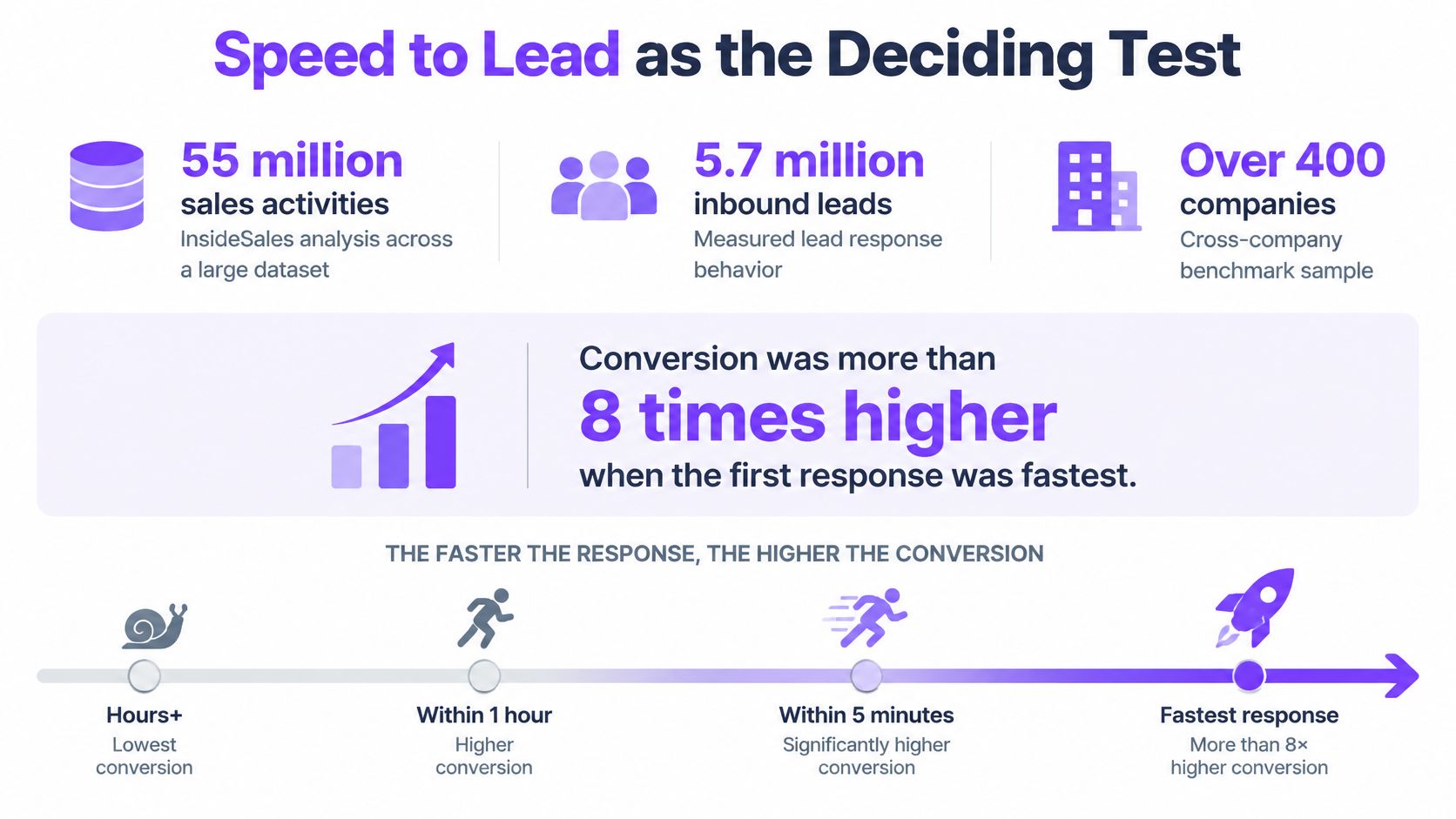
Response time is one of the clearest measured drivers of inbound conversion, and almost nobody captures it. An InsideSales analysis covering more than 55 million sales activities across 5.7 million inbound leads and over 400 companies found conversion rates were more than eight times higher when the first response came within five minutes than when it came after six minutes or more. Yet only 0.1% of inbound leads were engaged within five minutes, and 57.1% of first-call attempts happened after more than one week.
The gap is a useful test for an outreach sales engagement platform: does it get an appropriate response to a high-intent visitor quickly, and does it preserve a clear handoff when a person needs to step in? Measure both in a trial.
| Response time | Typical situation | What the research shows |
|---|---|---|
| Under 5 minutes | Live video or AI chat on a pricing or demo page | Conversion more than eight times higher than after six minutes or more |
| 6 minutes or more | Email or form follow-up | Lower conversion than the under-5-minute response rate |
| More than one week | First call after a form fill | 57.1% of first-call attempts happened after more than one week |
The Operating Target to Set
Set sub-five-minute automated engagement as the target for pricing, product, and demo pages. That does not require a rep to appear instantly every time. It requires a useful next step within five minutes: a live video invitation, AI qualification, or an alert routed to a rep who can accept it.
Routing determines whether speed turns into a useful conversation. When a visitor on a pricing page matches your ideal customer profile, the platform should notify an available rep with enough context to respond. If no rep is available, or the visit happens outside business hours, AI chat or one-click scheduling can keep the visitor moving. The guide to speed to lead benchmarks and response workflows explains ways to structure those response paths.
What to Measure in a Trial
A single average response time can hide slow handoffs. Segment the results and check whether fast engagement produces qualified conversations, not just activity.
- Response-time bands: Compare conversion across 0-5, 6-30, 31-60, and over 60 minutes to see where your own response-time drop-off occurs.
- Connection rate: Track how many engaged visitors reach a human or complete AI qualification.
- Qualified-meeting rate: Count meetings that meet your criteria, rather than raw bookings.
- Pipeline per visitor cohort: Divide pipeline created by the high-intent page visitors who triggered engagement.
Run a simple timing check in week one: select ten pricing-page visits and record the time from page view to first human or AI contact. If the median is not under five minutes, the platform is not addressing the response gap, regardless of its other features.
What Intent Detection and Visitor Identification Actually Reveal
Only 3% of website visitors self-identify through form fills, according to the 6sense guide to generative AI and B2B buyer research. The remaining visitors in that dataset do not self-identify through forms. That distinction matters: a company match can help prioritize outreach, but it does not prove who is browsing or whether the account is ready to buy.
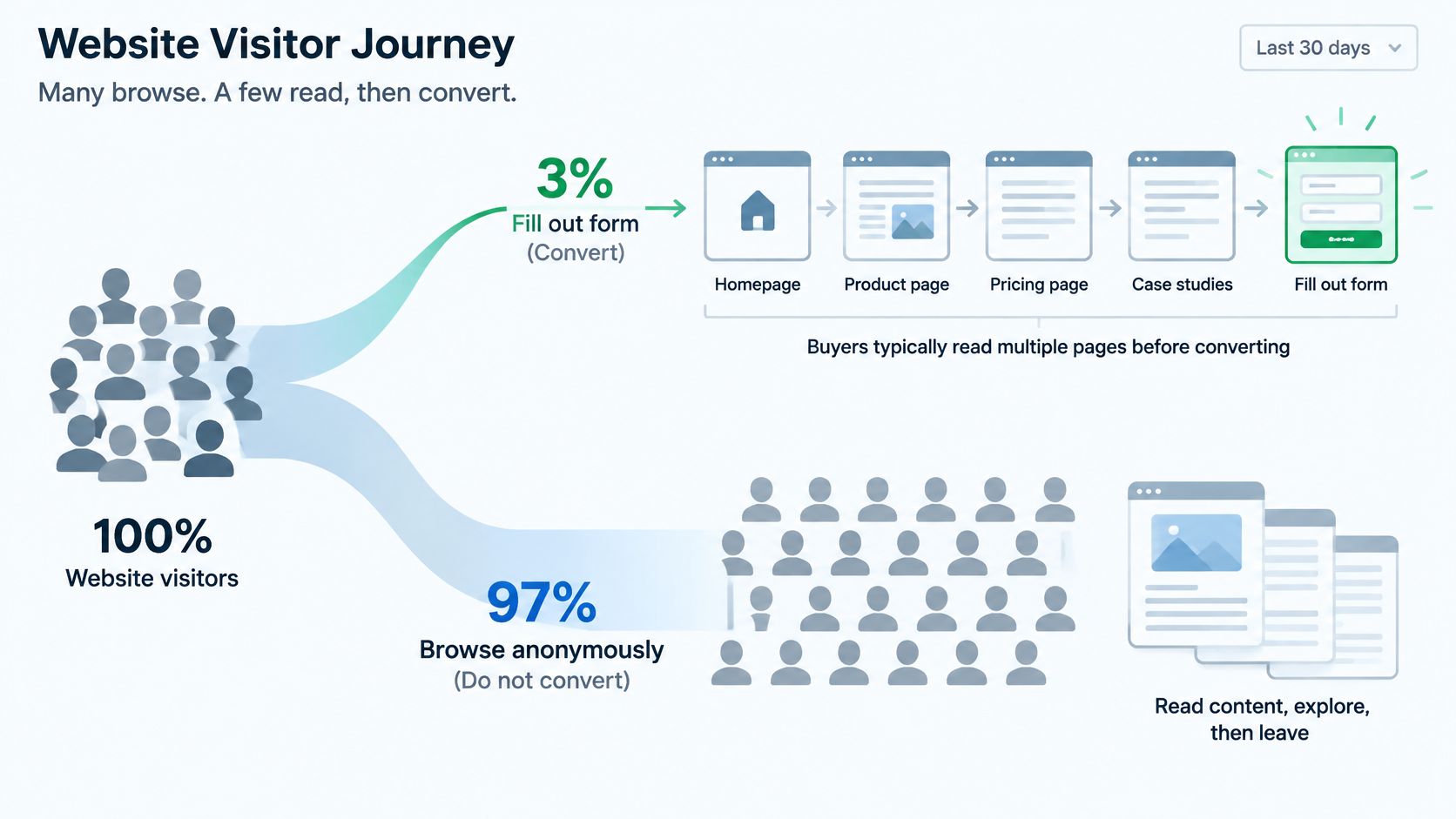
The guide also reports that buyers consume an average of 13 content pieces, eight vendor-produced and five from third parties, before or during their journey. Website activity captures only one part of that research. Nearly two-thirds of B2B buyers use generative AI as much as or more than traditional search, and 47% already use AI during time-sensitive research. A visitor-identification tool cannot reveal research happening in AI summaries or third-party content.
Identification Is Prioritization, Not Proof
Matching an anonymous session to a company indicates that an account may be researching. It does not establish that a buying committee is involved, that budget is available, or that a purchase is imminent. Use identification as a prioritization signal, then assess it alongside intent and known account context.
For example, if an account visits the pricing page repeatedly in a week without anyone identifying themselves, flag it for ABM tiering and give the rep relevant page activity. Treating the account as a hand-raiser and adding it directly to a call list risks wasting rep time and making outreach feel intrusive. This guide to B2B website visitor identification explains how company matching can inform that decision.
Evaluate the feature with a concrete sequence. Ask vendors to show how an anonymous visit is matched to a company, what signals support the match, and how consent governs enrichment and outreach. Then test how the platform combines repeat sessions from one account without double-counting them, and whether closed deals can be uploaded to measure earlier anonymous activity. Finally, compare identified-account rates with opportunities created, rather than treating the number of matched companies as proof of pipeline.
Questions to Put to Every Vendor
- Matching method: How are anonymous visits matched to accounts, and what evidence supports each match?
- Consent boundaries: What consent applies before identification, enrichment, or outreach triggers fire?
- Buying-group attribution: How are multiple anonymous sessions from one account connected without double-counting?
- Offline conversions: Can closed deals be uploaded to measure their relationship to earlier anonymous activity?
- Match rate versus pipeline: How do identified-account rates relate to opportunities in the vendor’s customer base?
Judge identification by qualified conversations, opportunities created, and influenced revenue. Identified company logos that do not lead to pipeline make a useful reporting view, not a sales outcome.
When AI Should Hand Off to a Human
A 2025 global study of 4,800 consumers and 457 business leaders found that 90% of business leaders believed customers were satisfied with conversational AI, compared with only 59% of consumers, a 31-point perception gap, as reported in coverage of the Twilio conversational AI study. Leaders are grading their own homework. The people on the other end of the chat window are considerably less impressed.
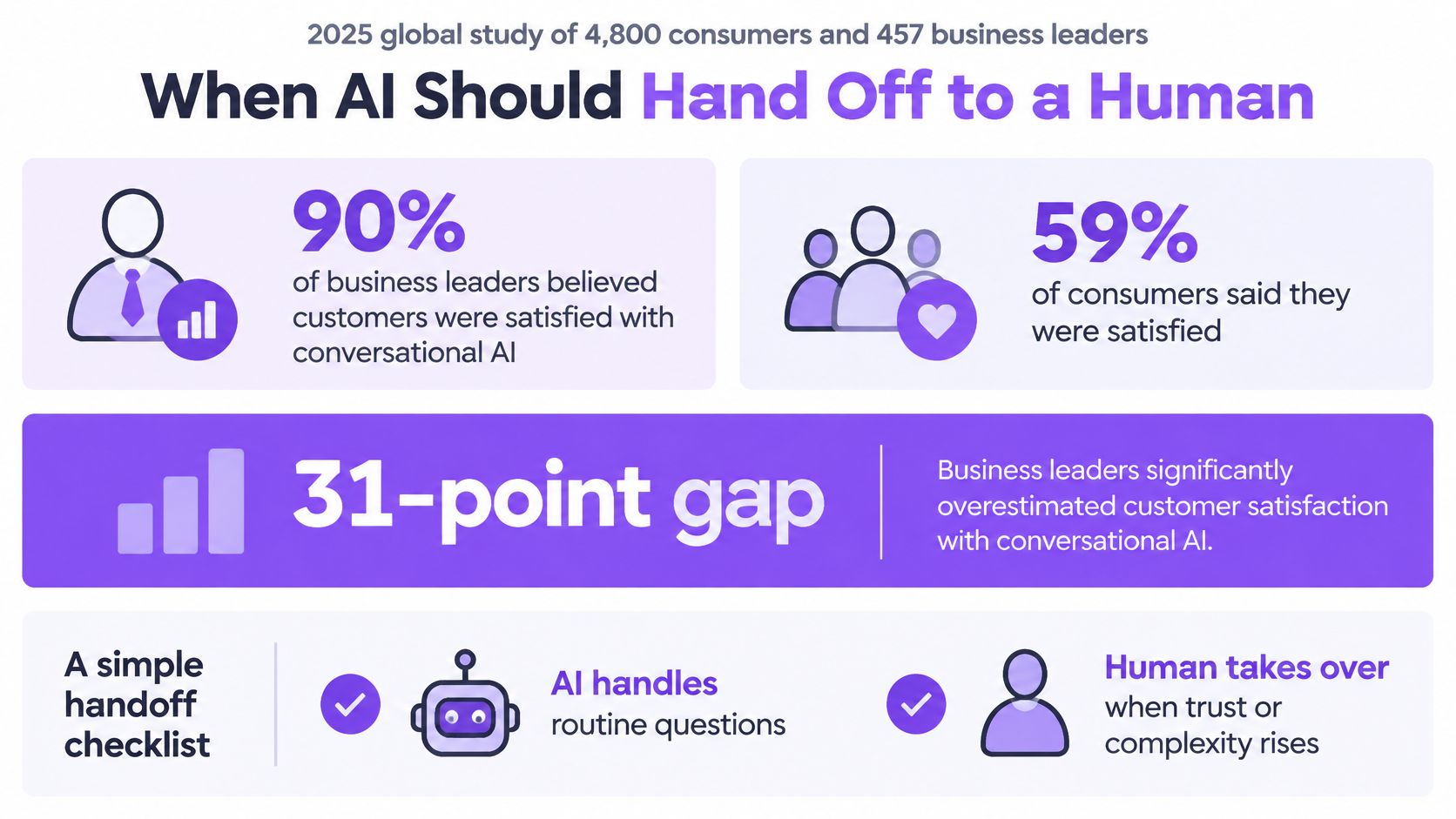
The trust problem runs deeper than satisfaction scores. The same research found that 51% of consumers were uncomfortable sharing personal or financial information with AI agents, while 66% were uneasy about an AI agent using all prior interaction context. So the always-on AI that vendors pitch as pure upside carries a real cost. It answers fast, but a large share of buyers don’t want to tell it anything sensitive, and they notice when it knows too much.
Five Escalation Triggers to Test in a Demo
The fix isn’t less AI. It’s AI that knows its limits. Configure immediate human escalation on these signals, then verify each one live before you sign.
- Pricing questions: Anything beyond published tiers, such as volume terms or contract length, goes to a person who can commit.
- Security concerns: Questions about data handling, compliance, or subprocessors need a human and, often, documentation.
- Buying authority: When the visitor signals they own budget or a decision timeline, don’t make them finish a chatbot flow.
- Frustration or repeated questions: The same question asked twice means the AI already failed once. Escalate before the third attempt.
- Requests for technical detail: Integration depth, API limits, and architecture questions deserve someone who can go off script.
Our breakdown of how an AI appointment setter should qualify and route covers the mechanics of booking inside that handoff.
Passing Context Without Creeping People Out
A handoff only works if the rep inherits the conversation. Pages visited, questions asked, and any stated timeline should arrive with the transfer so the buyer never repeats herself. But context transfer needs consent guardrails. Ask before starting a video call. Ask before enriching a visitor profile with third-party data. Buyers accept continuity they can see and control. They resist surveillance they discover after the fact.
Measure Outcomes, Not Containment
Chatbot containment, the share of chats the AI closes without a human, rewards exactly the wrong behavior. Track these instead.
- AI-only completion: Routine questions fully resolved, with the buyer’s goal met.
- AI-to-human conversion: How often escalations turn into real conversations or meetings.
- Meeting quality: Whether AI-booked meetings show up and qualify.
- Privacy opt-out rate: A rising rate signals your triggers feel intrusive.
- Post-conversation satisfaction: Asked after both AI-only and human-assisted chats, so you can compare.
The contrarian test: In the demo, ask the AI a pointed security question. If it tries to answer from a script instead of escalating to a human, you’ve found how it’ll behave with your most sensitive enterprise prospects.
Pricing Models and the Cost Traps Behind Them
The pricing unit decides who pays for your growth. Two platforms with similar sticker prices can diverge sharply within a year depending on whether you’re charged per seat, per conversation, per identified company, or per visitor band.
| Pricing unit | What drives cost up | Watch-out |
|---|---|---|
| Per seat | Each rep or user added | Cost climbs as SDR teams grow |
| Per conversation or meeting | Volume of calls, chats or bookings | Makes off-hours AI coverage costly to meter |
| Per identified company | Number of accounts matched | Anonymous traffic inflates the bill |
| Per website visitor band (Captiwate) | Monthly visitors moving into a higher band; seats, conversations and identified companies unlimited | Check which band your real traffic lands in |
How the Same Team Pays Differently
Say a team adds four SDRs over two quarters to cover more regions. Under per-seat pricing, the bill rises with every hire, including reps who mostly receive routed conversations rather than run sequences. Under a visitor band, the same hiring changes nothing, because seats are unlimited and cost only moves when traffic crosses into a higher band.
Now flip the scenario. Say a content campaign doubles anonymous traffic from accounts that mostly never convert. Under per-identified-company pricing, every matched account adds cost, including the ones your reps will never touch. Under per-conversation pricing, a busy quarter of AI chats at night meters up, which punishes you for the off-hours coverage you bought the tool for in the first place.
Hidden Costs to Surface Before Signing
- What counts as a conversation: Does a three-message AI chat bill the same as a twenty-minute video call?
- Overage rules: What happens in the month you exceed your band or volume cap, and is it priced per unit or as a forced upgrade?
- Integrations: Are HubSpot and Salesforce sync included, or gated behind a higher tier?
- Onboarding and support: Is implementation a separate line item, and which support tier do you get?
Before you sign: Estimate your monthly visitors and rep count twelve months out, ask which plan band that traffic lands in, and request the full annual cost including onboarding. Get the answer in writing.
Our model is traffic-based with unlimited seats, conversations, and identified companies, so test whether that structure matches your traffic profile. If your traffic is modest but your team is large, it’s favorable. If your traffic is enormous and mostly unqualified, check the band math carefully.
Match Your Sales Motion to the Right Platform
| Team type | Main need | Best-fit approach | Watch-out |
|---|---|---|---|
| Inbound SDR team | Answer pricing-page visitors within minutes | Live video and AI chat with routing rules | Routing must reach reps in every region |
| ABM team | Prioritise named target accounts | Visitor identification with ABM tiering and CRM sync | Identified accounts are not pipeline |
| PLG team | Convert product-led sign-ups | Triggered engagement on upgrade and pricing pages | Confirm consent for behavioral triggers |
| Enterprise or regulated buyer | Security review and data controls | SSO, data residency and human-led calls | Obtain compliance documents before the trial |
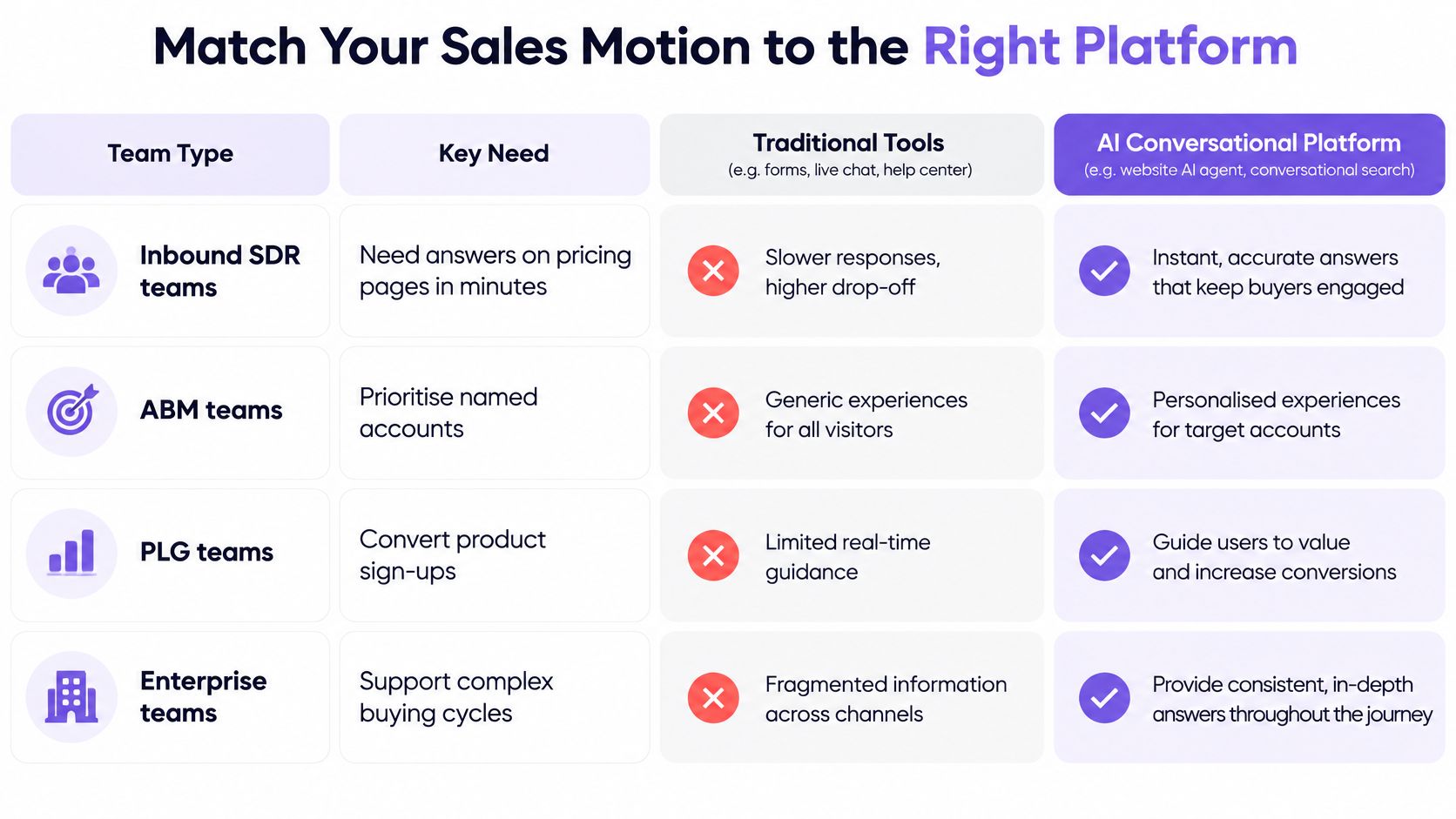
The research supports a hybrid answer for most of these rows. Gartner’s 2024 survey of 632 B2B buyers found that 61% preferred an overall rep-free buying experience, while buyers still favored seller input for tasks involving contextual intelligence, such as determining whether a solution fits their organization’s needs. The same research found that 69% of buyers experienced inconsistencies between information on a sales organization’s website and information provided by sellers.
That inconsistency figure is the operational case for keeping the website and the rep in one system. When the conversation starts on the page the buyer is reading, and the transcript syncs to the CRM, the rep works from the same facts the buyer just saw.
Where Each Category Fits, and Where It Doesn’t
Captiwate fits when high-intent pages drive your demand and you want in-browser human calls at the moment of interest. In the Salesforge case study, 50%+ of ARR is tied to widget-triggered conversations, which shows what happens when a team’s motion is built around live website engagement. Setup on our side is one JavaScript snippet plus connecting a calendar and CRM, with triggers and routing configured in the app without a developer for day-to-day use.
It fits less well when outbound sequencing is your main motion. If reps spend their days working cold lists through email and phone cadences, a sales engagement suite such as Outreach is the stronger first look, and a website tool becomes a complement rather than the core. Plenty of teams run both, but buy the core first.
The 30-Day Test to Run Before Committing
- Shortlist narrowly: Two or three platforms that match your row in the table, no more.
- Front-load compliance: Request security and compliance documents before any trial starts, especially for enterprise or regulated motions.
- Measure what matters: Response-time bands, qualified meetings, and CRM sync accuracy. Check that conversations, meetings, and intent signals land on the right records without manual cleanup.
- Test the handoff: Run the five escalation triggers through the AI and confirm a human takes over with full context.
A platform that wins the demo but can’t show sub-five-minute response times and clean CRM records in a live trial hasn’t won anything yet.
If your pipeline depends on high-intent website visitors, Captiwate turns those visits into live in-browser video calls, AI-qualified chats, and booked demos, with every conversation synced to HubSpot or Salesforce. Pricing follows your monthly visitor band with unlimited seats, so your bill doesn’t rise every time you hire a rep. Visit the site to see how it would handle your pricing page traffic and start measuring your own speed to lead.