A polished landing page can still lose a high-intent B2B buyer if its only move is, “Fill out this form and wait.” That workflow treats a ready prospect like a database record instead of a person who may want an answer, a walkthrough, or a commercial conversation right now.
The strongest landing pages manage the entire conversion path. They match the page message to the visitor’s intent, offer the right next step, trigger live or AI engagement when timing matters, route the opportunity to the right rep, and measure the resulting conversation or demo rather than clicks alone. They also reduce uncertainty without creating an intrusive experience.
These best practices for landing pages focus on ten practical wins for B2B teams. You’ll see where forms still make sense, when to replace them with scheduling or live video, how to use AI without damaging trust, and how to connect visitor behavior to sales follow-up. Before changing the design, use UX testing to improve conversion rates and observe where real visitors hesitate, abandon, or ask for help.
Table of Contents
- 1. Implement Intent-Triggered Engagement at High-Value Pages
- 2. Eliminate Form Friction With Instant Scheduling and Click-to-Meet
- 3. Use 24/7 AI Chat for Qualification, Routing, and After-Hours Coverage
- 4. Use Co-Browsing and Screen Sharing to Run Product Walkthroughs Without Downloads
- 5. Segment Traffic and Implement Account-Based Marketing Prioritization
- 6. Implement Behavioral Automation Flows and Smart Lead Routing Rules
- 7. Maintain Real-Time CRM and Collaboration Sync for Coordinated Handoffs
- 8. Optimize for Mobile and In-Browser Engagement Without Tool Downloads
- 9. Implement Visitor Identification and Enrichment for Targeted Outreach
- 10. Enable Sales Team Visibility and Accountability With Performance Metrics
- 10-Point Comparison of Landing Page Best Practices
- Turn the Landing Page Into a Live Revenue Handoff
1. Implement Intent-Triggered Engagement at High-Value Pages
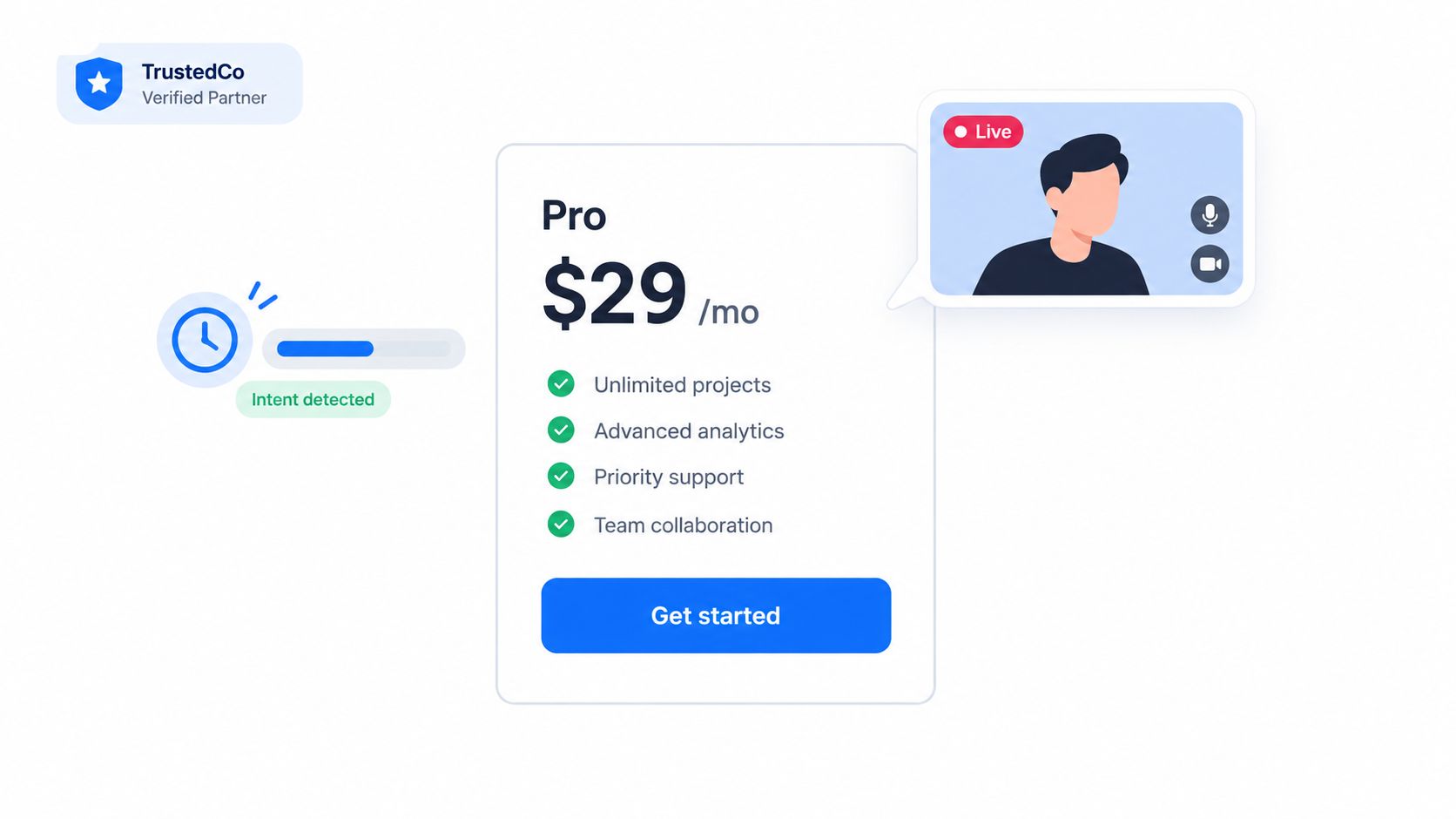
A visitor on a pricing page isn’t behaving like someone reading a blog post. They may be comparing vendors, checking whether your product fits their budget, or looking for a reason to involve their team. Your page should respond to that buying context instead of showing the same passive form to everyone.
Start with pricing, product demo, comparison, and ROI pages. Add a focused invitation to chat, start an in-browser video conversation, or ask an AI agent a question. The trigger should feel relevant to the page, not like an interruption. A pricing visitor might see “Get help choosing a plan,” while a comparison-page visitor might see “Talk through your requirements.”
Match the trigger to commercial intent
Use company and behavior signals together. A target account returning to a product page deserves a different response from a low-fit visitor who lands on the same page. Intent-based marketing helps teams connect those signals to a more relevant engagement path.
Keep the rules simple at first:
- Pricing visitors: Offer immediate answers about plans, packaging, or procurement.
- Demo-page visitors: Offer a live walkthrough or direct meeting booking.
- Comparison visitors: Route product questions to someone who understands competitive evaluation.
- ROI-tool users: Offer help interpreting the result and applying it to their workflow.
Don’t trigger a live conversation on every page. That creates fatigue and makes the experience feel surveilled. Begin with the pages where intent is clearest, test the timing and frequency, then route high-fit conversations to the fastest qualified rep available.
2. Eliminate Form Friction With Instant Scheduling and Click-to-Meet
A form has a place in content exchanges. It becomes a liability after a buyer has already chosen to speak with sales. A long form, delayed email, and calendar negotiation turn clear intent into administrative work.
Put the next conversation beside the primary CTA on high-intent pages. After a visitor clicks “Book a Demo,” show available times, confirm the booking, and explain what will happen. Replace the generic “Thanks, we’ll be in touch” page with a direct sales handoff.
Choose the fastest route to the right conversation
Use click-to-meet for visitors who want an answer immediately. Use calendar booking when the discussion needs preparation or multiple participants. Before showing times, an AI flow can collect the few details a rep needs, such as role, use case, and fit. Keep that exchange focused. Recreating a long form inside chat preserves the same friction.
Set the experience around the buyer’s intent:
- Place the booking point carefully: Add it after a product tour, beside pricing details, or near another strong evaluation signal.
- Show real availability: Synchronize calendars to prevent double booking and avoid offering times nobody can attend.
- Confirm the commitment: Send useful reminders through channels the buyer already uses.
- Prepare the rep: Pass along the visitor’s answers, page context, and stated goal before the meeting.
- State the handoff: Tell the prospect who they will meet and what the conversation will cover.
Click-to-Meet connects an interested visitor with a direct sales path instead of making them wait for a response. Teams comparing booking systems can review a SyncThemCalendars scheduling alternative.
Test speed, booking completion, attendance, and opportunity creation. Button clicks alone cannot show whether the landing page produced a useful conversation. A fast route still fails if it sends poor-fit leads to sales or gives representatives no context.
3. Use 24/7 AI Chat for Qualification, Routing, and After-Hours Coverage
Your landing page should keep working after the sales team signs off. A buyer may research late at night, during a regional holiday, or when an internal buying group finally becomes available. If the page offers only a form, that intent waits for a response.
An always-on AI chat agent can handle initial discovery. It can answer approved product questions, identify the visitor’s company and role, collect the use case, filter out poor-fit requests, book a meeting, or route a strong opportunity to a human. Treat it as a coverage layer that supports sales judgment, not a substitute for it.
Set firm limits before going live
Write the qualification policy first. Define the industries, use cases, company profiles, and commercial situations that justify a rep handoff. Train the agent on current positioning, product limitations, common objections, security information, and escalation rules. Block improvisation around pricing, guarantees, implementation commitments, and unsupported product claims.
A qualified flow should:
- Ask purposeful questions: Every question should affect routing or rep preparation.
- Summarize the conversation: Include the visitor’s needs, objections, page context, and stated goal.
- Escalate high-fit prospects: Route strong accounts to a qualified person quickly.
- Respect uncertainty: State when the answer is unknown and offer a human path.
- Improve through review: Have managers inspect conversations and refine prompts and rules regularly.
Follow AI lead qualification practices to cover nights and weekends without forcing automation on every visitor. Tell people when they are speaking with AI, keep human assistance visible, and provide an easy exit. A scripted loop damages trust and can turn a high-intent visit into a missed sales conversation. Review routing speed, qualification accuracy, escalation quality, and whether reps receive enough context to continue the discussion.
4. Use Co-Browsing and Screen Sharing to Run Product Walkthroughs Without Downloads
A product demo can lose momentum before the product appears. Installation, screen selection, access requests, and troubleshooting shift attention from the buyer’s problem to technical setup. That delay weakens the sales handoff, especially when the visitor arrived with a specific question and expects an immediate conversation.
Browser-based co-browsing and screen sharing keep the walkthrough in the browser. A rep can guide a visitor through a relevant workflow, show a pricing tier, or use an ROI calculator without asking for another application. The session becomes a working discussion tied to intent, not a presentation disconnected from the landing page.
Guide the buyer’s task, not the entire product
Start with the outcome the visitor named. If they ask about reporting, ask which decision the report supports, then show only the path that answers it. If they are comparing plans, examine the users, workflows, and governance requirements behind the comparison.
Build guided paths for common requests, including pricing, onboarding, reporting, and integrations. A rep should:
- Follow the stated task: Show the shortest route to the buyer’s desired outcome.
- Adapt in real time: Skip features unrelated to the visitor’s role or use case.
- Answer objections in the interface: Demonstrate permissions, setup, and workflow details instead of making abstract promises.
- Capture the handoff context: Record the question, relevant workflow, and unresolved concern for the next sales or technical conversation.
- Set a concrete next step: Confirm whether the buyer needs a deeper demo, technical review, or commercial proposal.
Use co-browsing with video when the visitor needs explanation and visual guidance together. Ask permission before sharing or interacting with the page, explain what the rep can see, and provide a clear stop control. Record sessions only with appropriate consent and a documented retention policy. Privacy controls are part of the conversion experience, not an afterthought.
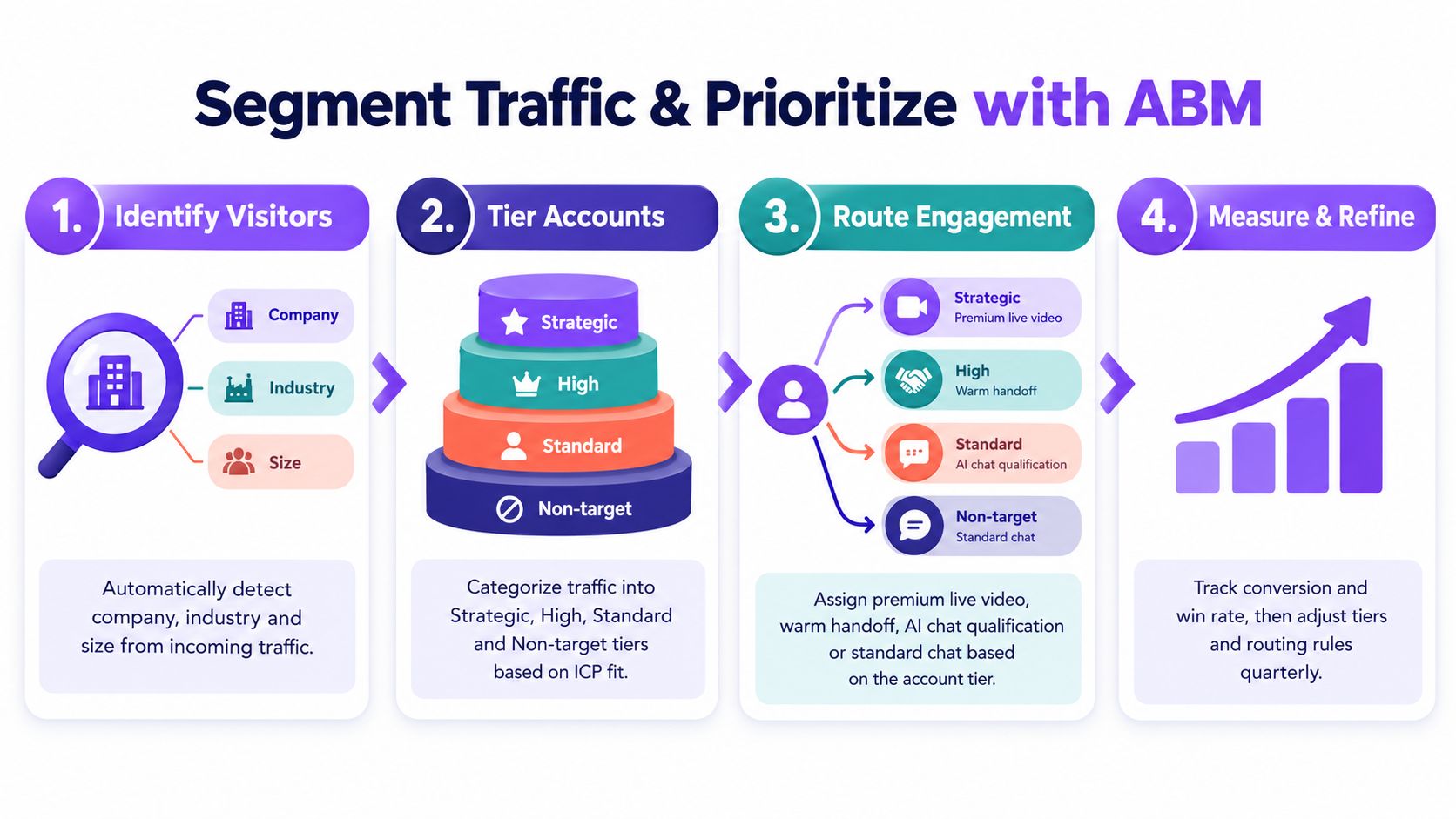
5. Segment Traffic and Implement Account-Based Marketing Prioritization
Route visitors by commercial value and buying intent, not through one default flow. A strategic enterprise account, a mid-market evaluator, a student, and a competitor may reach the same landing page, yet each needs a different sales handoff. Treating them alike wastes rep time and adds irrelevant friction.
Set account tiers using industry, company size, strategic value, and intent. Attach a specific response to each tier:
- Strategic accounts: Assign a named owner, trigger rapid alerts, and offer human-first engagement, including live video when appropriate.
- High-fit accounts: Use AI to qualify the visitor, then route the conversation to the right account executive.
- Standard accounts: Offer useful chat, scheduling, and normal sales follow-up.
- Non-target traffic: Provide self-service help without consuming scarce sales capacity.
Score fit against live behavior
Firmographic fit does not establish buying intent. A target account visiting a careers page should not receive the same treatment as one comparing pricing and reviewing integration documentation. Combine company data with page activity, return visits, campaign source, and engagement depth.
A pricing visit from a target account can alert its owner. Repeated product evaluation can justify priority AI qualification and a direct meeting option. A weak-fit visitor can stay in a self-service path. Keep these rules simple enough for marketing and sales to audit, then sync the tier and owner to the CRM.
Adapt the message to the account’s likely concerns. Enterprise buyers may need security, governance, and implementation guidance. Smaller teams may respond better to speed, ease of use, and a clear starting point. The landing page should pass that context to the next human conversation, rather than forcing the rep to reconstruct it.
Review each segment against qualified opportunities and closed business. If a tier generates activity but no meaningful pipeline, change its fit criteria, routing, or engagement level. ABM is resource allocation tied to commercial intent, not personalization for its own sake.
6. Implement Behavioral Automation Flows and Smart Lead Routing Rules
A landing page should trigger the right next conversation, not just record another visit. Route based on intent signals such as pricing views, product comparisons, ROI-tool use, repeat visits, and target-account recognition. A single article view belongs in education. Several evaluation actions deserve a faster sales response.
Set a small rule set that marketing and sales can inspect without technical help. For example, a pricing visit from a target account can alert the account owner. A completed AI qualification with strong fit can present an immediate meeting option or escalate to a person. Keep the handoff useful, because irrelevant automation teaches buyers that the page is working against them.
Make automation earn its place
Build each rule around five decisions:
- Behavior: Choose an action that signals intent, not passive browsing.
- Context: Add industry, role, company, campaign source, and current CRM ownership.
- Response: Start AI qualification, offer a meeting, route to a specialist, or send a relevant follow-up.
- Ownership: Name the responsible rep and define the escalation path.
- Review: Compare routed activity with qualified conversations, then revise or retire weak rules.
Campaign parameters can refine routing when they reveal buying context. An enterprise campaign may belong with an account executive, while a self-service campaign may need AI coverage and a lighter follow-up path. Do not alert reps for every pageview. Noise gets ignored, incorrect territories create awkward handoffs, and slow responses waste high-intent visits.
Keep a human override for unusual accounts, ownership changes, and buyers whose behavior conflicts with their profile. Automation should prepare the conversation, not dictate it. Give the assigned rep the trigger, supporting context, and recommended next action so the landing page functions as an active sales handoff.
7. Maintain Real-Time CRM and Collaboration Sync for Coordinated Handoffs
A landing page should start the sales handoff, not end with a form submission. If chat transcripts, meeting details, and account activity remain in separate tools, the prospect repeats the same information to every rep. The company then appears unprepared, even when the page generated strong intent.
Connect landing-page activity to the CRM in real time. Record the identified company, visited pages, intent signals, qualification responses, conversation transcript, meeting details, and current owner. Send focused alerts to Slack or Microsoft Teams only when someone must act. Collaboration channels should surface decisions and context, not become another database.
Give every handoff a clear owner
The receiving rep needs enough information to act without reopening the entire interaction. Include the prospect’s goal, questions or objections, routing reason, recommended next action, and deadline. A booked meeting should create a follow-up task immediately. An account match should update ownership. When AI passes a conversation to a person, preserve the transcript and explain why escalation occurred.
Use consistent field definitions across marketing and sales systems. Company, industry, role, use case, budget context, product interest, and source must carry the same meaning in every system. Otherwise, routing rules produce misleading context and reps waste time correcting records.
Review the connection regularly. Check for duplicate contacts, unassigned accounts, missing transcripts, stale owners, and meetings without follow-up tasks. Keep a human override for unusual accounts or ownership changes. The page has done its job only when the right team receives usable context and accepts responsibility for the next conversation.
8. Optimize for Mobile and In-Browser Engagement Without Tool Downloads
Mobile visitors should not have to fight the page before speaking with sales. A desktop layout can look polished while small tap targets, slow chat, external booking pages, or forced downloads stop a high-intent buyer.
Make the landing page an active sales handoff on every screen size. Keep the visitor on your domain, preserve the message that brought them there, and offer the fastest relevant next step: chat, a browser-based call, scheduling, or a callback. Test the full journey on real iOS and Android devices, from the first load through permissions, conversation, booking, confirmation, and follow-up.
Design for action, not device compliance
Touch targets need room. Text must remain readable, the main CTA should stay easy to find, and no step should require pinch-to-zoom or a second tab. If a visitor declines camera or microphone access, switch immediately to chat, scheduling, or a callback request rather than ending the handoff.
Run this prelaunch check:
- Mobile network tolerance: Keep chat and video usable on ordinary connections.
- Permission clarity: Explain each request and provide a clear alternative.
- In-browser scheduling: Let qualified visitors book without leaving the buying flow.
- Responsive priority: Keep the promise, proof, and primary action visible on small screens.
- Performance review: Compare mobile and desktop engagement, then investigate meaningful gaps.
The benchmarks summarized in involve.me’s landing-page statistics connect faster loading, fewer elements, and simpler forms with stronger conversion performance. Speed belongs to the sales workflow, not only the development backlog. Compress media, defer nonessential scripts, and remove widgets that do not support the page’s single objective. A fast page gives human reps and qualified AI more chances to start the right conversation.
9. Implement Visitor Identification and Enrichment for Targeted Outreach
Visitor identification should trigger better sales action, not automatic outreach. A company visit may reflect research, recruiting, support, or competitive curiosity. Route an account to a rep only when its behavior supports a conversation.
Start with company context: industry, size, location, technology, and pages viewed. Add return visits, pricing activity, product research, and chat or video engagement. Several people from one target account viewing related pages create a stronger handoff than one unverified IP match.
Use a confidence-based workflow:
- Target-account recognition: Notify the assigned owner when relevant buying behavior reaches your threshold.
- Returning-visitor context: Show the rep what changed since the previous visit, so the next conversation starts with useful context.
- Buying-group signals: Connect related activity from several visitors at the same company.
- Competitive research: Send competitor activity to the appropriate internal team, without labeling it sales-qualified.
- Personalized assistance: Adjust page messaging or offer help based on company context while leaving control with the visitor.
Identification is only useful when it improves the next action. A qualified AI assistant can ask a visitor what they need, confirm intent, and route the conversation. A human rep can then receive the account context instead of a vague alert. Test whether each signal produces a useful conversation, not merely another notification.
Privacy sets the boundary. Do not reveal private assumptions or claim to know exactly who someone is unless consent and disclosure practices support that interaction. Explain collection in the privacy notice and provide appropriate controls.
Treat IP-based identification as an uncertain signal. Remote work, shared networks, privacy tools, and mobile connections can produce incomplete or inaccurate matches. Combine signals, label confidence internally, and prioritize demonstrated interest over identification alone. A landing page earns its sales role when enrichment improves routing without making visitors feel watched.
10. Enable Sales Team Visibility and Accountability With Performance Metrics
A landing page is not successful because it collects contacts. It succeeds when the right visitor reaches a useful conversation and the sales team can act on that intent. Measure the handoff, not just the form.
Build a dashboard around the path from engagement to revenue. Track conversations started, meetings booked, attendance, response time, qualification quality, opportunity creation, and revenue outcomes when your systems connect those stages. Break results down by traffic source, page, account tier, device, engagement type, and rep.
Hold the workflow accountable
Review performance by both volume and outcome. A rep who handles many chats but produces poor-fit meetings needs better qualification or routing. A rep with fewer conversations may perform better with a particular industry or use case. Give managers enough context to coach the process instead of ranking people by activity alone.
Use the dashboard to make decisions:
- Which pages create the most qualified conversations?
- Which engagement triggers lead to useful meetings?
- Where do mobile visitors leave before speaking with someone?
- Which reps convert specific segments most effectively?
- Are CRM handoffs complete and timely?
- Do booked meetings become genuine opportunities?
The Unbounce landing-page benchmark offers planning context based on 41,000 landing pages, 464 million pageviews, and 57 million conversions. It reports a 6.6% median conversion rate across industries, with top-quartile pages above 11% and elite pages exceeding 20% in some cases. Industry results also vary, from 4.2% for ecommerce to 8.4% for education, so one target cannot fit every campaign.
Use these figures to set a starting reference, not to declare success after a submission. Your internal reporting should show whether a visitor moved from intent to a human or qualified AI conversation, then to a booked demo, qualified opportunity, and closed business. Add response-time and routing data so delays are visible before they become lost demand. Privacy controls belong in the same review, especially when visitor behavior is tied to account or rep-level reporting.
10-Point Comparison of Landing Page Best Practices
| Feature / Practice | Implementation Complexity 🔄 | Resource Requirements 💡 | Expected Outcomes 📊 ⭐ | Ideal Use Cases 💡 | Key Advantages ⚡ ⭐ |
|---|---|---|---|---|---|
| Implement Intent-Triggered Engagement at High-Value Pages | Medium–High: behavior tracking + routing rules | Dev work, data enrichment, ABM reps, analytics | Higher demo bookings, faster response, improved conversion (⭐⭐⭐) | Pricing, demo, comparison pages; ABM target accounts | Captures peak intent, context-aware outreach, prioritizes high-fit (⚡ faster engagement) |
| Eliminate Form Friction with Instant Scheduling and Click-to-Meet | Low–Medium: calendar integrations and UI | Calendar APIs, scheduler logic, reminder system | Reduced abandonment, faster bookings, fewer no‑shows (⭐⭐) | Pricing CTAs, end-of-tour CTAs, webinars | One-click booking, instant confirmation, saves SDR time (⚡ quick conversion) |
| Leverage 24/7 AI Chat for Qualification, Routing, After-Hours | Medium: AI training + CRM integration | Conversational AI platform, training data, integrations | Always-on qualification, increased coverage and booked meetings (⭐⭐⭐) | After-hours traffic, global timezones, high inbound volume | Scales SDR capacity, immediate responses, captures off‑hours demand (⚡) |
| Use Co-Browsing and Screen Sharing for Product Walkthroughs | High: secure in‑browser co-browse & annotations | Engineering, bandwidth, rep training, compliance | More personalized demos, faster close, higher confidence (⭐⭐⭐) | Complex products, ROI calculators, enterprise demos | Interactive demos without downloads, reduces objections, higher demo-to-close velocity (⚡) |
| Segment Traffic & Implement ABM Prioritization | High: segmentation logic + dynamic routing | Account intelligence, CRM sync, senior reps | Improved win rates for target accounts, efficient resource allocation (⭐⭐⭐) | Enterprise/strategic accounts, targeted ABM plays | Allocates premium resources to high-value accounts, scales ABM (⚡ focused efficiency) |
| Implement Behavioral Automation Flows & Smart Routing Rules | Medium–High: workflow builder + conditional logic | Automation platform, revops, CRM integration | Consistent immediate responses, scalable outreach (⭐⭐) | High-velocity sites, repeatable conversion behaviors | Eliminates manual routing, predictable SLAs, easier A/B testing (⚡) |
| Maintain Real-Time CRM & Collaboration Sync for Handoffs | Medium: integrations, field mapping, alerts | CRM admin, integration tooling, Slack/Teams config | Unified prospect view, faster handoffs, pipeline visibility (⭐⭐) | Teams using HubSpot/Salesforce, multi-team workflows | Removes manual entry, real-time alerts, closed-loop reporting (📊 faster coordination) |
| Optimize for Mobile & In‑Browser Engagement (No Downloads) | Medium: responsive UI + extensive testing | Frontend dev, QA across devices, performance tuning | Higher mobile conversions, reduced abandonment (⭐⭐) | Mobile-first audiences, paid ads, on-the-go prospects | Removes download friction, keeps prospects in-domain, consistent mobile UX (⚡) |
| Implement Visitor Identification & Enrichment | Medium: data provider + privacy compliance | Enrichment vendor, legal/compliance, CRM mapping | Converts anonymous traffic to actionable accounts, better targeting (⭐⭐⭐) | ABM, competitive intel, outbound enrichment lists | Enables ABM at scale, prioritizes high-value companies, informs outreach (⚡) |
| Enable Sales Visibility & Accountability with Performance Metrics | Low–Medium: dashboards + data pipelines | BI/RevOps, dashboard tooling, metric definitions | Improved coaching, SLA adherence, data-driven decisions (⭐⭐) | SDR managers, scaling sales orgs, performance optimization | Increases transparency, identifies training needs, aids forecasting (📊 actionable insights) |
Turn the Landing Page Into a Live Revenue Handoff
The practical shift is simple. Stop treating the landing page as the final destination for a form, and start treating it as the first working moment of the sales process.
Begin with the page’s intent. A pricing page, product page, comparison page, and content-download page shouldn’t all use the same CTA. Decide whether the visitor needs an answer, a walkthrough, a scheduled meeting, a technical resource, or a low-friction way to continue researching. One clear action still matters, but that action should reflect the visitor’s context.
Next, remove unnecessary steps. If a qualified buyer wants to meet, don’t make them submit a form and wait for a scheduling email. If they need a product explanation, don’t send them to another tool before a rep can help. Replace avoidable friction with in-browser chat, live video, click-to-meet scheduling, or a carefully bounded AI flow.
Then define the handoff before you launch the widget. Specify who owns each account tier, which behaviors trigger escalation, what qualification data the rep receives, and how quickly the team should respond. Sync the result into the CRM and collaboration tools so the buyer doesn’t have to repeat their story.
Validate the experience on mobile, test page speed, review permissions and privacy language, and inspect the complete path from first interaction to booked meeting. The Unbounce planning benchmark shows why conversion-rate context matters, but the most useful metric for a B2B team is the quality of the resulting conversation. A page that produces clicks without qualified follow-up is not doing its job.
Start with one pricing or product page. Add one engagement trigger, one routing path, and one primary success measure. Review actual conversations with sales, remove rules that create noise, and expand only after the handoff works reliably. If you want to operationalize this approach, Captiwate offers in-browser video and chat, AI qualification, click-to-meet scheduling, visitor intent signals, routing, CRM sync, and a single-snippet implementation. You can also review guidance on how to add video to landing pages before choosing the right placement and experience.
The best landing pages reduce uncertainty and response time without forcing every visitor into the same funnel. They give high-intent buyers a direct route to a capable human, a qualified AI assistant, or a useful next step. That is how a page becomes a revenue handoff instead of a passive form.
Captiwate helps B2B teams turn high-intent landing-page visits into in-browser video and chat conversations, AI-qualified leads, booked meetings, and coordinated CRM handoffs. Visit Captiwate to explore a practical way to connect landing-page intent with immediate sales engagement.