Teams start by shortening the demo form. That’s useful, but it’s rarely the decisive fix. A buyer who clicks Book a Demo isn’t just submitting contact details. They’re signaling a level of intent, and your website has only a brief moment to decide what should happen next.
Send that buyer into a generic form, a delayed email exchange, or an irrelevant calendar, and the opportunity starts losing momentum. Route them to an immediate conversation, a relevant product experience, or a calendar that understands their context, and the same click can become a qualified meeting.
The strongest demo funnels don’t treat the CTA as a button. They treat it as a conversion system that connects intent, routing, scheduling, reminders, and attendance.
Table of Contents
- Stop Treating Book a Demo Like a Form
- Why the Demo CTA Still Runs B2B SaaS
- The Hidden Funnel Between Click and Meeting
- What a Modern Click-to-Meet Flow Looks Like
- Matching the CTA to the Buyer’s Actual Intent
- Why Booked Demos Still No-Show
- Your Monday Morning Demo Conversion Checklist
Stop Treating Book a Demo Like a Form
The popular advice says to remove unnecessary fields, keep the form short, and place it prominently on the page. None of that is wrong. It’s just incomplete.
A demo CTA isn’t a CRM record waiting to be created. It’s a routing decision. When a buyer clicks, your system needs to determine whether that person should speak with sales now, choose a meeting time, explore the product independently, or receive a lower-pressure next step.
A static form ignores the difference between a pricing-page visitor who has returned several times and a reader who has just discovered your category. Both may click the same button, but they haven’t expressed the same intent. Treating them identically creates three predictable problems:
- Abandoned fields: The buyer loses patience before completing the request.
- Unqualified meetings: Sales representatives spend time with people who expected a product tour but received a discovery call.
- Wasted follow-up: SDRs manually coordinate calendars while the buyer’s attention moves to another vendor.
The issue isn’t only the number of fields. It’s the distance between the buyer’s action and the next useful experience. A form that asks for a name, work email, company, role, use case, employee count, phone number, and project timeline may collect rich data, but it also asks the buyer to do your qualification work before they’ve received anything in return.
Practical rule: Every demo click should resolve to a clear next step within seconds, not an internal queue.
Intent-aware routing uses the page, traffic source, account information, and on-site behavior to make that decision. A buyer arriving from a pricing campaign may see a rep-matched calendar. Someone reading an educational article may receive an interactive walkthrough or a group session. A high-value account browsing a product page outside business hours may enter an AI-assisted qualification path instead of disappearing into a form inbox.
Your landing-page best practices still matter, but the form is only the front door. The revenue impact sits in what happens after the click. A productive system captures context, routes accurately, offers an immediate path, confirms the meeting, and keeps the buyer engaged until the scheduled time.
That’s the standard the rest of the funnel should meet. The question isn’t, “How do we get more people to complete this form?” It’s, “What does this buyer need right now, and how can we deliver it without making them wait?”
Why the Demo CTA Still Runs B2B SaaS
The classic demo CTA remains popular because complex software still benefits from human explanation, qualification, and trust. A historical benchmark covering roughly 5,000 product websites found that “Book a Demo” appeared on 61% of B2B SaaS product websites, ahead of “Try for Free” at 22% and “Interactive Demo” at 18%. The figures come from the 2026 product demo CTA benchmark, so they should be read as a market snapshot rather than a universal rule.
That dominance doesn’t mean buyers want a slow sales process. It means the demo remains a familiar entry point for products that require configuration, stakeholder alignment, security review, or guidance. The mistake is assuming that the familiar CTA can continue using an outdated handoff.
A separate benchmark based on nearly 4 million form submissions found that adding immediate scheduling after a demo form raised form-fill-to-meeting conversion from about 30% to 66.7%. The book-a-demo conversion analysis is valuable because it isolates the operational gap. The buyer already completed the form. The lost opportunity came from making them wait to coordinate the meeting.
That distinction changes what you should optimize. Lead volume can look healthy while booked meetings remain weak. A marketing team may celebrate completed forms, while sales sees a calendar with empty slots and an SDR queue full of follow-up tasks.
| Metric | Standard Demo Form | Click-to-Meet Flow |
|---|---|---|
| Buyer action | Submit details and wait | Submit details and choose a time |
| Routing | Often manual or delayed | Immediate rules based on context |
| Calendar access | Usually a separate follow-up | Available during the active session |
| Sales workload | Coordination and qualification | More time spent on relevant conversations |
| Buyer experience | Uncertain next step | Clear confirmation and ownership |
This is why resources such as ViralBrain can be useful when teams are reviewing the broader conversion system, not just the copy on a form. The right question is how messaging, intent signals, routing, and follow-up work together.
The CTA itself isn’t the bottleneck. The gap between form submission and confirmed meeting is where pipeline dies unseen. Fix that handoff before you debate whether the button should say “Talk to Sales,” “See It in Action,” or “Book a Demo.”
The Hidden Funnel Between Click and Meeting
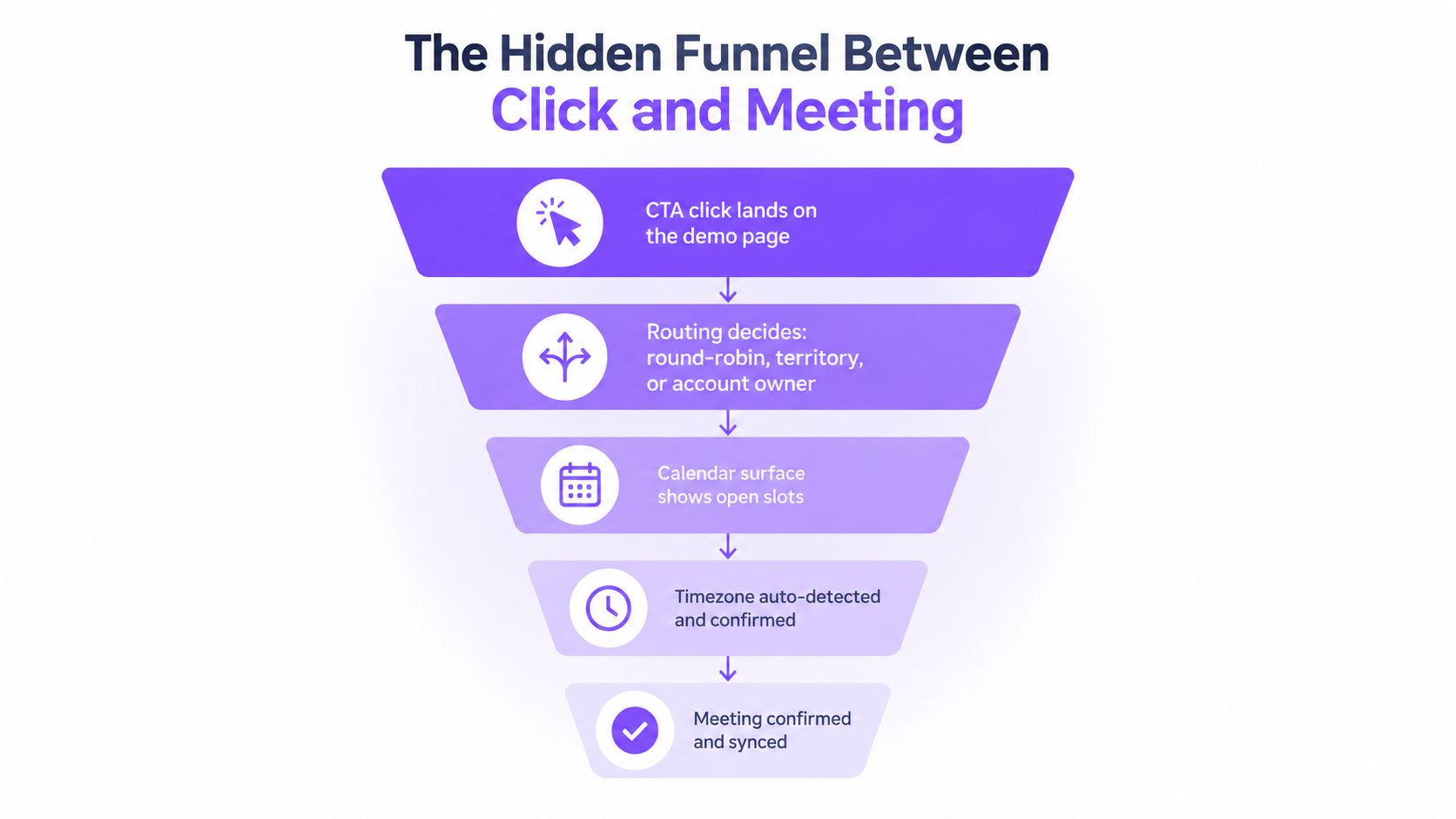
A demo click starts a second funnel. The first funnel moves a visitor toward the CTA. The hidden funnel moves a high-intent visitor from that click to an attended conversation.
The click creates a routing problem
The first decision is whether the buyer should book time, speak with someone immediately, or continue self-serve exploration. Your system should use the context behind the click, including the page viewed, campaign source, account tier, previous visits, and declared use case.
A pricing-page visitor who has compared plans may be ready for a direct sales conversation. A first-time visitor from a general educational article may need proof before committing to a meeting. Sending both people to the same form creates friction for one and weak qualification for the other.
The calendar must remove uncertainty
Once the buyer is eligible to schedule, show availability without forcing an account creation step or opening an unrelated tab. The calendar should reflect the correct representative, territory, meeting type, and working hours.
A buyer clicking at 11 p.m. should see times translated into their local timezone. A buyer who pauses halfway through the process shouldn’t have to start from the beginning when they return. If your system can’t preserve context, the follow-up should at least explain the next step clearly and provide a direct path back to scheduling.
Confirmation is part of conversion
A vague message such as “We’ll be in touch” creates doubt. The confirmation should identify the representative, meeting purpose, date, local time, duration, and joining instructions. It should also make rescheduling easy without forcing the buyer to explain themselves to an SDR.
The reminder sequence needs the same clarity. Confirmation emails that resemble automated marketing messages are easy to ignore or send to spam. The buyer should recognize the sender, understand why the meeting exists, and know how to change the appointment.
Attendance requires active ownership
A booked meeting isn’t complete pipeline. The assigned representative needs the buyer’s context, including the page that generated the booking, the selected use case, and any qualification answers. That information lets the rep begin with relevance instead of repeating the form.
The real conversion event isn’t the form fill. It’s a confirmed meeting that the buyer understands and intends to attend.
Review each handoff separately. Measure where visitors abandon the calendar, where invites fail, where reschedules occur, and where meetings become no-shows. This click-to-meeting path deserves the same scrutiny as the top-of-page CTA because it determines whether intent becomes sales capacity or disappears into administration.
What a Modern Click-to-Meet Flow Looks Like
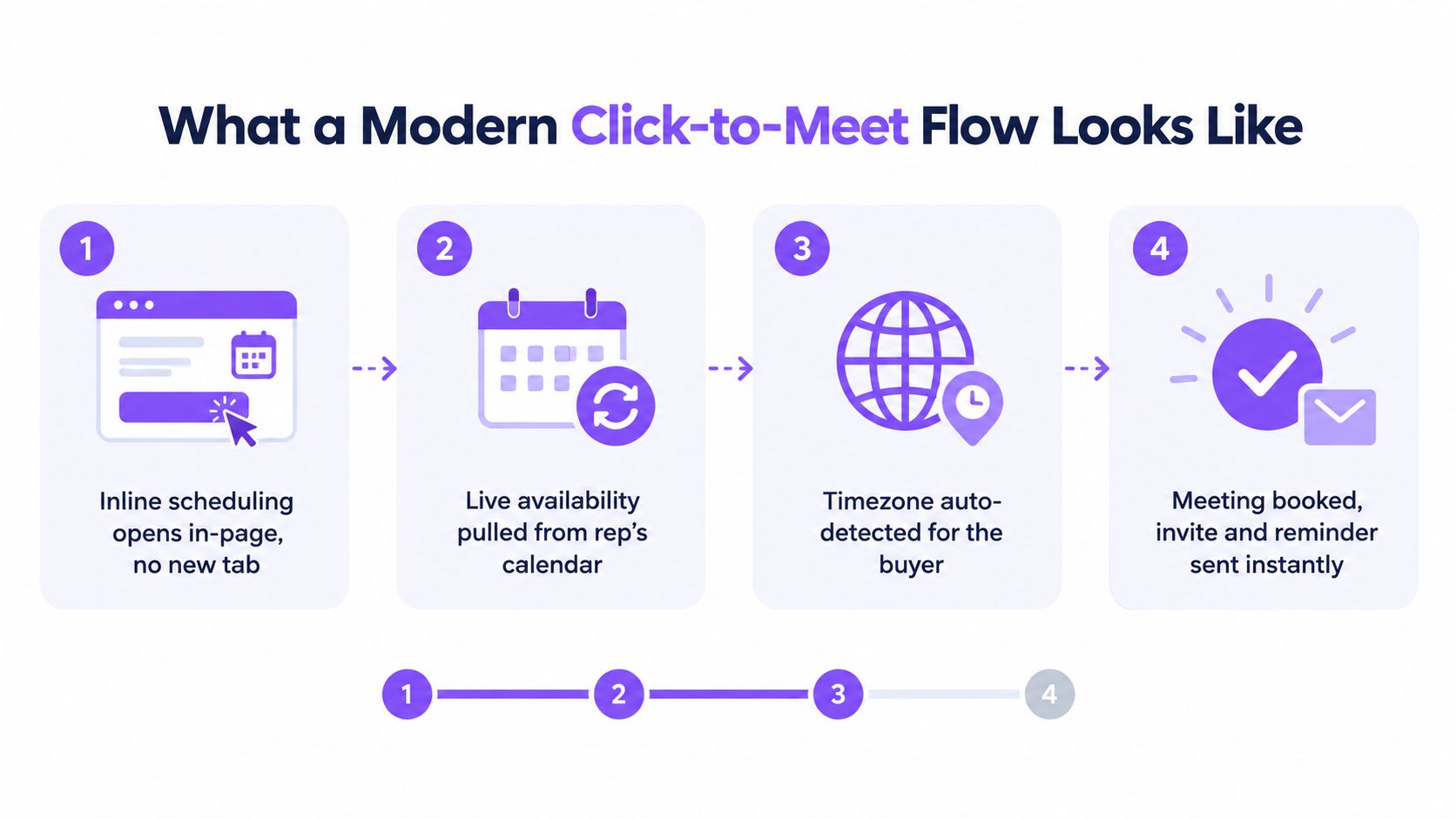
A modern click-to-meet experience keeps the buyer in the same context while the system handles availability, ownership, and confirmation. It shouldn’t feel like a form glued to a scheduling link. It should feel like the website has responded to the buyer’s request.
Open scheduling inside the page
The first stage is an inline scheduling panel. The buyer clicks the CTA and sees the next available action without moving to a new tab or losing the product page that convinced them to book.
That context matters. A buyer may want to review the pricing language, integration details, or use-case section while selecting a time. A separate scheduling domain breaks that connection and makes the meeting feel disconnected from the original evaluation.
Pull live availability from the right calendar
The scheduling surface should read the assigned representative’s actual calendar, not a manually maintained list of generic slots. Routing may depend on territory, account ownership, segment, product line, or round-robin rules.
Real-time sync prevents the most damaging scheduling errors, including offering a slot that has just been taken or assigning a buyer to the wrong team. It also gives sales operations a reliable ownership record before the meeting exists.
Resolve timezone and conflicts automatically
Timezone confusion can turn a positive buying signal into an immediate cancellation. The system should detect the buyer’s likely location, display the local time, and let the buyer confirm it before submitting the booking.
Conflict handling matters too. If the chosen representative becomes unavailable, the system should offer suitable alternatives without resetting the entire journey. The buyer shouldn’t need to repeat their company, use case, and preferred meeting format because a calendar changed.
Teams reviewing setting goals for B2B automation should include these handoffs in the operating goals. Automation isn’t successful merely because it removes a manual task. It’s successful when the buyer receives a faster, clearer experience and the sales team receives usable context.
Confirm the meeting and protect attendance
After booking, send the calendar invitation immediately. Use a confirmation email that states the meeting purpose and includes a simple reschedule path. A reminder around 24 hours before the meeting and another around one hour before it provide a practical baseline, but the exact sequence should reflect your audience and meeting type.
The join link should be created as part of the confirmed calendar event, not shown as an ambiguous placeholder before the booking exists. If the buyer reschedules, preserve the original representative, qualification details, and meeting context.
This is the difference between a genuine click-to-meet flow and a Calendly link bolted onto a form. The buyer stays in one journey, the sales owner remains visible, and the system maintains continuity from intent to appointment. The same principle applies to giving buyers a choice between click-to-call and click-to-meet, especially when some visitors want immediate help while others prefer a scheduled conversation.
Matching the CTA to the Buyer’s Actual Intent
One CTA for every visitor is a routing failure disguised as brand consistency. Buyers arrive with different levels of urgency, knowledge, authority, and willingness to speak with sales. Your booking surface should reflect those differences.
A repeat visitor on a pricing page has supplied a stronger signal than someone reading a general guide. A buyer spending time on a comparison page may want a competitive walkthrough. Someone arriving from an outbound campaign may need a short, tightly framed conversation that validates the campaign promise.
Read the path behind the click
Use behavioral signals to classify intent before deciding what the CTA should do.
- Pricing-page return visits: Offer a direct calendar with a qualified representative and a clear promise about what the meeting will cover.
- Comparison-page engagement: Offer a competitive or use-case-specific walkthrough instead of a generic introduction.
- Blog-to-product movement: Give the visitor a self-guided tour, short product video, or optional group session before demanding a live meeting.
- Outbound campaign traffic: Match the booking language and meeting format to the message that brought the buyer to the site.
- High-value account activity: Route to an account-aware owner rather than a broad round-robin queue.
The objective isn’t to hide the demo. It’s to make the next step credible. If the CTA says “Book a Demo” but the first call is only qualification, buyers may feel misled. If it promises a walkthrough matched to the audience and the rep knows the visitor’s use case, the meeting begins with trust.
Use different surfaces for different intent
High-intent traffic should usually reach a rep-matched calendar or live browser conversation. Mid-intent visitors often need self-serve exploration with an easy route to sales when they’re ready. Lower-intent traffic can receive a group session, educational event, or product resource that keeps the relationship moving without creating unnecessary sales capacity.
| Intent Signal | Recommended CTA | Demo Format | Expected Show Rate |
|---|---|---|---|
| Repeated pricing visits | Talk to a specialist | Rep-matched live conversation | Higher when the promise and timing are clear |
| Active comparison research | See the relevant workflow | Use-case or competitive walkthrough | Strong when the meeting matches the research |
| Product-page engagement | Explore, then book | Self-guided tour with optional scheduling | Depends on whether the buyer reaches value |
| Educational content visit | See how it works | Group session or interactive experience | Better when the commitment stays low |
| Target account activity | Meet your account team | Account-aware discovery and demo | Strong when ownership is explicit |
A qualified request still isn’t the same as a booked meeting. Across more than one million inbound B2B SaaS form submissions, the median qualified-to-booked conversion was 62%, the top 10% reached 78% or more, and the best performer reached 88%, according to RevenueHero’s demo form benchmark. Those figures make averages dangerous. A single blended rate can hide the fact that one intent segment books efficiently while another needs a different path.
Track qualified-to-booked performance by source, page, segment, and CTA promise. The winning system isn’t the one with the shortest form. It’s the one that gives each buyer a next step that makes sense.
Why Booked Demos Still No-Show
No-shows usually get blamed on buyer motivation. That diagnosis is convenient and often wrong. Most missed meetings begin with a preventable operational error.
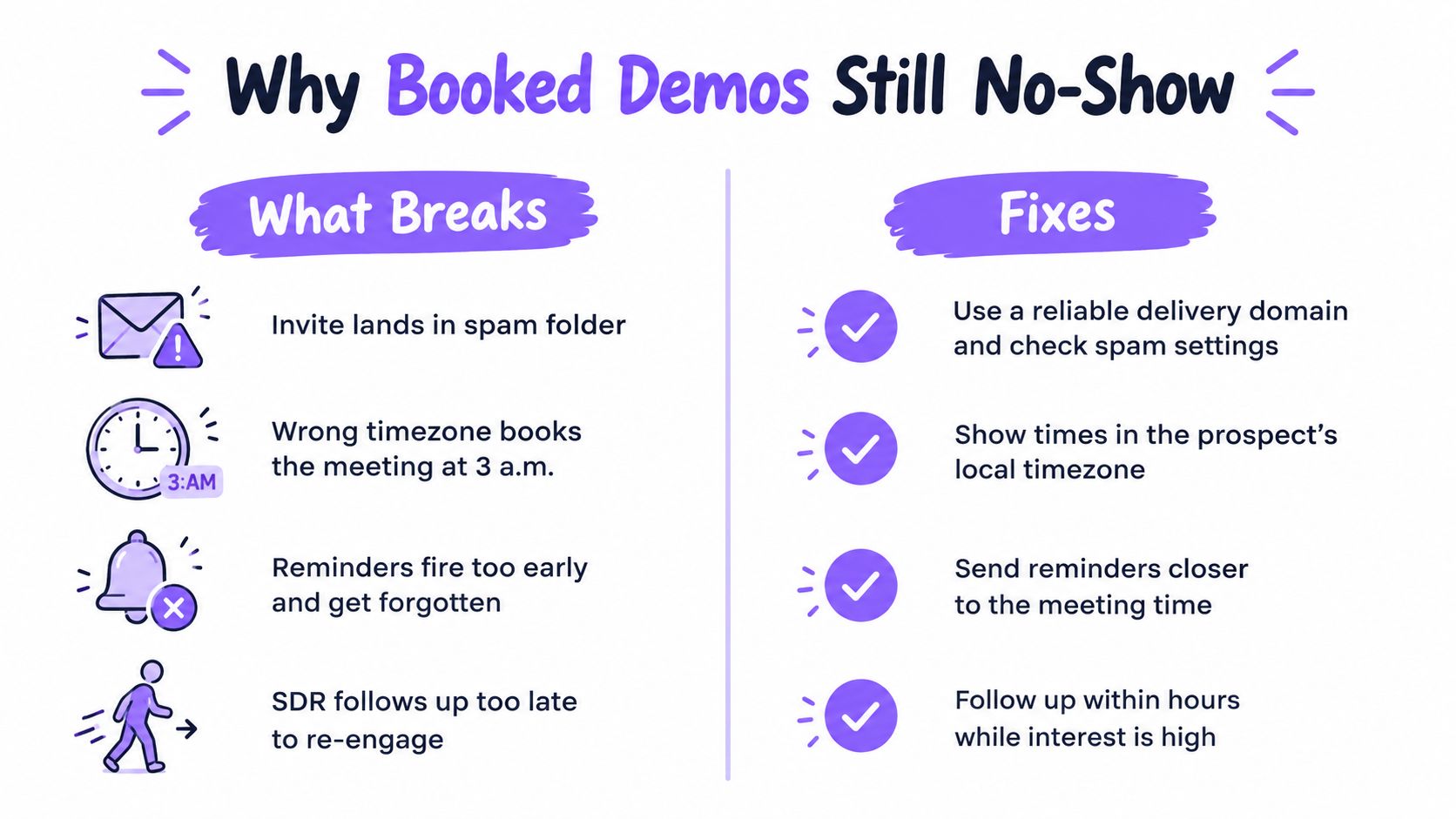
The first failure is a calendar invitation that never reaches the buyer’s attention. Sending-domain authentication, clear sender identity, and a recognizable subject line help protect the invitation from looking like unsolicited marketing. The email should also explain the meeting in plain language, rather than relying on a generic automated template.
The second failure is timezone confusion. A buyer may select a time that looks correct in the booking interface and discover later that the invitation uses a different zone. Display the buyer’s local time prominently, include the timezone name in the confirmation, and provide a simple way to correct it.
Fix the reminder sequence
A reminder sent too early can be forgotten. A reminder sent only moments before the call gives the buyer no chance to prepare or reschedule. Use a reminder around 24 hours before the meeting and another around 60 minutes before it, then test whether the timing fits the audience.
The content should repeat the useful details, including the meeting purpose, representative, local time, duration, and join instructions. Don’t make the buyer search through an old email thread to find the link.
Put a human behind the appointment
A same-day confirmation from a named SDR or representative can resolve uncertainty that automation can’t. The message doesn’t need to be elaborate. It can confirm the topic, ask whether the attendee wants anything covered, and make rescheduling straightforward.
Use SMS or WhatsApp only when the buyer has given appropriate permission and the channel fits your market. The objective is not to add messages. It’s to create a recognizable ownership signal before the meeting begins.
Teams should also define what happens after a no-show. Trigger re-engagement quickly, preserve the original context, and offer a reschedule path that doesn’t force the buyer through qualification again. The operational guide to reducing demo no-shows treats attendance as a process problem, which is the right starting point.
A no-show rate is a data quality problem before it’s a motivation problem.
Audit the plumbing before rewriting the pitch. Check invite delivery, timezone logic, reminder timing, ownership, and rescheduling. If those systems work, sales can focus on the conversation instead of recovering meetings the funnel should have protected.
Your Monday Morning Demo Conversion Checklist
A demo funnel audit shouldn’t become a six-month transformation project. Give one owner each task, make the changes visible, and review the result at the next operating meeting.
-
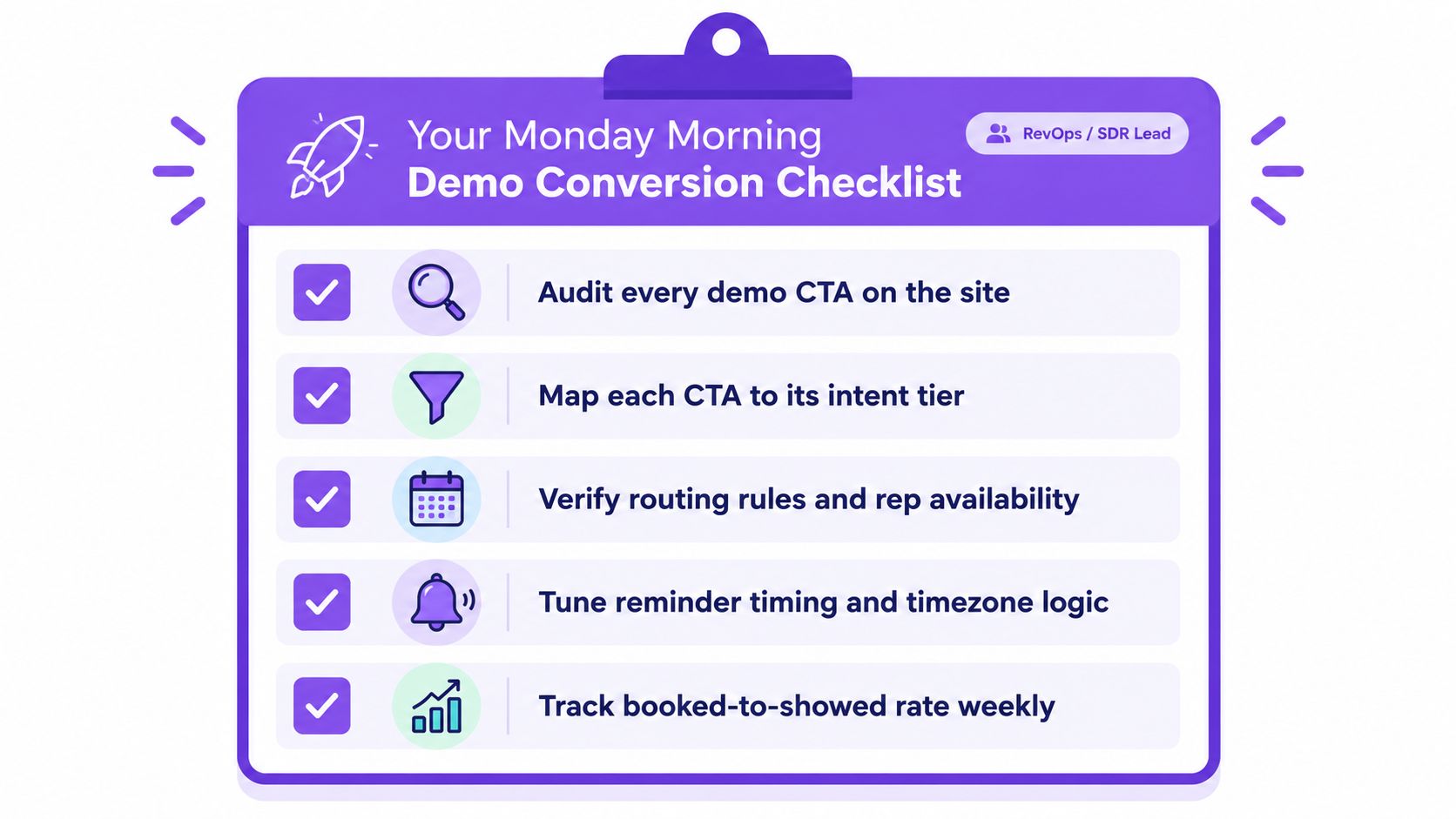
Audit every demo CTA on the site. The RevOps owner should identify the highest-traffic pages that generate demo clicks, record the current CTA, and document what happens after submission. Include pricing, comparison, product, and solution pages rather than reviewing only the homepage.
-
Map each CTA to an intent tier. Marketing should label each page as high, medium, or low intent based on its subject, traffic source, and visitor behavior. Replace generic promises with specific variants such as a pricing consultation, use-case walkthrough, self-guided tour, or group session.
-
Verify routing rules and rep availability. Sales operations should test round-robin assignment, territory rules, account ownership, calendar sync, working hours, and conflict handling. Book test meetings from different locations and devices, then confirm that the right representative receives the right context.
-
Tune confirmation and reminder timing. The SDR lead should verify local timezone display, immediate calendar invites, reminder delivery, rescheduling, and join-link behavior. Review the message content as a buyer would, not as the system administrator who already understands the process.
-
Track booked-to-showed performance weekly. Revenue operations should report CTA clicks, qualified requests, booked meetings, held meetings, reschedules, and no-shows by page and intent tier. Assign a follow-up workflow for no-shows within four hours so the opportunity doesn’t return to an unowned queue.
Start with the smallest useful change. If calendar sync is unreliable, fix that before redesigning the form. If high-intent pages route every buyer to the same queue, change the routing before adding more traffic. If meetings are booked but poorly attended, repair confirmation and reminder logic before asking SDRs to send more manual emails.
A platform such as Captiwate can combine in-browser video, AI chat, intent detection, click-to-meet scheduling, calendar sync, reminders, CRM records, and sales routing in one website engagement flow. That kind of system is relevant when your team needs to connect the buyer’s first live interaction with the eventual meeting and recorded outcome.
Replace your static demo form with an intent-aware flow that can qualify visitors, connect them to live sales conversations, or book the right meeting without unnecessary delay. Visit Captiwate to see how in-browser video, AI chat, and click-to-meet scheduling can turn more high-intent website visits into attended sales conversations.