Most business live chat advice is wrong about the job. It treats chat as a support widget, adds a bot to the corner of every page, then celebrates response time and conversation volume. That approach creates activity, not necessarily pipeline.
On a B2B website, chat belongs much closer to the revenue path. A visitor on a pricing page, comparison page, or product page is already giving your team context. The right conversation can answer an objection, identify an account, qualify urgency, connect a buyer with sales, or book a meeting before interest cools. The wrong conversation adds another form, another queue, and another reason to leave.
The operating principle is simple: business live chat should be judged by qualified conversations and revenue outcomes, not by how busy the widget looks. That means choosing the right delivery mode, designing AI handoffs that preserve trust, and connecting every meaningful interaction to CRM and pipeline reporting. For teams comparing customer-engagement tools, a practical review of Freshsales pricing details can also help clarify how chat, CRM, and sales costs fit together.
Table of Contents
- Why Business Live Chat Is a Revenue Layer, Not a Support Widget
- The Three Modes of Business Live Chat Explained
- Choosing the Right Mode for Each Page and Visitor
- What Live Chat Delivers for Sales and Support
- The Feature Checklist That Separates Real Platforms From Widgets
- Implementation Playbook for a Same-Day Go-Live
- Designing the AI to Human Handoff Without Losing the Visitor
- Measuring Pipeline and Conversion Impact, Not Just Response Time
Why Business Live Chat Is a Revenue Layer, Not a Support Widget
Business live chat became a mainstream web channel during the late 1990s, when organizations adopted commercial chat and web-contact-center software for real-time visitor communication. The shift moved businesses beyond email-only support and static contact forms. By 2017, live chat was being used across customer service, technical support, and online sales, with the Comm100 benchmark analyzing 40,149,888 chat conversations across 13 industries worldwide in its 2018 benchmark report.
That history matters because it shows what chat has become. It isn’t merely a faster inbox. It’s a real-time layer between website behavior and human action. A buyer can move from reading a product page to discussing fit with sales without waiting for a form submission, an email reply, or a scheduled call.

The metric that matters
Response speed still matters. A 2025 benchmark found an average wait time of 23.6 seconds and an average response time of 44.8 seconds for 2024, based on more than 220 million live-chat interactions in Comm100’s benchmark. But a fast answer that doesn’t create a qualified next step is operational theater.
Measure whether chat helps your team:
- Identify the right account and buying context.
- Qualify a genuine sales opportunity.
- Book and complete a meeting.
- Shorten the path from intent to human conversation.
- Resolve support issues without increasing customer effort.
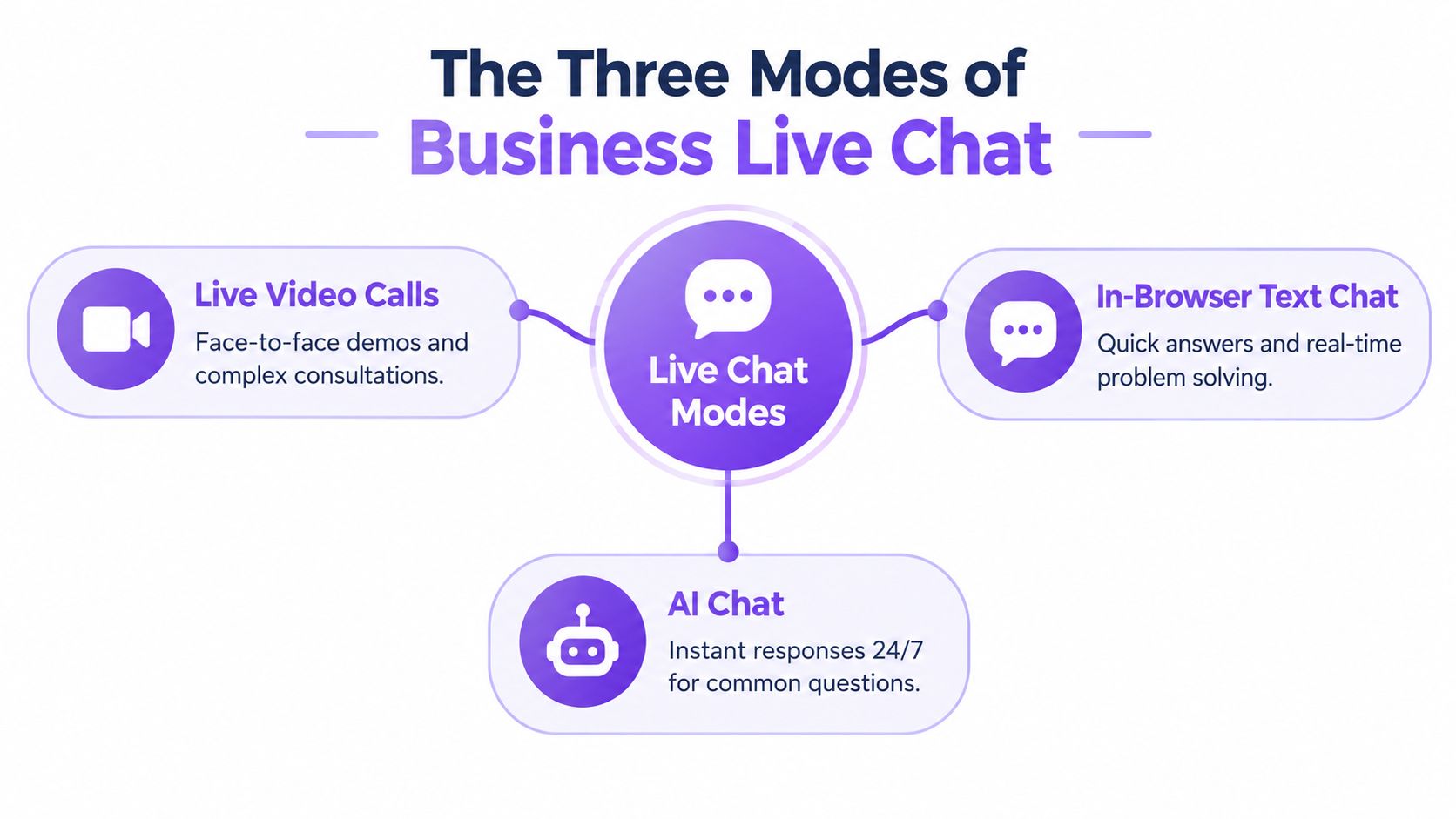
The three delivery modes support different moments. Live video serves high-intent visitors who benefit from immediate face-to-face help. In-browser text chat handles questions, qualification, and routing. AI chat provides always-on coverage for routine questions and off-hours demand.
If you want the broader strategic context, Captiwate’s guide to conversational marketing frames the same shift from passive forms toward active, context-aware engagement. The point isn’t to put chat everywhere. It’s to put the right conversation in front of the right visitor while the buying signal is still fresh.
The Three Modes of Business Live Chat Explained
Treating every chat experience as the same product creates poor routing. A buyer asking for a technical explanation, a prospect ready to compare plans, and a visitor browsing a blog post shouldn’t enter an identical flow.
Think of your website as a storefront. Live video is the sales associate on the floor, text chat is the greeter who answers immediate questions, and AI chat is the kiosk that keeps the doors useful outside staffed hours.
Live video calls
Live video belongs on pages where intent is visible and the cost of delay is high. Pricing pages, demo pages, product comparison pages, and pages visited by priority accounts are strong candidates. A browser-based call removes the scheduling step and gives sales a chance to answer nuanced questions while the buyer is already evaluating the offer.
This mode works best when a trained human is available and the visitor understands what will happen after clicking. Don’t use live video as a decorative button. Give it a clear promise, such as a quick product walkthrough, technical consultation, or plan-fit discussion.
In-browser text chat
Text chat is the workhorse. It handles questions that don’t justify a meeting, collects qualification details, routes visitors to sales or support, and gives representatives a written record of the interaction. It also works well on product pages, documentation, integration pages, and comparison content.
The best text-chat flows are short. Ask what the visitor is trying to accomplish, identify the blocker, and offer a relevant next step. Long forms disguised as chat still feel like forms.
AI chat
AI chat handles the long tail. It answers common questions, gathers basic context, and keeps the site responsive during nights, weekends, and periods when human coverage isn’t available. It should also know when to stop.
A useful AI flow doesn’t aim to contain every interaction. It recognizes uncertainty, detects buying intent, and hands complex or high-value conversations to a person with the transcript intact. AI is the coverage layer, not the entire revenue motion.
Choosing the Right Mode for Each Page and Visitor
Start with page intent, then add visitor context. Teams often do the reverse. They install one widget globally and hope the same prompt works for a first-time blog reader and a returning pricing-page visitor.
Use a simple decision sequence.
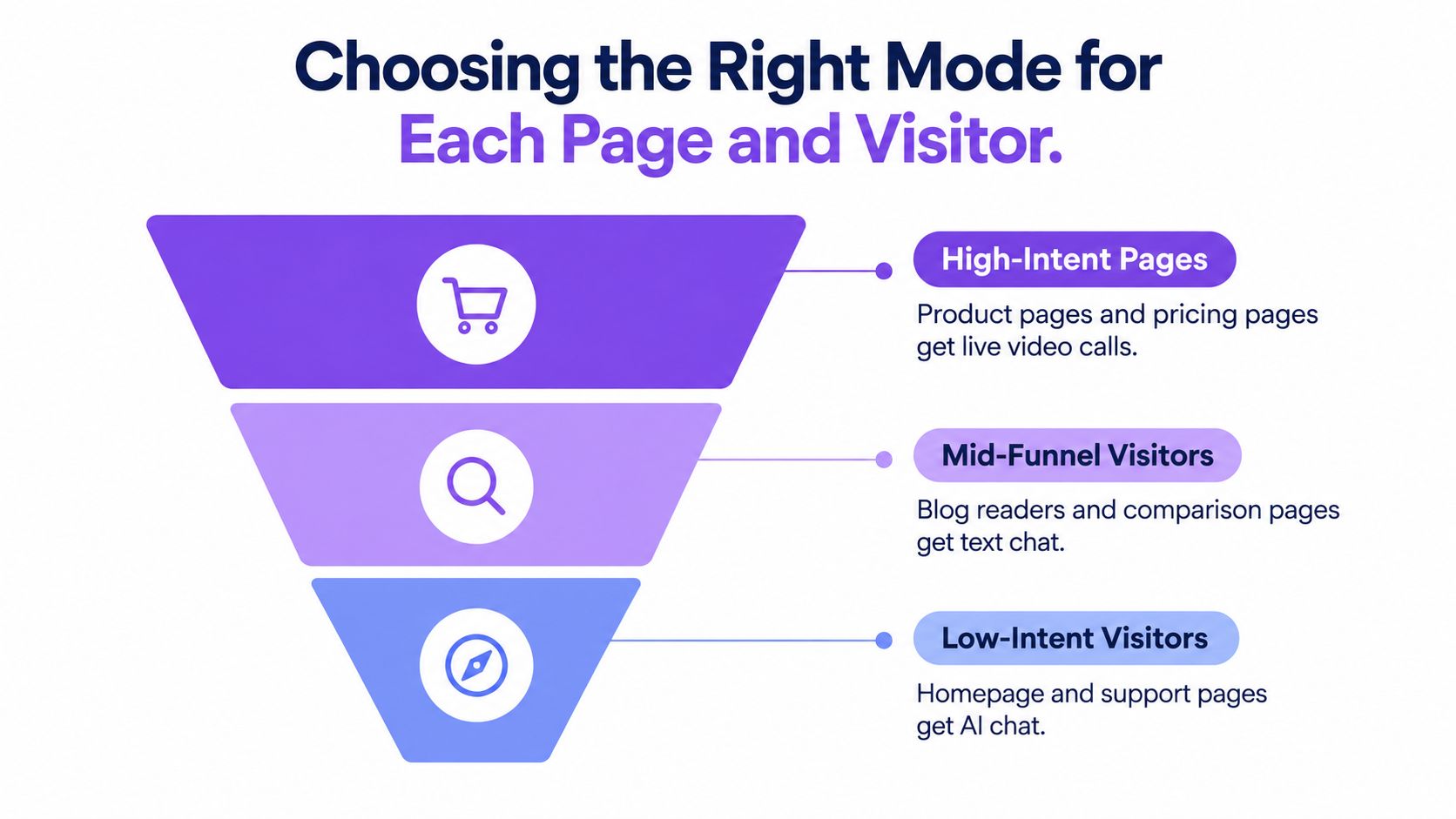
First, classify the page. Pricing, demo, product, and comparison pages usually signal commercial intent. Documentation and integration pages often indicate technical evaluation. Blog and resource pages attract a wider mix, so they need lighter qualification.
Next, classify the visitor. A return visit, an identified company, a known target account, or repeated product-page activity can justify faster human routing. A first-time visitor with no clear commercial signal should receive a low-friction AI or text interaction.
Finally, define the action. Don’t ask the system to “engage visitors.” Specify whether it should offer a video call, answer a question, collect qualification details, create a CRM lead, or direct the person to self-service.
A routing matrix worth building
| Visitor or page signal | Recommended mode | Primary action |
|---|---|---|
| Pricing-page visitor with a return visit and a relevant company match | Live video | Offer an immediate sales conversation |
| Product or comparison-page visitor with a specific question | In-browser text chat | Answer, qualify, and route |
| First-time blog visitor | AI chat | Offer a useful answer and collect light context |
| Off-hours visitor with commercial intent | AI chat with escalation path | Qualify and book or queue a follow-up |
| Existing customer on documentation or support content | Text chat or AI chat | Resolve the issue and preserve account context |
The rules should be explicit enough for revenue operations to audit. For example, a pricing-page visit plus return behavior can trigger a human offer, while a first-time blog visit can start with an AI question about the reader’s goal. Don’t infer more than you need. A visitor shouldn’t receive an unnervingly specific greeting because an enrichment tool matched a company domain.
Use page placement carefully. Put high-intent prompts near the decision point, not over the primary call to action. Keep the first interaction focused on the visitor’s task. A chat experience that interrupts reading before it establishes relevance will create resistance.
What Live Chat Delivers for Sales and Support
Sales and support can use the same conversational surface, but each team needs its own definition of success.
For sales, measure qualified meetings, sourced opportunities, account coverage, and progress through the buying process. A representative who joins a buyer on a pricing page can answer questions about fit, procurement, implementation, or integrations while the buying context is still active. That interaction can outperform a scheduled-only call to action because the buyer can ask for help without leaving the page or starting another process.
J.D. Power research summarized by HelpSquad found that 42% of online customers preferred live chat as a digital contact method, compared with 23% for email and 16% for social media or forums in its live-chat statistics summary. Preference creates an opportunity, not a guaranteed result. An unanswered request damages trust, so treat human coverage and escalation as part of the revenue motion, not as optional service polish.
For support, track resolution quality, avoided tickets, time to resolution, and customer effort. First-response time helps diagnose staffing and routing problems, but it does not prove that the issue was solved. A fast reply that forces repeated explanations or another handoff can create more work than a slower response that resolves the problem cleanly.
Operating rule: Sales owns pipeline movement. Support owns resolution and effort. Revenue operations owns the shared context that shows what happened.
One conversation record beats disconnected queues
A sales representative should see the page that prompted the conversation, prior qualification answers, and relevant account context. A support representative should see previous issues, appropriate product-usage context, and whether the visitor already works with an account team.
That shared record reduces duplicate questions and makes routing defensible. It also separates genuine revenue contribution from a high volume of low-value chats. Store the interaction in the CRM, not only in the chat console, so marketing, sales, support, and revenue operations can connect the conversation to later outcomes.
Customer sentiment belongs in the same operating model. A large-scale analysis of more than 170,000 online customer-service chat sessions found that customer and agent sentiment were stronger predictors of perceived satisfaction than session metadata such as conversation length, time of day, and response time in the study published on arXiv. Give agents prompts and escalation support that recognize frustration. Timers alone cannot protect trust or recover a failing interaction.
The Feature Checklist That Separates Real Platforms From Widgets
Don’t evaluate chat platforms with a thirty-item feature dump. Score them by the business capability each feature delivers.
| Tier | Feature | Outcome It Unlocks |
|---|---|---|
| Must-have | In-browser text chat and live video | Immediate conversation without forcing a form or separate meeting flow |
| Must-have | AI chat with human escalation | Always-on coverage with a path for complex intent |
| Must-have | Visitor context and intent signals | Better prioritization and more relevant routing |
| Must-have | CRM and calendar sync | Traceable meetings, follow-up, and pipeline attribution |
| Must-have | Mobile-ready experience | Usable conversations for visitors on mobile devices |
| Differentiator | Behavioral triggers and ABM tiering | Human attention directed toward valuable moments |
| Differentiator | Co-browsing and screen sharing | Faster explanation of product or technical issues |
| Differentiator | Slack or Teams alerts | Faster internal response without another dashboard |
| Differentiator | Automation flows and qualification logic | Consistent routing across segments and time periods |
| Nice-to-have | Advanced analytics and multilingual routing | Better optimization after the core motion works |
| Nice-to-have | Custom branding | More control over the interface and visual experience |
What to verify in a vendor review
Start with the must-have tier. If a platform can’t connect conversation activity to CRM records and meeting outcomes, it will struggle to prove revenue impact. A polished widget doesn’t compensate for missing calendar sync, weak routing, or incomplete transcript history.
Then test the differentiators with real scenarios. Ask the vendor to demonstrate a high-intent account arriving on a pricing page, an AI conversation escalating to sales, and the resulting record appearing in HubSpot or Salesforce. Don’t accept screenshots of an ideal flow. Run the workflow.
Enterprise review often exposes the hidden requirements. Confirm SSO and SAML, data residency options, privacy controls, and security documentation. For regulated or European traffic, ask how the system supports GDPR and CCPA requirements. Verify whether the vendor offers SOC 2 Type II and ISO 27001 evidence where your review process requires it.
Finally, inspect the pricing model. Per-seat, per-conversation, and per-identified-company charges can discourage broad adoption. Unlimited seats and clear usage boundaries make it easier to include marketing, sales, support, and customer success without creating internal rationing. Captiwate is one example of a platform that combines browser-based video and chat, AI qualification, visitor intent signals, CRM sync, calendar connections, co-browsing, and enterprise privacy controls in one implementation.
For teams mapping the broader inbound motion, inbound sales software guidance can help connect chat capabilities to routing and follow-up design.
Implementation Playbook for a Same-Day Go-Live
A fast launch doesn’t mean skipping design. It means limiting the first release to a narrow, measurable motion.
Install the base experience
Add the platform’s single JavaScript snippet, verify the website domain, and place the widget where it won’t cover navigation or the primary CTA. Match the brand without hiding the interaction. A visitor should know what will happen after clicking.
Check desktop and mobile layouts separately. Test pricing, product, comparison, documentation, and support pages. A widget that looks acceptable on a wide screen can obscure content or controls on a smaller one.
Configure routing before automation
Write the routing rules in plain language first:
- High-intent pages route to available sales representatives.
- Support and documentation traffic routes to support or self-service.
- Off-hours traffic enters AI qualification with a clear fallback.
- Priority accounts trigger an internal alert and preserve the full context.
- No available representative produces a transparent “not available” state, not a dead end.
Keep the first rules simple. Every exception adds a test case, and untested exceptions create missed conversations.
Connect the systems people already use
Sync conversations, identified accounts, meetings, qualification fields, and outcomes to the CRM. Connect calendars so the visitor doesn’t have to re-enter information. Send urgent alerts to Slack or Microsoft Teams only when someone can act on them. An alert nobody owns becomes noise within days.
Run a short enablement session for sales and support. Show representatives how to accept a conversation, transfer it, annotate the outcome, and mark the next step. Adoption fails when the team understands the product demo but not the operating expectation.
Pilot with a controlled queue
Use a small representative pool for the first thirty days. Review transcripts, routing misses, abandoned conversations, and booked meetings each week. Don’t launch AI across every page before the team trusts the human routing rules. Start with a limited set of intents and expand only after the escalation path works.
Launch standard: Every visitor must receive either a useful answer, a human path, or a clear next action. “Someone will get back to you” isn’t a complete experience unless ownership and timing are visible.
Designing the AI to Human Handoff Without Losing the Visitor
The common AI goal is maximum containment. That’s the wrong north star for revenue conversations. A bot that prevents a valuable buyer from reaching sales may improve a dashboard while damaging pipeline.
Customers accept automation conditionally. 72% of surveyed US customers said they would use a chatbot if it worked and delivered an immediate response, while 82% still wanted the option to interact with a real person when necessary according to the Webex State of Messaging report. The design implication is direct: AI must disclose what it is, perform a useful task quickly, and make escalation easy.
Set stop conditions
Escalate when the AI has low confidence, the visitor asks for a person, the conversation involves pricing or procurement, the account matches a priority segment, or frustration appears. Escalate after repeated clarification requests or when the visitor’s question requires judgment the bot can’t defend.
The human should receive:
- The full transcript.
- The visitor’s stated goal and qualification answers.
- The page that initiated the conversation.
- Relevant company or account context.
- The reason for escalation.
- Any promised follow-up or meeting action.
The visitor shouldn’t have to repeat the same story. That is the minimum standard for a credible handoff.
A platform such as Captiwate’s AI chat product can support AI qualification, routing, and human handoff, but the workflow still needs governance. Define who owns escalations, what happens outside coverage hours, and how the system records consent and retention choices.
Personalization needs restraint
Visitor identification is useful when it improves routing. It becomes intrusive when the interface reveals sensitive inferences the visitor never supplied. Separate anonymous behavioral signals, such as a return visit or viewed pricing content, from personal data and account enrichment.
Executive research across seven countries found that 65% of executives said data-privacy rules limit how extensively their organizations can use AI to personalize customer experience in Verizon’s 2025 CX Annual Insights Report. Use purpose-limited signals, explain personalization where appropriate, honor consent, and document retention and deletion practices. More data doesn’t automatically create a better conversation.
Measuring Pipeline and Conversion Impact, Not Just Response Time
A live chat program earns budget when it moves buyers through the funnel. Build the scorecard around three layers.
Activity shows adoption: chats initiated, video calls completed, qualified conversations, and meetings booked. Quality shows whether those interactions deserve sales attention: sentiment recovery, resolution quality, qualified-meeting rate, escalation accuracy, and meeting no-show rate. Pipeline shows business impact: opportunities sourced from chat, revenue influenced by chat, and sales-cycle movement against a suitable non-chat cohort.
Track wait time and response time as separate operating measures. Wait time covers the delay before connection or the next reply. Response time covers agent-message latency during an active conversation. Use medians and percentiles, then compare speed with abandonment, qualification, and funnel progression. A fast reply that produces no qualified next step is activity, not revenue.
Use an attribution model people can act on
Record three views:
- First-touch: chat introduced the account or contact.
- Chat-touch: chat materially influenced an active buying process.
- Last-touch: chat directly preceded a meeting or opportunity.
Review the scorecard weekly with the SDR lead, marketing lead, and revenue operations. Test one variable at a time, such as trigger placement, AI versus human coverage, or routing by account tier. Keep the dashboard small enough to support a clear decision.
AI can improve operational efficiency in defined workflows. Broader guidance on how AI agents boost efficiency provides useful context, but efficiency alone does not prove commercial value. The proof is a qualified buyer reaching the right person, with conversation context intact, and progressing toward revenue.
Captiwate combines in-browser live video, text chat, and AI qualification for routed conversations and booked meetings. Teams can compare that motion with their current funnel at Captiwate.