Your team already knows the feeling. A target account lands on your pricing page, clicks into integrations, opens the security page, checks a competitor comparison, then disappears. No form fill. No chat. No meeting booked. By the time sales sees anything, the buyer has moved on or booked with someone who responded while interest was still live.
That’s why most advice on how to track website visitors is stuck in the past. Counting sessions, pageviews, and traffic sources is fine for reporting. It doesn’t help revenue teams act. In 2026, visitor tracking has to answer a harder question: which company is here, how strong is the buying signal, and how fast can we get that signal into a workflow that creates a conversation?
Table of Contents
- The High-Intent Traffic You Are Watching Slip Away
- Setting Up an Analytics Foundation That Actually Holds Up
- Turning Anonymous Visitors Into Companies You Can Name
- Consent, Compliance, and What You Are Actually Allowed to Track
- Detecting Real Buying Intent From On-Site Behavior
- Syncing Visitor Signals Into CRM and Live Sales Workflows
- What to Measure Now and What to Stop Chasing
The High-Intent Traffic You Are Watching Slip Away
Website visitor tracking started with server logs in the early web. A widely cited milestone was 1993, when WebTrends became one of the first commercial web analytics companies, and in 1995 Analog was released as the first free log-file analysis tool. Back then, the web had only about 600 websites in 1993 according to this history of website analytics. That model made sense for the time. Count hits, inspect logs, move on.
It doesn’t work for a modern B2B funnel.
Revenue teams don’t need another dashboard that says traffic was “up.” They need to know whether the visit came from an ICP account, whether that account looked like a student doing research or a buying committee doing evaluation, and whether someone should intervene before the session ends.
What the dashboard misses
A lot of high-intent traffic never raises its hand. The buyer reads pricing. The solutions consultant checks integrations. Procurement scans security content. A manager shares your comparison page internally. None of that guarantees a demo request.
If your stack only records anonymous session totals, you learn almost nothing useful:
- You can’t separate curiosity from purchase motion
- You can’t route a hot account to sales in time
- You can’t connect on-site behavior to CRM context
- You can’t prioritize follow-up around actual interest
Practical rule: If the signal dies in analytics, it was never operational.
What RevOps actually needs
The operational standard is higher now. You want anonymous traffic resolved to company-level identity where possible, behavioral events mapped to clear intent, and those signals pushed into CRM, chat, Slack, or routing logic fast enough for a human to act.
That doesn’t mean chasing perfect person-level identity everywhere. It means building a system that turns unknown visits into usable intent signals. Sometimes that gives you the account. Sometimes it gives you the account plus likely function. Rarely does it reliably give you the individual in a way that’s both scalable and compliant across regions.
That gap is where pipeline leaks.
Setting Up an Analytics Foundation That Actually Holds Up
Most broken tracking setups fail before the first event fires. They load scripts too early, collect the wrong events, duplicate records, and then wonder why sales doesn’t trust the data. A reliable foundation starts with governance, not tags.
Put the consent gate first
A modern setup should load a consent management platform before any non-essential tracking. That order matters. If your analytics, heatmaps, pixels, or personalization scripts fire before consent logic runs, you’ve built a compliance problem into the architecture.
Independent research found that about 92% of websites studied perform some form of tracking by setting at least one identifier cookie, and more than 80% of those sites use multiple tracking mechanisms, based on research into web tracking practices. That’s exactly why governance can’t be an afterthought.
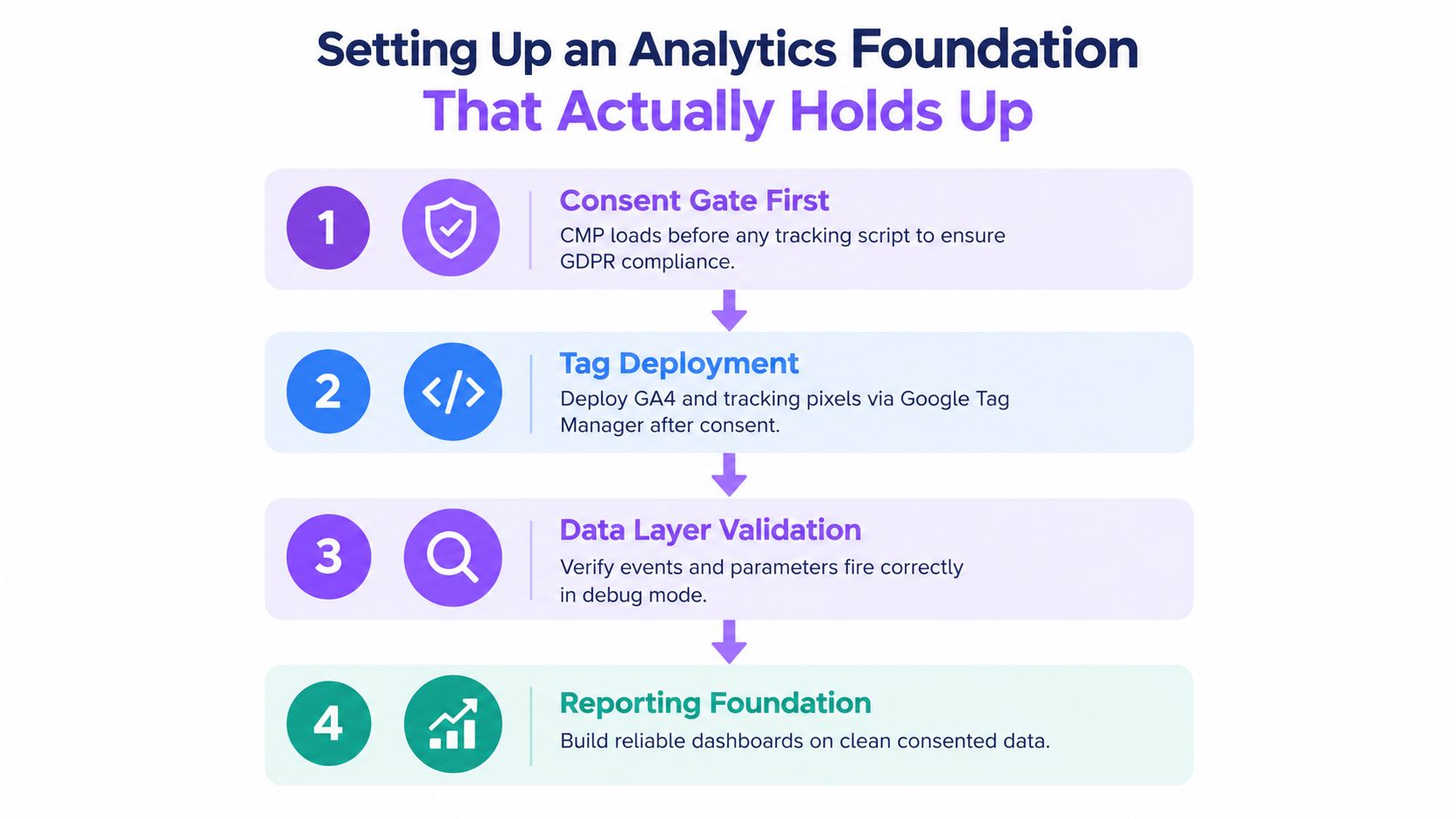
Use the CMP to control what loads, when it loads, and for which region. Don’t rely on a privacy policy and hope for the best.
Use browser collection with server-side processing
The stack I recommend is simple: a lightweight web snippet for event collection, then a server-side endpoint that receives, validates, enriches, and forwards data. Google’s server-side consent flow describes this as a pipeline where the browser sends events, the server container processes consent parameters, then destination tags adjust what they send based on consent state, as outlined in Google’s server-side consent mode documentation.
That architecture is useful for practical reasons:
- Cleaner data flow: the server can filter junk before it hits downstream tools
- Better control: consent state travels with the event
- Safer routing: you can strip unnecessary fields before forwarding
- More flexibility: analytics and activation tools can receive only what each destination needs
A lot of teams also want qualitative behavior tools for page analysis and friction review. If you’re comparing options, this list of a Formbricks alternative to Hotjar is useful because it frames trade-offs around privacy and product fit instead of assuming every session replay tool belongs on every site.
Here’s a concise walkthrough if your team needs a visual explanation before implementation:
Your event taxonomy matters more than your dashboard theme
Pageviews alone won’t tell sales anything. Your data layer needs explicit business events. At minimum, define events for pricing views, demo CTA clicks, integration page reads, security page visits, repeat visits, content depth, and other behaviors tied to evaluation.
Then clean the data before anyone sees it.
- Deduplicate events so one action doesn’t become three records.
- Standardize naming so “pricing_view” doesn’t coexist with “view_pricing_page.”
- Separate bot noise from human activity.
- Make the raw event stream queryable before building reports.
Pretty dashboards don’t create pipeline. Clean event design does.
Turning Anonymous Visitors Into Companies You Can Name
Teams usually get unrealistic. They buy a “visitor identification” tool and expect it to reveal every buyer by name. That’s not how it works. The practical goal is usually company resolution first, then enrichment, then behavior-based confidence.
What identification methods actually do
Most B2B visitor identification starts with network-level matching. The system sees a visit, maps the connection to known company ranges where possible, then appends firmographic detail. Some tools layer in reverse DNS, domain clues, or other confirmation signals.
What matters operationally isn’t magic identity. It’s whether the visit can be tied to an account your team cares about.
| Method | Accuracy | Coverage | Best Use Case |
|---|---|---|---|
| IP-to-company resolution | Stronger for established corporate networks | Weaker for remote work, mobile traffic, residential connections, and VPN use | Identifying visiting accounts for ABM prioritization |
| Reverse DNS | Best as a confirmation layer, not a primary method | Limited on its own | Verifying likely organization context |
| WHOIS and network ownership checks | Helpful for validation in edge cases | Narrow coverage for day-to-day operations | Investigating ambiguous account matches |
| Behavioral pattern matching | Improves confidence over repeated sessions | Requires enough event history to be useful | Tying unknown visits to known account interest over time |
| Firmographic enrichment | Not an identity method by itself | Depends on the base match | Deciding whether the account is worth sales attention |
If you want a concise overview of the category, this guide to B2B website visitor identification is a useful reference point.
Where accuracy rises and falls
Large office-based companies are easier to identify at the company level. Distributed teams are harder. Remote employees on home internet often collapse into generic network providers. Mobile connections are worse. VPN use muddies everything further.
That’s why smart teams stop overvaluing exact personal identity and start valuing account-level confidence plus intent.
The enrichment layer matters more than people think:
- Industry fit tells you whether this belongs in your ICP.
- Company size band helps route enterprise traffic differently from SMB traffic.
- Region informs compliance and handoff rules.
- Existing CRM status tells reps whether this is net-new, open pipeline, or a customer.
Plan around the honest limit
You can often name the company. You can sometimes infer likely function based on page path and content consumed. You usually can’t count on naming the individual across all markets and devices in a way that’s stable and defensible.
That’s not a flaw. It’s the operating reality.
Build the SDR workflow for account-level action first. Treat person-level visibility as a bonus, not the foundation.
Teams that accept this move faster. They route by account, page context, repeat behavior, and CRM status. Teams that insist on perfect identity usually end up with brittle tooling and bad assumptions.
Consent, Compliance, and What You Are Actually Allowed to Track
A common mistake is installing tracking tools, letting marketing run wild, and asking legal to bless it later. That’s backwards, and in regulated markets it’s reckless.
More tracking isn’t better
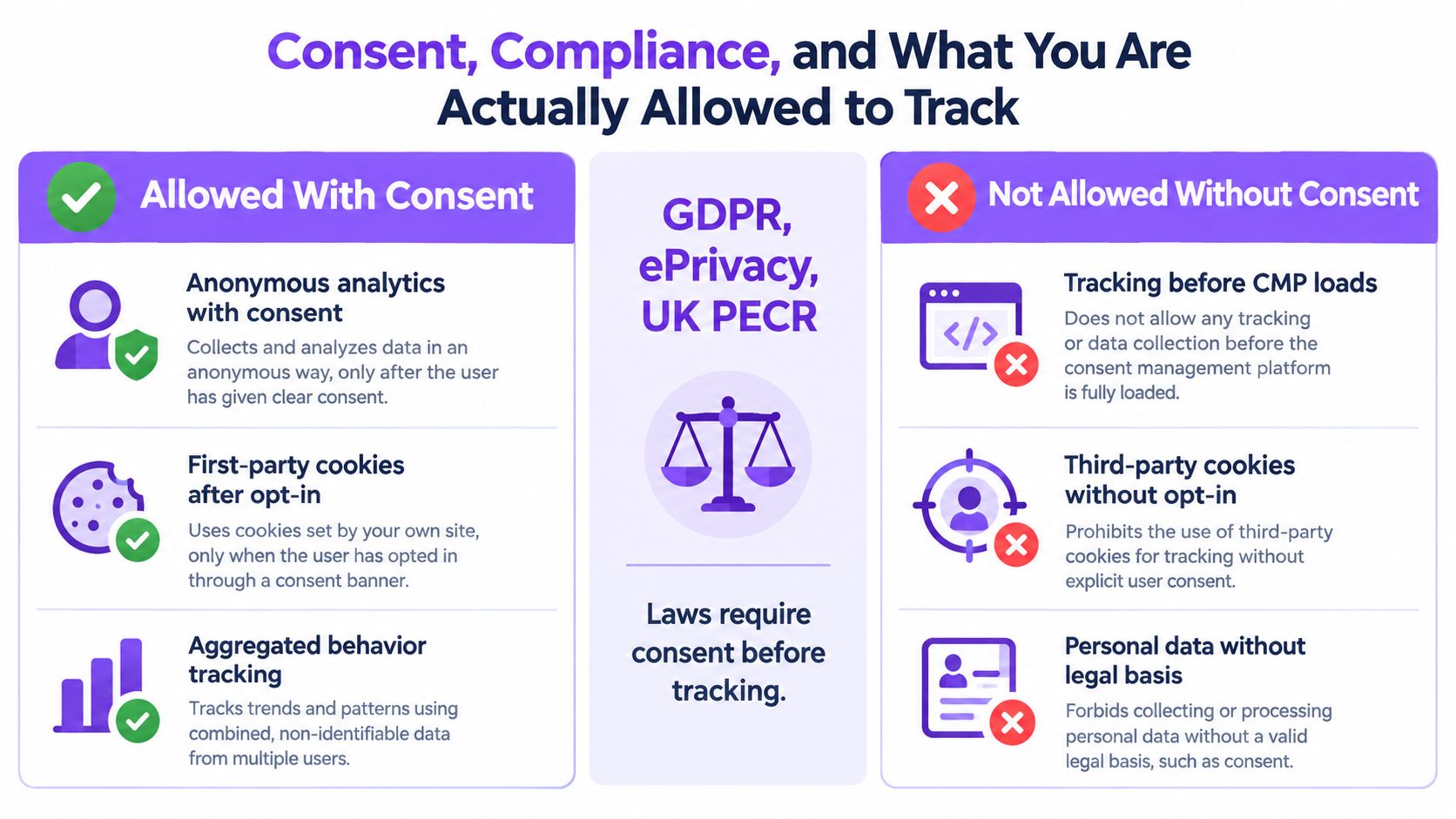
The hard question in 2026 isn’t how much data you can collect. It’s what data you can use. In the EU and UK, non-essential analytics, advertising, personalization, A/B testing, pixels, fingerprinting, and similar technologies generally require prior opt-in consent. Credible compliance guidance also expects consent to be freely given, specific, informed, unambiguous, with equal-weight Accept and Reject choices plus timestamped logs, according to this cookies, tracking, and consent checklist.
That should change how you think about visitor tracking.
Company-level intelligence is often easier to defend than person-level identification. Aggregate flows and operational session metadata can still be useful. But trying to match individual EU or UK visitors without valid consent is where teams create avoidable risk.
What to block by default
If you want a setup that survives scrutiny, block all non-essential tags until consent exists for that purpose. That includes many analytics tools, ad pixels, replay tools, personalization engines, and experimentation scripts.
Honor consent state everywhere it matters:
- At collection time in the browser
- At the server endpoint before enrichment or forwarding
- At each downstream destination so only allowed fields are sent
- Inside reporting so teams understand what the dataset includes and excludes
A lot of teams assume server-side tracking gets them out of this. It doesn’t. Moving collection to your own server doesn’t erase the consent requirement. It just changes the plumbing.
The real compliance trap
The trap isn’t obvious banners. It’s stacks of identity vendors that perform browser-level matching or reverse lookup in regulated regions while your team assumes the vendor “handles compliance.”
It doesn’t work that way. You still own the implementation choices, the legal basis, and the data routing rules.
If you care about pipeline and not drama, choose consent-aware, company-level intelligence over risky identity theater.
Detecting Real Buying Intent From On-Site Behavior
A pricing page visit isn’t intent by itself. Neither is a long session. Sales teams get burned when marketing sends every “engaged” visitor into a queue and calls it buyer intent.
Real intent shows up as a pattern.
What high-intent behavior actually looks like
You’re looking for combinations that suggest evaluation, not casual browsing. Repeated visits from the same company matter. So does movement across pages that answer buying questions, not just educational ones.
| Behavior Signal | Intent Weight | Why It Matters |
|---|---|---|
| Repeat visits from the same company | High | Repeat traffic often signals internal circulation or renewed evaluation |
| Pricing page plus product pages | High | Indicates commercial investigation, not just top-of-funnel reading |
| Integrations or API documentation views | High | Usually tied to implementation feasibility |
| Security, compliance, or procurement content | High | Often appears when buying gets serious |
| Competitor comparison pages | High | Signals shortlist evaluation |
| Single blog post session | Low | Useful for nurture, weak for sales action |
| Careers page visit | Low | Often unrelated to buying intent |
| Support or help-center browsing from a customer | Context-dependent | May indicate expansion, renewal, or service need instead of new business |
If you want a broader framing of the category, this explainer on what intent data is helps distinguish noisy signals from useful ones.
Score intent with context, not with one trigger
The model should combine account fit, page taxonomy, recency, and frequency. A mid-market company visiting pricing once is different from a target enterprise account returning to pricing, integrations, and security content in the same week.
Use weighting that reflects buying motion:
- Fit first: a strong signal from a bad-fit company is still a bad lead
- Depth second: deeper page paths deserve more weight than generic browsing
- Recency matters: fresh activity deserves faster action
- Repeat behavior compounds confidence: one visit can be noise, recurring evaluation usually isn’t
Don’t alert reps because someone existed on your website. Alert them because the account’s behavior suggests a buying process is underway.
Route it while the session is alive
Most programs break. Teams build a clever score, dump it into a report, and review it the next morning. That’s too late for live engagement.
High-intent signals should trigger actions in minutes:
- Slack alerts for named target accounts on key pages
- CRM tasks or queue entries when account fit and behavior both cross your threshold
- Chat or live routing rules that change the experience on pricing, product, or comparison pages
- Scheduling prompts when behavior suggests readiness for a conversation
One practical option here is Captiwate, which combines visitor identification, intent detection, and live engagement options like in-browser chat, video, and scheduling so teams can act on hot traffic instead of just logging it.
The rule is simple. If no human or workflow can act on the signal immediately, it isn’t an intent system. It’s a reporting system.
Syncing Visitor Signals Into CRM and Live Sales Workflows
A dashboard is not a workflow. If identified visits, intent scores, and page context never reach Salesforce, HubSpot, Pipedrive, or the tools reps already live in, your tracking project will turn into shelfware.
Build the flow end to end
The data path should be boring and dependable. Browser or server-side events are collected, company identity is resolved where possible, intent is scored, CRM records are matched or created, then routing logic decides who should act and how.
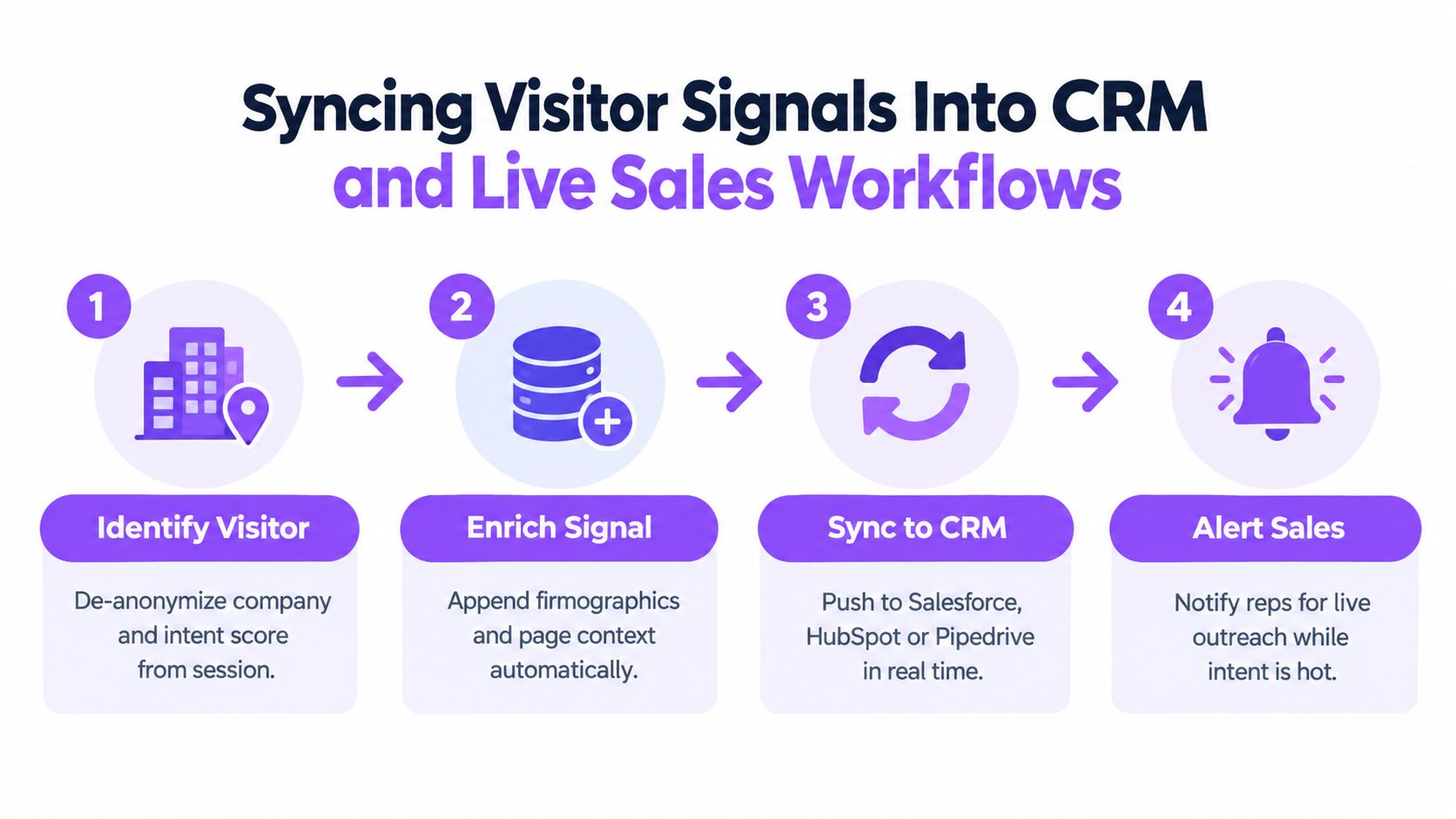
The useful CRM record isn’t just “visited website.” It should include enough context for a rep to know why it matters:
- Account name or likely company
- Pages viewed and visit sequence
- Intent score or tier
- Known owner if the account already exists
- Open opportunity or customer status
- Timestamp for immediate follow-up
If your team runs Salesforce, this overview of Salesforce visitor tracking integration shows the kind of object sync and workflow connection you should expect from this category of tooling.
Match the workflow to intent level
Not every signal deserves a rep interrupt. The mistake is sending everything to everyone.
Use tiered actions instead:
- High-intent accounts should trigger live outreach, chat routing, or immediate account owner alerts.
- Mid-intent accounts belong in a monitored queue or chatbot branch with more contextual prompts.
- Low-intent sessions should enrich account history and support retargeting, nurture, or content sequencing rather than direct sales action.
Routing logic creates advantage. A pricing-page visit from an open opportunity should go to the AE. A known customer visiting expansion content should go to customer success. A new target account should hit SDR coverage.
Watch the failure modes
Most CRM sync problems are operational, not technical.
Common issues include duplicate company creation, stale account ownership, bad matching between visitor data and CRM domains, and webhook delays that kill any chance of real-time engagement. If your team doesn’t define a single system of record for account ownership and status, routing gets messy fast.
The meeting matters, not the metadata. If your sync design doesn’t help a rep start a better conversation, simplify it.
The best setup gives reps context before they ever open a conversation window. They should know who’s likely visiting, what they read, and why the account is worth attention.
What to Measure Now and What to Stop Chasing
If you still judge visitor tracking by raw traffic charts, you’re measuring the easiest thing to collect, not the most useful thing to act on.
Keep revenue-linked metrics
The strongest scorecards are short and brutal. Measure whether the program identifies qualified company traffic, whether your team responds while intent is fresh, and whether those sessions influence pipeline creation or progression.
| Metric Category | Measure This in 2026 | Stop Chasing This |
|---|---|---|
| Traffic quality | Qualified company visits and ICP-fit sessions | Total session volume with no account context |
| Response operations | Speed-to-lead on identified accounts | Generic average response time across all inbound |
| Pipeline impact | Meetings and opportunities influenced by visitor signals | Dashboard engagement metrics with no sales outcome |
| Identity quality | Actionable account matches with useful context | Treating every reverse-IP match as a lead |
| Data health | Deduplicated events and CRM sync reliability | More tools stitched together without governance |
Retire metrics that flatter the dashboard
Some metrics are mostly noise in a modern B2B motion:
- Bounce rate obsession rarely tells sales what to do.
- Total session duration is easy to misread without page context.
- Unique users can create false confidence when identity quality is weak.
- Attribution windows often hide the messy reality of dark social, direct traffic, and internal account sharing.
Recent compliance and privacy guidance also points toward first-party, consent-aware setups over fragile third-party habits. A more useful model is to prioritize on-site behavioral intent, company-level identification, consent-aware analytics, and CRM-connected workflows instead of trying to force universal identity resolution, as discussed in this analysis of consent mode and privacy-safe tracking trade-offs.
Use a three-metric scorecard
I’d keep it simple:
- Qualified account visits
- Speed-to-action on high-intent accounts
- Meetings or pipeline influenced from previously anonymous traffic
Review those quarterly. If a vendor pitch can’t map to one of those, ignore it.
The teams that win with website visitor tracking in 2026 aren’t collecting the most data. They’re collecting the most usable data, under rules they can defend, and getting it in front of reps while the buyer is still paying attention.
Captiwate helps B2B teams turn anonymous website traffic into live sales conversations by combining visitor identification, intent detection, chat, in-browser video, scheduling, and CRM sync in one workflow. If you want a system that routes high-intent visitors to the right rep while interest is still live, visit Captiwate.