The most popular advice about choosing scheduling software is incomplete: connect your calendar, customize a booking page, and pick the cheapest plan. That can remove email exchanges without improving your sales process. A calendar full of poorly qualified meetings, inconvenient time slots, and conversations without next steps isn’t a revenue outcome.
The best meeting scheduling software should help your team book meetings that happen, serve a clear purpose, and end in a decision. Your comparison also needs to account for what happens when you add representatives, attract more website traffic, or introduce enterprise security requirements.
Table of Contents
- Quick Picks for Meeting Scheduling Software
- Five Features That Separate Scheduling Tools
- How Booking Speed Changes Whether Meetings Happen
- Enterprise Controls Worth Checking Early
- Pricing Models and What They Cost as You Grow
- Matching the Scheduler to Your Team’s Situation
- Choose Your Scheduler and Run a Two-Week Test
Quick Picks for Meeting Scheduling Software
Shortlist by team type, routing depth and pricing model
| Tool | Best for | Routing depth | Pricing model |
|---|---|---|---|
| Calendly | Reps and small teams booking external meetings | Moderate | Per seat |
| Cal.com | Engineering-led teams wanting custom routing | Advanced | Confirm hosted-plan and deployment terms |
| Microsoft Bookings | Organizations already using Microsoft 365 | Strong | Microsoft 365 license eligibility governs access |
| Salesforce Scheduler | Teams working inside Salesforce | Strong | Salesforce licensing and Scheduler entitlement govern cost |
| Captiwate | Inbound sales converting website visitors | Intent-triggered routing to reps in Slack or Teams | Traffic-based, by monthly visitors |
Treat these as fit-based picks, not a universal ranking. The routing labels are directional comparison categories, not proof that a particular subscription includes every assignment rule your team needs. Confirm the quoted plan’s capabilities before making a purchase.
Calendly belongs on the shortlist when representatives mainly need to share availability with external contacts. Its evaluation should focus on how easily a prospect books, how team ownership works, and which features require a higher subscription tier.
Cal.com is a candidate when engineers need more control over scheduling behavior. Customization is useful only if someone owns implementation, testing, and maintenance. Don’t choose flexibility without budgeting the operational work that comes with it.
Start with where meetings originate
Microsoft Bookings and Salesforce Scheduler deserve consideration when those suites already define how employees work. That doesn’t make either tool automatically suitable for every sales motion. Test whether the scheduler can respect account ownership and assignment rules without creating a parallel process.
Our platform addresses a different starting point: a visitor browsing your website. Scheduling sits alongside qualification, live conversations, and routing rather than functioning only as a booking link. That makes the comparison broader than booking-page design, but it also means you’re evaluating a sales engagement platform rather than a standalone calendar utility.
Buying rule: Choose the workflow first, then the scheduler. An excellent external booking link and an excellent website-to-sales handoff solve different problems.
Shortlist two tools whose best-fit column matches your team. For each, write down the exact handoff you’re trying to improve, such as pricing-page visitor to available account executive, or renewal contact to existing account owner.
Five Features That Separate Scheduling Tools
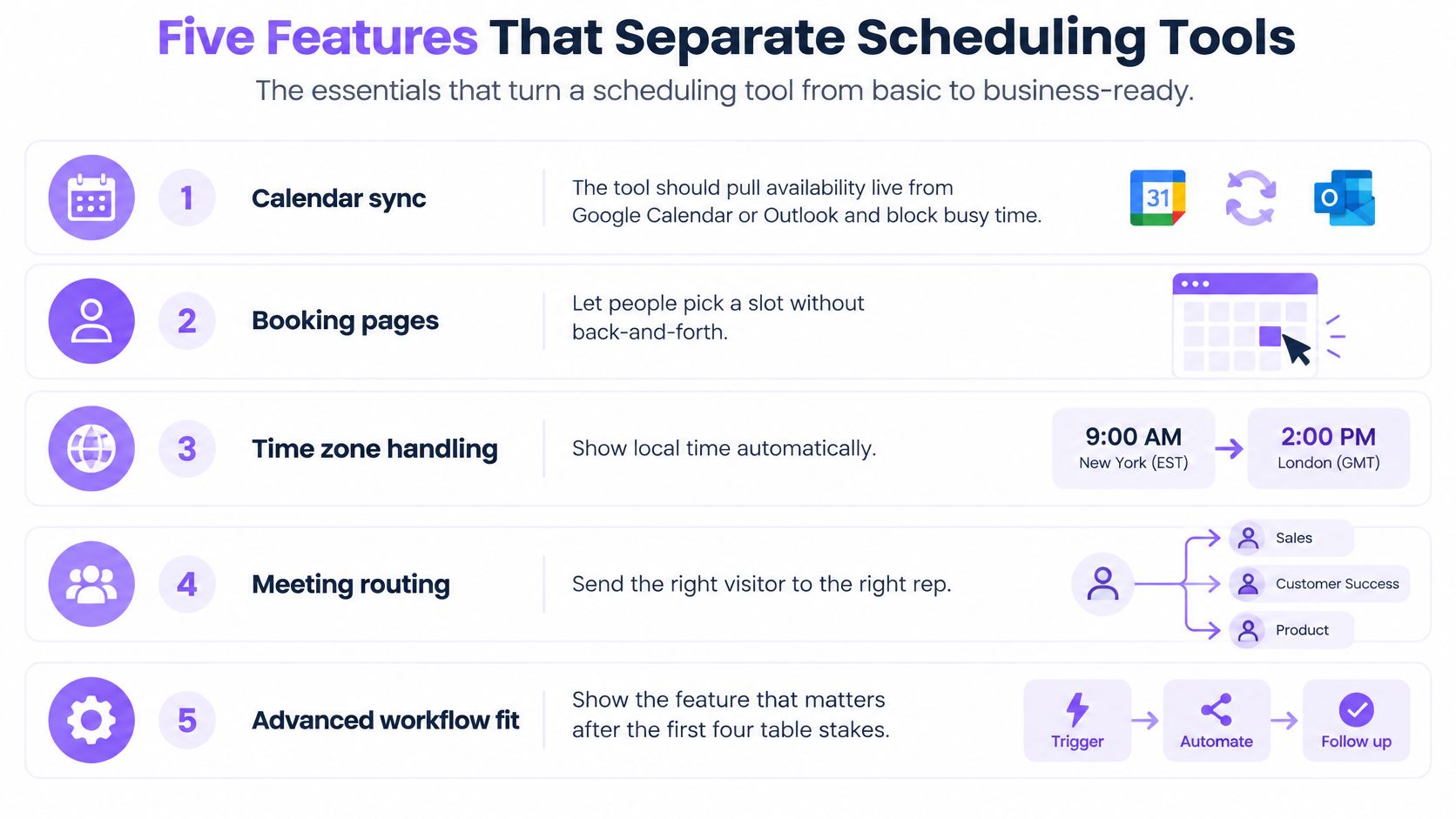
Treat the first four capabilities below as table stakes, not reasons to award a tool first place. Ask vendors to demonstrate them in your environment rather than accepting a checked integration box.
- Calendar sync: Pull availability from Google Calendar or Outlook, exclude connected busy periods, and verify that a newly created conflict removes the corresponding slot.
- One-click booking: Let the prospect confirm an available time without email negotiation, then check that the calendar invitation contains the correct participants and meeting link.
- Reminders and rescheduling: Give attendees a usable way to change plans, and make sure the old invitation and reminders don’t remain active.
- Integrations: Test CRM records and Slack, Teams, or chat handoffs so the booking doesn’t become another event someone must manually reconcile.
- Routing and meeting purpose: Match the request to an appropriate owner, establish why the meeting should happen, and record what should happen afterward.
Use this visual checklist to separate basic scheduling from workflow fit.
Calendar integration also needs an operational design. The guide to CRM integration with Outlook is useful when defining which records should move between systems. For distributed teams, use SyncThemCalendars to build a time zone scheduling workflow before configuring availability rules.
Meeting purpose is the differentiator
In a survey of 5,000 knowledge workers across four continents, meetings were considered ineffective 72% of the time, according to Atlassian’s workplace meetings analysis. That’s a warning against equating easier booking with better work, not a measurement of any scheduler’s performance.
The practical distinction is whether your workflow can reject, redirect, or improve a request. A straightforward product question might need an asynchronous answer. A buying committee discussion might need an agenda, the correct specialist, and a defined decision.
The best scheduler isn’t necessarily the one that fills the most calendar space. It’s the one that helps your team reserve time for work that requires a conversation.
Score each shortlisted tool against this outcome checklist:
- Agenda requirement: Can the workflow collect a purpose without burdening prospects with unnecessary questions?
- Decision capture: Can the owner record an agreed next step or a clear no-fit outcome?
- Follow-up trigger: Can that outcome create the appropriate CRM task or message?
- Outcome reporting: Can operations connect a held meeting to its result?
- Asynchronous alternative: Can simple requests receive an answer without becoming meetings?
Some capabilities may live in your CRM or automation layer rather than the scheduler. Score the complete workflow, including the maintenance burden.
How Booking Speed Changes Whether Meetings Happen
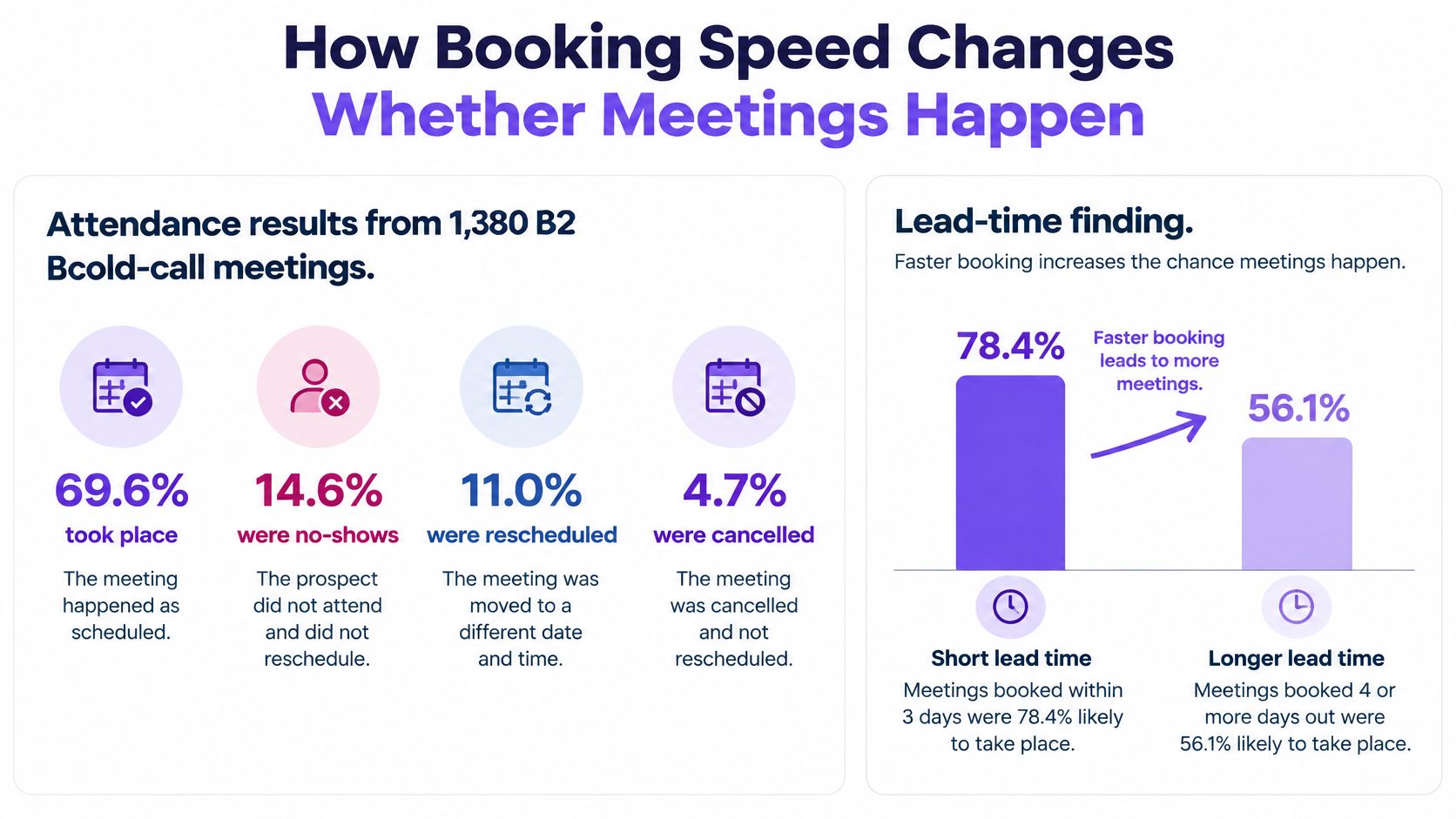
Meetings scheduled within two days occurred 85.4% of the time, compared with 58.5% for meetings scheduled more than 30 days ahead, in GrowthCab’s study of 1,380 B2B cold-call meetings.
Attendance by scheduling lead time
| Scheduling lead time | Meetings held | Context |
|---|---|---|
| Booked within two days | 85.4% | Shorter lead time, higher attendance |
| Booked more than 30 days ahead | 58.5% | Longer lead time, lower attendance |
| All booked meetings | 69.6% | 14.6% no-show, 11.0% rescheduled, 4.7% cancelled |
The figures above describe the cold-call meeting sample in that study. They aren’t an attendance forecast for inbound demos, renewals, or your own sales team.
The attendance breakdown makes the distinction between booked and held meetings visible.
Shorten the gap without assuming causation
The association supports testing near-term availability. It doesn’t establish that moving every meeting forward will produce the same attendance improvement. Prospect urgency, qualification, and willingness to commit could also influence when people book.
For tool selection, the useful question is concrete: can an interested buyer reach an appropriate representative soon? A booking page that opens immediately but shows only distant availability hasn’t solved that problem. Evaluate host coverage, assignment rules, and what happens when the preferred owner is unavailable.
After confirmation, test the invitation and reminder sequence. Our click-to-meet scheduling syncs with the calendar, and an invitation containing a Zoom link lands on both calendars. We report 60% fewer no-shows through one-click scheduling and instant reminders; treat that as a vendor-reported outcome to verify against your own baseline, not a guaranteed result.
A demo-booking workflow should make the next action obvious while preserving enough context for the representative to prepare.
Measure the meetings that survive
Use a dashboard that distinguishes the original booking from later status changes:
- Booking-to-held conversion: Track whether each booked meeting eventually takes place.
- Time-to-meeting: Measure the interval between confirmation and the scheduled conversation.
- No-show rate: Keep absence separate from advance cancellation.
- Reschedule rate: Preserve the relationship between the original booking and its replacement.
- Attendance by lead source: Separate website demand, outbound prospecting, and existing customers.
Keep rescheduled meetings from appearing as fresh pipeline just because a new calendar event was created. For high-intent visitors, favor immediate or near-term options; for slower-moving leads, validate attendance before treating booking volume as evidence of pipeline creation.
Enterprise Controls Worth Checking Early
A functioning booking link isn’t proof that a scheduler is ready for enterprise use. The harder questions concern who can access information, who can change assignment rules, and whether operations can reconstruct what happened.
The enterprise scheduling comparison published by Cal.com emphasizes SSO/SAML, permissions, auditability, and administrative controls; it rates Cal.com’s routing and automation as advanced, Microsoft Bookings and Salesforce Scheduler as strong, and Calendly as more moderate. Because a scheduling vendor publishes the comparison, use it as a starting point for demonstrations, not an independent certification of product quality.
Turn controls into acceptance tests
- SSO/SAML. Sign in through your company identity provider. Then remove a test employee’s access and confirm the scheduler follows your offboarding process.
- Role-based access. Test as a representative, manager, and administrator. Verify that CRM ownership and calendar permissions don’t become broader when someone can view a booking.
- Audit logs. Change an assignment rule, reassign a meeting, and cancel a booking. Check whether an export identifies the actor, action, and affected record.
- Administrative policies. Attempt to bypass team working hours or assignment rules from an individual account. Confirm which settings administrators can enforce centrally.
- Data residency and contract support. Establish where scheduling information is stored, which processors handle it, whether a data processing agreement is available, and what the contract promises when service fails.
Don’t put sensitive customer information in public event titles merely because the calendar integration allows it. Decide which fields belong in invitations and which should remain behind CRM permissions.
Check the plan, not just the security page
ISO 27001 and HIPAA may become relevant when scheduling touches regulated information or enterprise governance requirements. A named standard doesn’t establish that your particular configuration, contract, or handling of sensitive information is appropriate.
Our stated security posture includes SOC 2 Type II, ISO 27001, and GDPR and CCPA compliance. Use the information security and compliance overview to structure your review, then validate the applicable documentation and scope.
Our Unlimited plan adds SSO/SAML, custom data residency, custom SLA and uptime guarantees, a dedicated account manager, custom integrations, security questionnaire and DPA support, and enhanced training and enablement. Don’t assume those enterprise options are included in a different plan.
Procurement question: Which of these controls is included in the plan I’m being quoted, and which requires a contractual or subscription change?
Pricing Models and What They Cost as You Grow
The pricing model decides which growth event becomes expensive: hiring, demand spikes, traffic, or a suite renewal. Judge it against whether meetings happen, matter, and end in a decision. A scheduler that books cheap meetings while coverage, routing, or CRM follow-through decays can cost more in lost pipeline than a higher subscription.
How each pricing model grows with the business
| Pricing model | What drives the bill | How cost grows | Watch for |
|---|---|---|---|
| Per seat | Licensed users | Rises with each rep added | Occasional users can still require paid access |
| Meeting or usage tiers | Booked meetings or conversations | Rises with volume | A busy quarter can move you to a higher tier |
| Traffic-based | Monthly website visitors | Steps up only when the visitor band changes | Heavy traffic can outweigh a small team’s seat savings |
| Bundled suite license | Existing Microsoft or Salesforce contract | Follows license and entitlement terms | Existing suite access doesn’t establish Scheduler eligibility |
Compare the variable you’re buying, not just the headline subscription price. Seat pricing ties spending to access. Usage pricing ties spending to activity. Traffic pricing ties spending to the size of the website audience.
For a hypothetical growing sales team, per-seat spending increases when additional representatives need licenses, even if meeting volume stays flat. Include coordinators, managers, and occasional hosts in the licensing review rather than counting only quota-carrying representatives. Time-zone coverage makes this sharper: follow-the-sun scheduling only works if the people covering each region can hold licenses.
Our pricing model
Captiwate uses monthly website visitor volume rather than seats or conversations. Exact plan prices and visitor thresholds are set through a quote, and enterprise options are scoped in that same plan and contract conversation.
Every plan includes unlimited seats and unlimited conversations across chat, video, and AI, with no metering. Adding representatives, running more conversations, or identifying more companies does not raise the bill by itself.
That creates a specific trade-off. A small team with substantial traffic could pay more than it would for a standalone per-seat scheduler. A larger team with modest traffic could find the model more favorable, particularly if it needs live engagement, AI coverage, CRM sync, routing, and scheduling in one platform. Neither conclusion follows from headcount alone.
Compare equivalent scope
A full sales engagement platform and a booking-only subscription solve different scopes. List which existing tools you would replace and which contracts would remain before counting savings. For Microsoft Bookings or Salesforce Scheduler, review the existing agreement and the scheduling entitlement separately. An established procurement relationship may simplify approval, but it does not settle incremental cost.
Build your purchasing model around next-stage headcount and traffic, including seasonal campaigns. Confirm how visitors are counted, whether repeat visits and AI conversations sit inside the same definition, and how band transitions are handled in the contract. The better model is the one whose billing variable rises when useful meetings rise, and stays predictable when headcount or coverage expands.
Matching the Scheduler to Your Team’s Situation
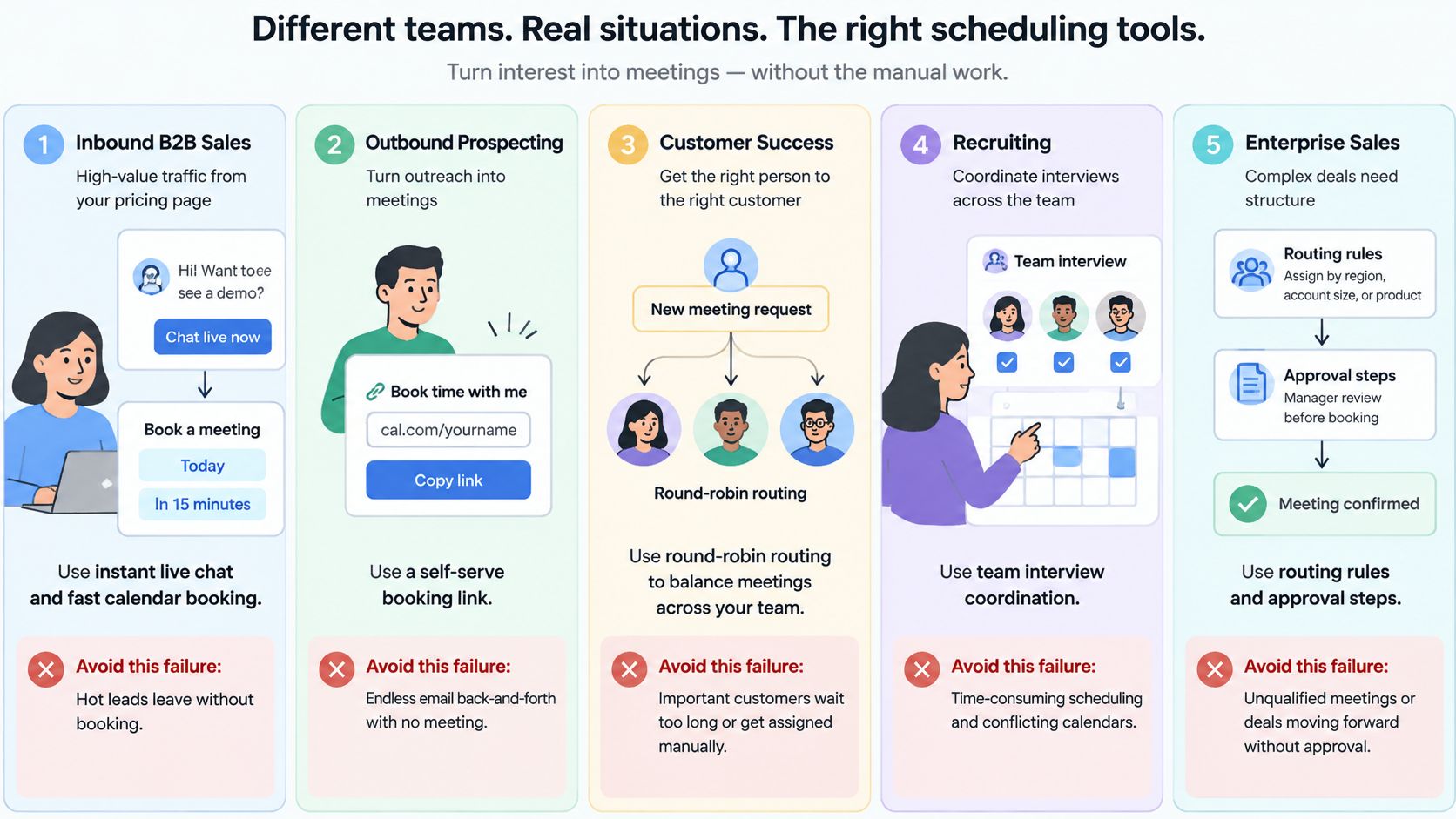
A useful shortlist starts with a recognizable failure, not a feature inventory. Match your team to the situation where scheduling currently breaks.
These scenarios show how different starting points change the buying decision.
An inbound sales team handling pricing-page traffic
Say a prospect returns to your pricing page after reviewing the product. The failure to avoid is making that person submit a generic form while an appropriate representative is available.
Choose a workflow that can offer a live conversation, qualify the request, or arrange a suitable demo. Our automation flows can trigger on pricing visits, ideal customer profile matches, or repeat visits, then route the visitor to the right representative in Slack, Teams, or the widget without code.
The important test is the fallback. When nobody can take the conversation, the visitor should receive a clear alternative rather than an unanswered invitation. Our AI chat provides off-hours qualification and can hand qualified prospects to representatives or book a demo.
A distributed team sharing global coverage
A representative’s open calendar isn’t the same as a fair meeting time. Survey findings summarized by Tools8020’s meeting statistics report that 28.4% of workers had to miss or move a meeting scheduled outside their working hours, while 82.5% experienced conflicts caused by overlapping meetings.
Prioritize local-hour protections, regional holidays, daylight-saving behavior, and transparent reassignment. Test whether round-robin distribution allocates opportunities fairly without repeatedly giving the least convenient hours to the same representatives.
Accessibility belongs in this test. Use the booking page with a keyboard and screen reader. Check whether accommodation requests can reach a named coordinator and remain attached when someone reassigns the meeting.
An account team preparing renewals
An existing customer shouldn’t reach an unfamiliar representative who lacks account context. Choose the workflow that preserves account ownership and puts the meeting’s purpose into the customer record.
Our native HubSpot and Salesforce sync carries conversations, identified companies, intent signals, and bookings into the CRM. Test the matching behavior with an existing account and contact, not only a newly created lead.
For a concrete look at the website engagement context, use this demonstration alongside your workflow review.
A small agency arranging client calls
A small agency may need little more than external booking, reliable calendar handling, and a professional invitation. Start by evaluating a per-seat tool such as Calendly rather than assuming an engagement platform is necessary.
The failure to avoid is buying configuration work your team doesn’t need. Compare the actual quote and required features before declaring a model cheaper.
An enterprise already working inside a suite
An organization centered on Microsoft 365 or Salesforce should evaluate its ecosystem’s scheduler early. Existing identity, administration, and procurement processes can make that route attractive.
Still, demonstrate the actual handoff. A suite-aligned scheduler that can’t express your ownership rules may require more operational work than a separate tool. Place your team in the closest scenario and choose candidates around that failure mode.
Choose Your Scheduler and Run a Two-Week Test
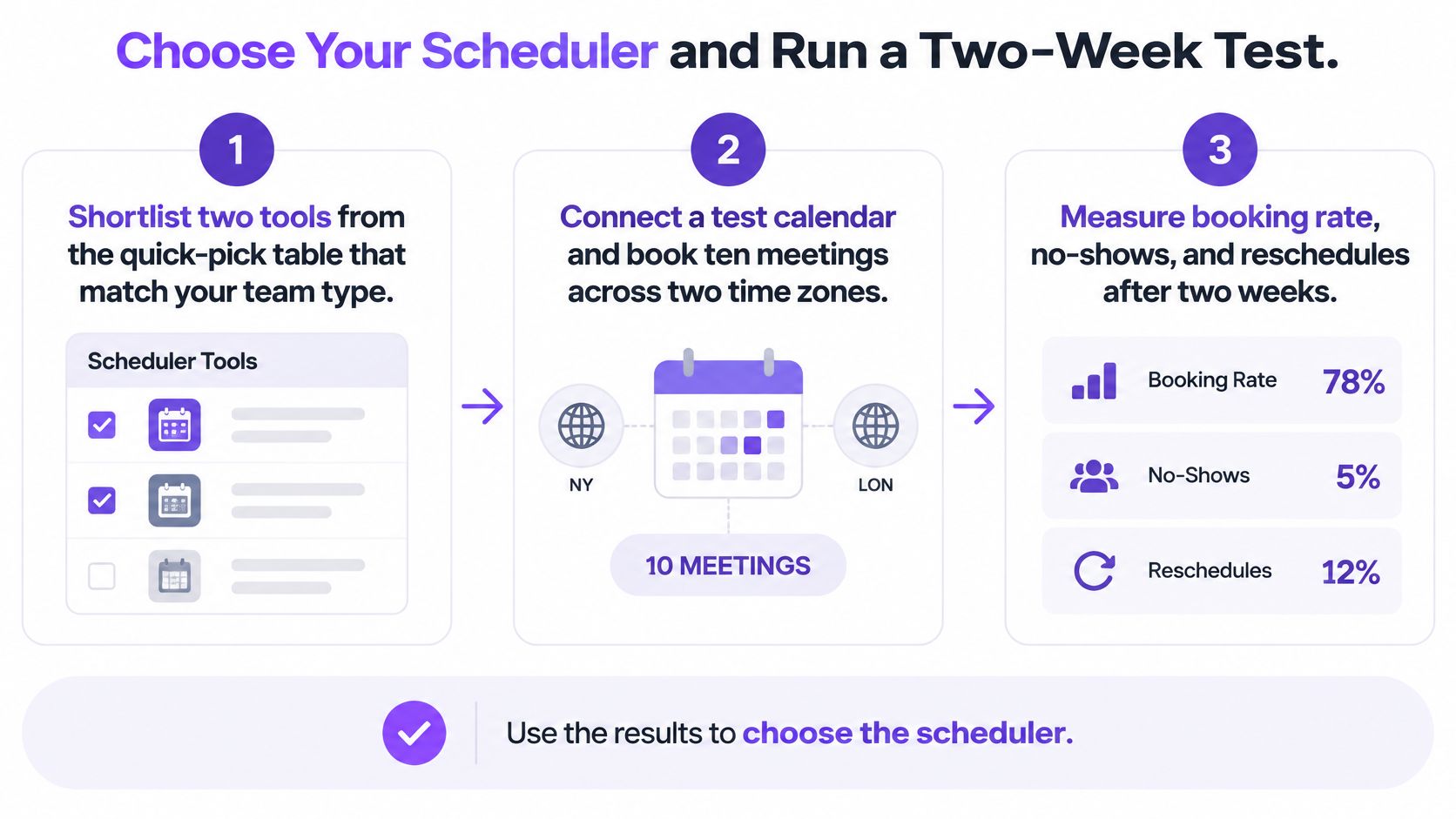
Choose a primary candidate and a challenger, then attach a written acceptance plan. A short trial can expose workflow failures, though a small sample won’t establish a dependable long-term attendance improvement.
Use this process to keep the evaluation tied to observable behavior.
Test reliability before polish
Use a deliberately small test set, for example, ten bookings across two time zones. Include cancellation, rescheduling, concurrent booking attempts, a newly blocked calendar slot, and an unavailable host.
Measure p95 slot-generation latency, calendar-sync freshness, duplicate-booking rate, and webhook delivery delay. Ask the technical evaluator to test recovery when calendar APIs throttle requests and confirm that retrying a booking request doesn’t create another meeting.
The open-source scheduling SDK README publishes availability-processing targets of under 1 ms for 100 busy intervals, under 10 ms for 1,000, and under 100 ms for 10,000. Those are component-level engineering benchmarks, not equivalent end-to-end response promises for hosted products.
Make the decision operational
Keep an evaluation sheet covering:
- Workflow results: Record held meetings, absences, reassignment failures, and missing next steps.
- Governance: Mark each required control as demonstrated, contractually confirmed, or unresolved.
- Economics: Compare the quoted configuration at your expected operating scale.
If your pipeline begins with website traffic, our setup requires a JavaScript snippet plus calendar and CRM connections. Day-to-day triggers, segments, and routing are configured in the app without a developer. A demo built around your website can help establish which traffic plan fits.
For internal coordination or a small external-booking team, a narrower scheduler may be the better purchase. This week, select the tool to trial, name the evaluation owner, and attach the acceptance sheet before connecting production calendars.
Captiwate combines website intent detection, live conversations, AI qualification, and click-to-meet scheduling so your team can evaluate the whole path from visitor interest to a sales meeting. Visit Captiwate to book a demo built around your website and assess the workflow and traffic plan against your trial criteria.