
CRM integration connects a customer relationship management system with other business tools so customer data moves between them instead of sitting in isolated databases. When those connections work, every team sees the same account history without copying fields by hand or chasing updates across five browser tabs.
You’ve probably lived through what happens when those tools don’t talk. A sales rep joins a renewal call with a smiling pitch, completely unaware that the customer logged an urgent support ticket two hours earlier. Meanwhile, marketing celebrates a spike in pricing-page visits while sales has no idea which target accounts showed up, and finance exports invoice spreadsheets every Friday because the billing platform won’t speak to the pipeline tracker.
That disconnect is why managers keep asking what is CRM integration and why it feels so much harder than plugging in a power cord. Buying a CRM gives you a place to store customer records. Connecting it properly decides who owns each piece of data, how systems recognise the same buyer twice, and whether your team trusts what appears on screen.
Table of Contents
- What CRM Integration Means in Plain Terms
- How Connected Systems Exchange Data
- Why Organisations Connect Their CRM
- Real-World CRM Integration Examples
- Identity Matching and the Pitfalls That Break Sync
- Who Owns the Data After Integration
- How to Plan a CRM Integration Step by Step
- Pick Your First Integration to Build
What CRM Integration Means in Plain Terms
CRM integration is the practice of linking your customer relationship management platform to the other applications that touch buyers and revenue, so records flow automatically across departments. Rather than treating the CRM as a standalone digital Rolodex, you turn it into a single source of truth that reflects one consistent view of accounts, contacts, interactions, opportunities, and service history.
Without that link, a CRM behaves like a filing cabinet with no shared index. Marketing keeps a folder of campaign clicks in one room, sales maintains call notes in another, and support files open issues down the hall. Every folder looks tidy on its own, yet nobody holds the full customer story when a buyer asks a simple question.
Which Business Tools Usually Connect
Most companies link their CRM to a predictable cluster of daily systems. Marketing automation platforms feed campaign activity and lead scores, while customer service desks share open tickets and resolution notes. Calendars and collaboration tools such as Outlook, Google Calendar, Slack, and Microsoft Teams keep meetings and alerts tied to active deals, and analytics or enterprise resource planning (ERP) software connects pipeline forecasts to real orders and invoices.
For finance leaders weighing how order and ledger data should connect back to sales, Loopfour’s 2026 integration checklist for controllers walks through the core accounting handoffs to verify before syncing ERP and CRM tables.
In its overview of CRM integration, IBM notes that breaking down silos between CRM software and systems like ERP, project management, and order-management platforms improves data accuracy, visibility, planning, and forecasting. The same IBM guide cites a 2024 industry summary reporting that 73% of businesses used CRM software, with adoption reaching 94% among technology companies and 71% among small businesses. Once customer data lives digitally across that many companies, connecting the surrounding stack stops being a technical luxury.
One Everyday Flow from First Click to Report
Trace what a working connection looks like on an ordinary Tuesday. A prospect fills in a demo request on your website. Instead of sitting in a shared inbox, the form submission triggers an automated workflow that creates or updates the contact in your CRM, alerts the assigned sales rep, offers a calendar slot to book the meeting, and stores the full interaction history for downstream reporting.
Owning a CRM only buys you storage. Integration is what turns those stored records into a working customer history that teams can act on.
How Connected Systems Exchange Data
Picture one simple record trying to cross the hallway: a buyer books a thirty-minute discovery call in your rep’s calendar, and that meeting needs to appear on the matching contact and deal inside your CRM. Even a small handoff like that depends on four moving parts working in sequence.
First, you have a source system (the calendar where the event starts) and a destination system (the CRM that needs to record it). Second, a trigger fires when the booking is created or rescheduled. Third, field mappings translate each attribute so the calendar’s “attendee email,” “start time,” and “meeting title” land in the exact CRM fields built to hold them. Fourth, a write-back step confirms the record saved cleanly or logs an error if it failed.
Below is how that exchange travels from trigger to verified sync across connected systems.
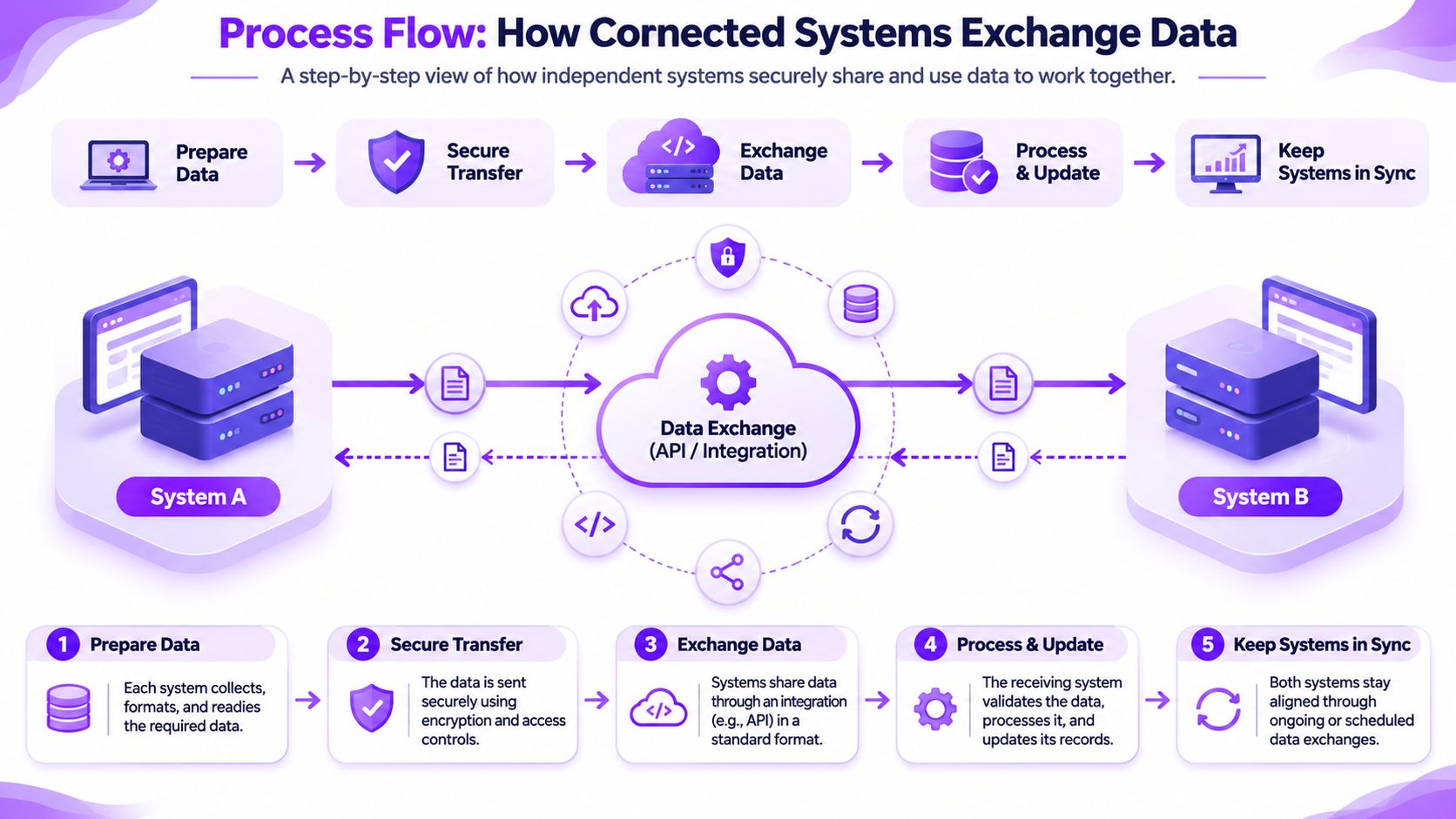
Five Ways Data Moves Between Tools
Teams move records using five main patterns, and picking the wrong one creates either sluggish data or fragile engineering. If you run HubSpot alongside other revenue apps, reviewing how a HubSpot CRM integration structures native connectors and event triggers makes these trade-offs concrete before you build.
| Method | How data moves | Best for | Main trade-off |
|---|---|---|---|
| Native connector | Prebuilt link between two named products, set up in settings | Common pairs such as CRM and calendar or email | Limited to fields and products the vendor supports |
| API calls | Your system reads or writes records through the CRM’s REST or SOAP interface | Custom logic and specific field rules | Needs developer time and ongoing maintenance |
| Middleware or integration platform | A separate tool routes, transforms and logs data between many systems | Connecting three or more systems without point-to-point code | Extra licence cost and another layer to monitor |
| Scheduled batch sync | Records are copied every hour, day or other fixed interval | Large historical loads and nightly reconciliation | Data can be stale between runs |
| Event-driven sync (webhooks) | A change in one system triggers an immediate message to the other | Time-sensitive actions such as alerting a rep on a pricing-page visit | Duplicate or out-of-order events must be handled |
The Design Layer That Prevents Sync Loops
Connecting pipes in both directions sounds helpful until two tools start arguing over the same field. Say a rep updates a phone number in Salesforce while an older spreadsheet syncs from a marketing tool two minutes later. Without a clear rule, both platforms bounce updates back and forth in an endless loop or erase fresh edits.
That’s why resilient integrations define a canonical data model (a shared dictionary of what an “account,” “contact,” and “order” mean), explicit authentication, conflict resolution, and a named system of record for every field. As a CGI white paper on SAP and Salesforce integration explains, APIs help harmonise data models and support bi-directional sync while cutting manual-entry errors, and production setups work best when they pair real-time streaming for high-value changes with scheduled batch jobs for reconciliation and historical loads.
In practice, that hybrid approach saves headaches. Webhooks push urgent events like inbound leads and booked meetings within seconds, while a nightly batch job catches any missed payloads and reconciles totals while nobody is working live deals.
Why Organisations Connect Their CRM
CRM software has moved well past early-adopter status. According to Eurostat data on e-business integration, 28.51% of enterprises in the European Union used CRM software in 2025, up 2.68 percentage points from 2023. Adoption rises sharply with company size, too: a separate Eurostat release on enterprise CRM usage shows 2025 usage ranging from 25% for small enterprises to 65% for large enterprises, a 41-percentage-point gap.
Those platforms aren’t locked inside sales teams anymore, either. Industry figures compiled by WPForms on CRM usage put cloud-based CRM adoption at 87% in 2020 (up from 15% in 2010), with sales teams as the primary users at roughly 80%, alongside 46% of marketing teams and 45% of customer-service teams. When three separate departments rely on the same buyer relationships, leaving tools disconnected guarantees conflicting versions of the truth.
What Teams Actually Gain When Systems Stay in Sync
When records move cleanly across the stack, day-to-day operations change in six tangible ways:
- One shared customer view across teams: A sales rep opens an account record before a renewal call and immediately spots two unresolved support tickets logged that week.
- Fewer duplicate entries and less manual copying: An account executive closes a deal in the CRM and finance receives the billing address and line items automatically, instead of retyping a PDF quote.
- Faster speed-to-lead on live intent: The moment a target prospect requests a demo or returns to a key product page, the assigned rep gets an instant alert with context rather than waiting for a daily CSV export.
- Cleaner forecasting and pipeline reporting: Every call, email, and meeting logs itself against the active opportunity, so leadership reviews real buyer momentum instead of guesswork entered on Friday afternoon.
- Shorter handoffs between marketing, sales, and customer success: Onboarding managers inherit the exact goals, stakeholders, and promises recorded during the sales cycle without making the buyer repeat themselves.
- A clear audit trail of every change: Revenue operations can trace which system or user edited a contract value, lead owner, or opt-out flag and exactly when it happened.
Reality check: Every one of those benefits assumes the incoming data is accurate. Connect messy databases without rules, and you just move bad information faster.
Real-World CRM Integration Examples
Abstract diagrams only go so far until you watch records move through a real workday. Below are six everyday integration flows side by side, followed by two scenarios that show how field ownership and triggers play out on the ground.
| Trigger | Systems connected | Data that moves | Result |
|---|---|---|---|
| Website form submitted | Website form, CRM, sales alert tool | Contact name, company, inquiry source | Contact created and rep notified within minutes |
| Visitor reaches pricing page | Website intent tool, CRM | Company identity, pages viewed, visit time | Rep prioritises the account for outreach |
| Meeting booked in calendar | Calendar, CRM | Meeting time, attendees, owner | Activity logged against the right opportunity |
| Support ticket closed | Service desk, CRM | Ticket status, issue category | Account health score updated before renewal |
| Order placed in ERP | ERP, CRM | Order value, product lines, delivery date | Deal marked won and revenue reported |
| Dealer service visit recorded | Dealer management system, CRM | Vehicle, service history, customer contact | Sales team sees service history before a trade-in offer |
Scenario One A Dealership Syncs Service Visits Without Overwriting Them
Take a multi-location car dealership running a dealer management system (DMS) alongside its CRM. When a customer brings a four-year-old SUV into the service bay for brake repairs, the workshop logs the vehicle identification number, repair details, and service date inside the DMS. An automated one-way feed pushes that service record into the CRM contact profile.
Two weeks later, that same driver requests a trade-in valuation. The salesperson opens the CRM and sees the exact model, mileage, recent brake work, and last workshop visit before picking up the phone. The CRM displays the service record as read-only and never rewrites it, because the DMS remains the authoritative home for workshop and accounting history.
Scenario Two High-Intent Pricing Traffic Turns Into a Tracked Opportunity
Now consider a B2B software team selling to mid-market buyers. A director from a known target account lands on the pricing page at 10:15 a.m. and compares the enterprise tier against the standard plan. The website intent platform matches the visit to the existing CRM account, then fires a real-time alert to the account owner listing the exact pages viewed and timestamp.
The rep reaches out while the comparison is still fresh, and the buyer books a product walkthrough for Thursday. Because the team set up a CRM integration with Outlook, the calendar invitation automatically logs the meeting time, attendee list, and deal owner straight onto the active opportunity timeline. Nothing gets lost in an inbox, and attribution stays intact from first visit to scheduled demo.
Look across all six rows in the table and both scenarios, and the same three-part pattern repeats every time: a concrete trigger fires in one system, a mapped set of fields travels under a named owner, and a human receives visible context at the exact moment they need to act.
Identity Matching and the Pitfalls That Break Sync
Here’s the mistake that breaks more CRM integrations than bad code: matching records across two systems using a company name or a person’s full name. Names look obvious to humans, so non-technical teams assume software can line them up just as easily.
In reality, name matching falls apart within days. “Acme Corp,” “Acme Corporation,” and “Acme UK Ltd” look like three separate accounts to a naive connector. Companies rebrand and change domains, buyers fill in web forms using a personal Gmail address instead of their work email, and regional subsidiaries share the same logo while holding separate contracts. Auto-merging on loose text either spawns duplicate accounts that split your pipeline or merges two unrelated customers into one scrambled timeline.
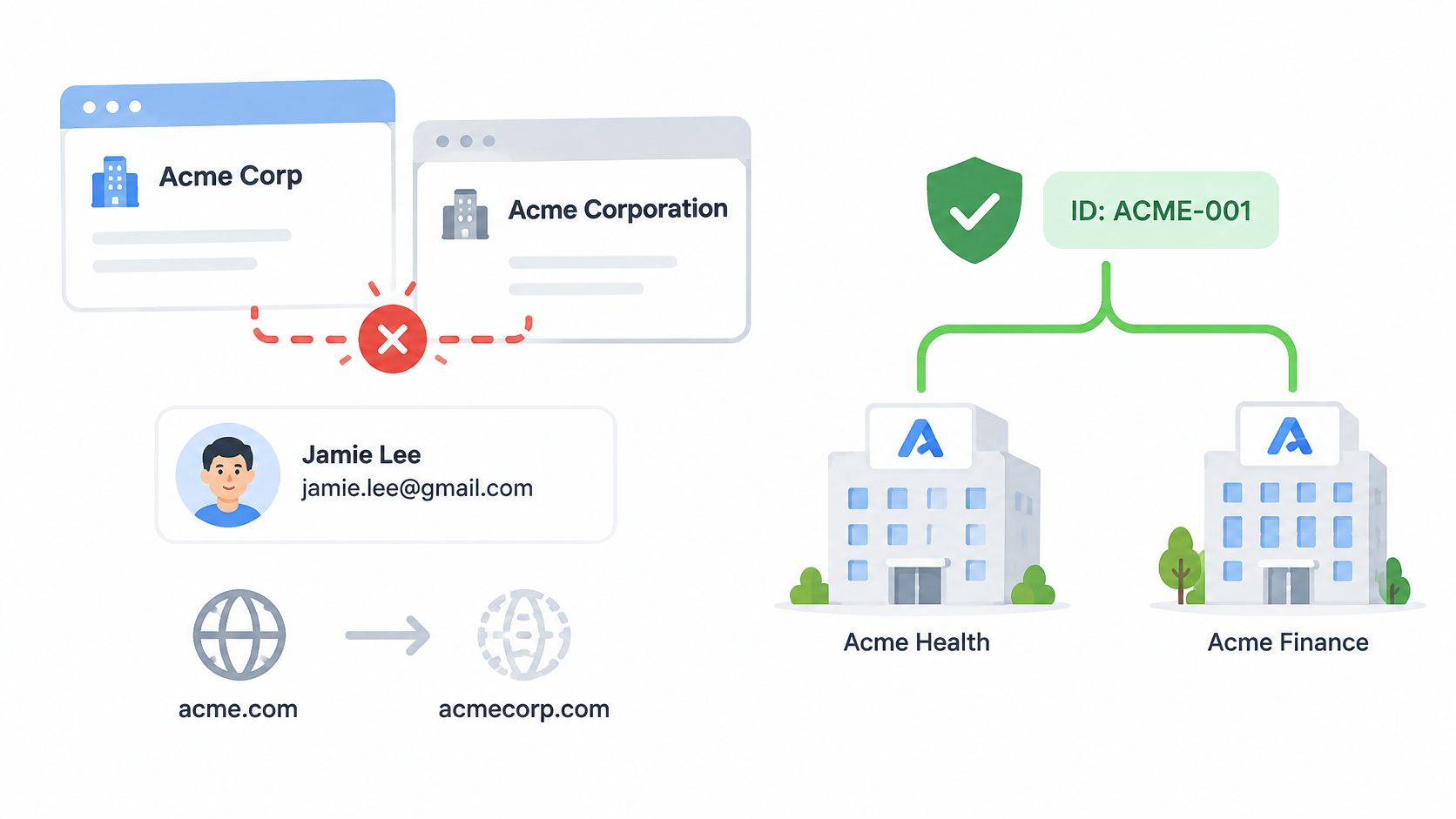
The Safe Order of Matching Identifiers
Reliable pipelines resolve identity in a strict priority order before creating or updating anything:
- CRM record ID first: If the external tool already holds the unique CRM ID (such as a Salesforce 18-character ID or HubSpot object ID), use it above everything else.
- Verified business email or company domain: For contacts, a verified work email is the strongest natural key; for accounts, the root corporate domain beats the display name.
- External account ID: Billing IDs, ERP customer numbers, or product tenant IDs bridge operational tools when domains shift.
- Deterministic multi-field rules: Combine normalised company name with country and postcode when no shared ID exists yet.
- Thresholded fuzzy matching as a fallback: Only use similarity scoring when earlier keys fail, and tune the cutoff carefully for each object type.
That calibration isn’t academic nitpicking. An evaluated ETL identity-resolution study on arXiv tested deterministic and blocked fuzzy matching and reported hybrid pairwise F1 scores of 0.918 for accounts and 0.885 for contacts; adding object-specific threshold calibration raised those scores to 0.938 for accounts and 0.963 for contacts. Treating accounts and contacts with separate matching thresholds prevents the subtle cross-contamination that ruins lead routing and attribution.
Failure Modes You Will Actually Meet in Production
Even with clean keys, connected tools hit mechanical snags. In a 2024 Freshworks survey of 600 U.S. business owners and professionals, 19% identified integration with other tools and systems as a major CRM challenge, right behind the 25% who cited user training and adoption.
Watch out for five recurring breakages:
- Duplicate events: A webhook retries after a brief timeout and writes the same form submission twice unless you enforce an idempotency key (a unique event ID that tells the CRM to ignore repeats).
- Out-of-order delivery: Network delays deliver an older status update after a newer one, rolling a deal stage backward unless timestamps are checked before writing.
- API rate limits: High-volume syncs hit your CRM’s daily call ceiling and start dropping updates midday without warning.
- Partial writes: A contact saves cleanly, yet the linked meeting or custom object fails, leaving orphaned records with missing context.
- Silent sync deaths: An expired authentication token pauses a connector for three weeks because nobody configured failure alerts or dead-letter queues.
Always store provenance, confidence scores, merge history, and survivorship rules. If a borderline match falls below your confidence cutoff, send it to a human review queue instead of letting an automated rule merge two accounts blindly.
Who Owns the Data After Integration
Most technical setup guides stop the moment records start flowing. Yet the hardest question shows up the morning after launch: once four platforms connect to your CRM, who decides which system is authoritative, which fields can be overwritten, how duplicates get resolved, and who approves schema changes?
Teams often confuse system ownership with data stewardship. IT or marketing operations might administer the marketing automation platform, while sales leadership manages the CRM licence. That tells you who resets passwords, not which tool wins when two systems disagree about a buyer’s phone number, lifecycle stage, or email consent.
Without explicit field-level ownership, an integration synchronises wrong values just as efficiently as right ones. Conflicting timestamps bounce lead ownership between reps, a refreshed list import wipes out a buyer’s opt-out request, and newly created custom fields clutter layouts until sales reps abandon the CRM altogether.
Settling Authority Object by Object
Before anyone opens a field-mapping screen, sit sales, marketing, finance, service, and privacy leads in the same room and lock down a single table like this one.
| Object | System of record | Who may overwrite | Conflict rule |
|---|---|---|---|
| Accounts and contacts | CRM | CRM administrator, through an approved schema change | Verified identifier wins; duplicates are merged, not overwritten |
| Lead source and first touch | Website form or intent platform | Marketing operations | Write-once field; later touches are appended |
| Opportunity stage and value | CRM, owned by the sales manager | Deal owner with approval | CRM value overrides imported pipeline figures |
| Campaign activity and email engagement | Marketing automation | Marketing operations | Appended as activity records; CRM contact fields stay untouched |
| Consent and opt-out status | Consent management platform or CRM privacy field | Privacy lead only | Most restrictive status wins; no automated override |
| Support and service history | Service desk or dealer management system | Service manager | Append-only; the CRM displays it and does not rewrite it |
| Orders and invoices | ERP | Finance | Read-only inside the CRM |
Look closely at the consent and opt-out row. A broken opt-out sync isn’t a minor reporting annoyance; it’s a compliance violation. Setting a hard rule that the most restrictive status always wins, and blocking automated tools from flipping an opt-out back to subscribed, protects both buyers and your legal team.
Governance Artefacts That Keep Syncs Clean
A verbal agreement fades the first time a new manager joins the company. Keep seven lightweight artefacts live in a shared ops folder: a field-level ownership sheet, documented deduplication keys, written conflict rules, automated audit logs, a weekly human review queue for flagged merges, clear data-retention limits, and a formal retirement process for sunsetting unused fields.
Notice how this protects high-velocity inbound workflows too. Visitor identity, buying intent, live chats, booked meetings, and call outcomes should enter the CRM as structured, attributed activity without overwriting core account ownership or forecast fields that reps manage manually.
Governance beats volume: Real-time sync isn’t automatically better. A tightly governed feed that logs five trustworthy buying signals beats a firehose that dumps fifty noisy events onto every contact record and buries the context sales actually needs.
How to Plan a CRM Integration Step by Step
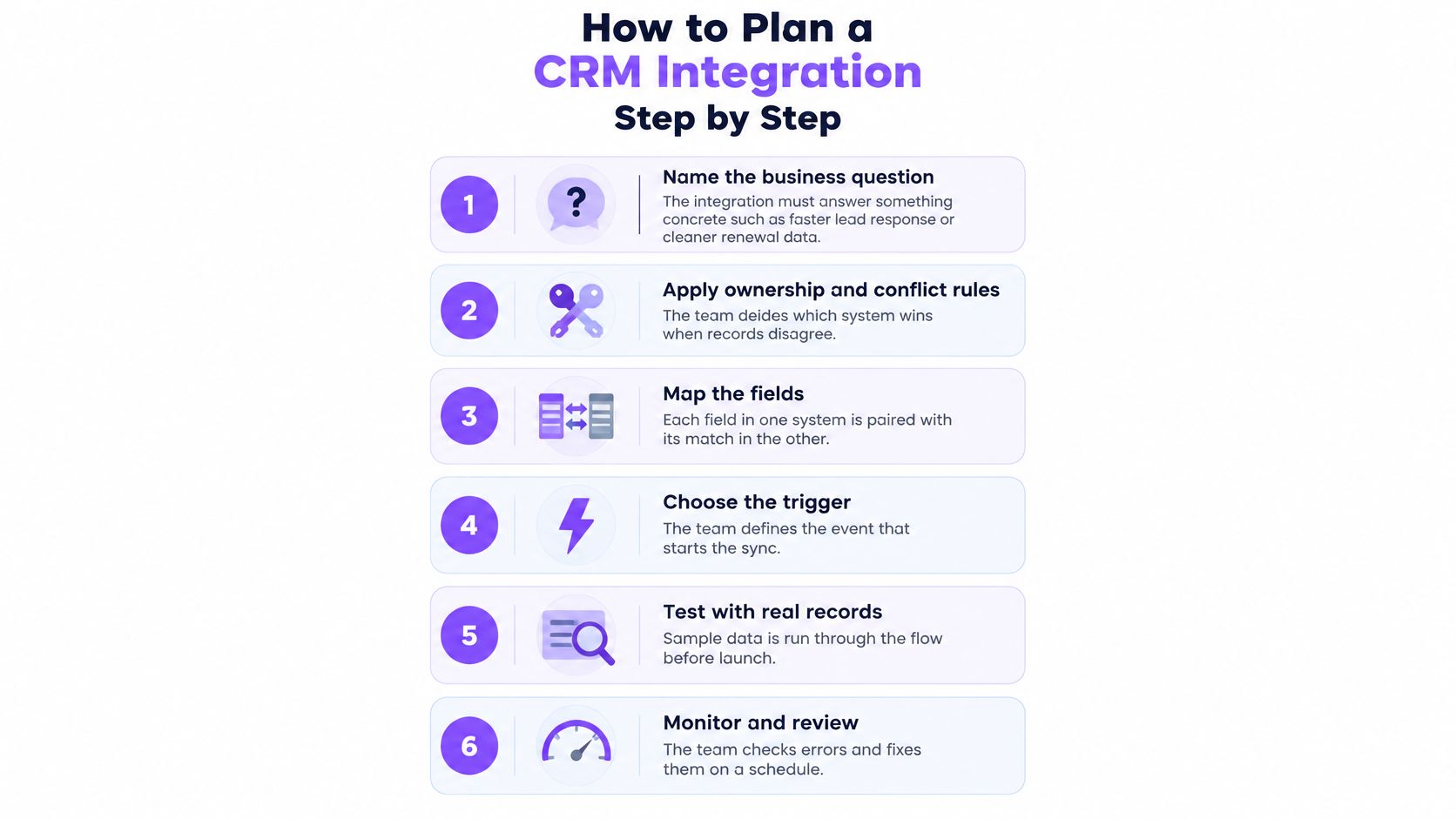
Planning an integration in the wrong order wastes months. Teams usually start by toggling native connectors on, then scramble to untangle duplicate leads and broken reports six weeks later. Run these seven steps in sequence instead, so your ownership decisions drive the technical build.
-
Name the concrete business question first. Write down the exact operational gap you want to close, such as cutting lead response time on demo requests or giving account managers live invoice history before renewal calls. If nobody can tie a proposed sync to a decision a human will make differently, leave it out of scope.
-
Apply ownership and conflict rules before mapping fields. Ownership blind spots are startlingly common: a 2025 CRM adoption analysis by TwoPir Consulting reported that 34% of CRM stakeholders did not know who was responsible for CRM data accuracy and completeness, while only 20% said their organisation had formal data-governance policies. Assign a named steward to every object in scope before a single field gets paired.
-
Lock in matching keys and enrichment standards. Choose the exact identifier priority your connector will check before creating a new record, and write down what happens when fields come in incomplete. For teams trying to prevent stale job titles and missing domains from poisoning new syncs, the Fetchin guide to keeping records current covers practical enrichment habits that keep baseline profiles accurate.
-
Pick the sync method that fits the decision speed. Reserve webhooks and real-time events for flows where minutes change revenue outcomes, such as routing a hot pricing-page visitor or updating an active support escalation. Pair those alerts with clear lead assignment rules so incoming context reaches the right rep immediately, and leave historical reconciliations or financial roll-ups on scheduled nightly batches.
-
Pilot one workflow with live exception logging. Launch with a narrow slice of traffic or a single sales pod first. Route sync failures and low-confidence matches to a named reviewer who checks the log daily for two weeks, validating test leads, opt-outs, reschedules, and cancellations end to end.
-
Measure commercial outcomes before and after launch. Moving data isn’t the finish line. Global research from Bain & Company found that 70% of companies struggle to integrate their sales plays into CRM and revenue technologies, and while more than 80% reported structured sales and marketing activities, only about 20% had realised full value. Benchmark speed-to-lead, qualified-conversation rate, meeting-booking rate, duplicate rate, sync-failure count, and rep adoption before go-live, then compare again at thirty and ninety days.
-
Audit field ownership every quarter and retire dead weight. Schedule a recurring ninety-minute review to archive unused custom fields, confirm system stewards haven’t changed roles, and prune noisy activity logs that reps ignore.
That order matters because an integration can be green across every technical dashboard and still fail commercially. When follow-up habits, routing ownership, and rep visibility never change, all you built is an expensive pipe moving data nobody reads.
Pick Your First Integration to Build
If your stack has ten disconnected tools, resist the urge to wire them all up in one giant project. Start with the single flow that carries the most costly delay and sits on the cleanest existing data. For most B2B teams, that is the inbound handoff linking your website, your CRM, and your sales team’s calendars.
Here is the basic handoff flow that eliminates the highest-friction gap first.
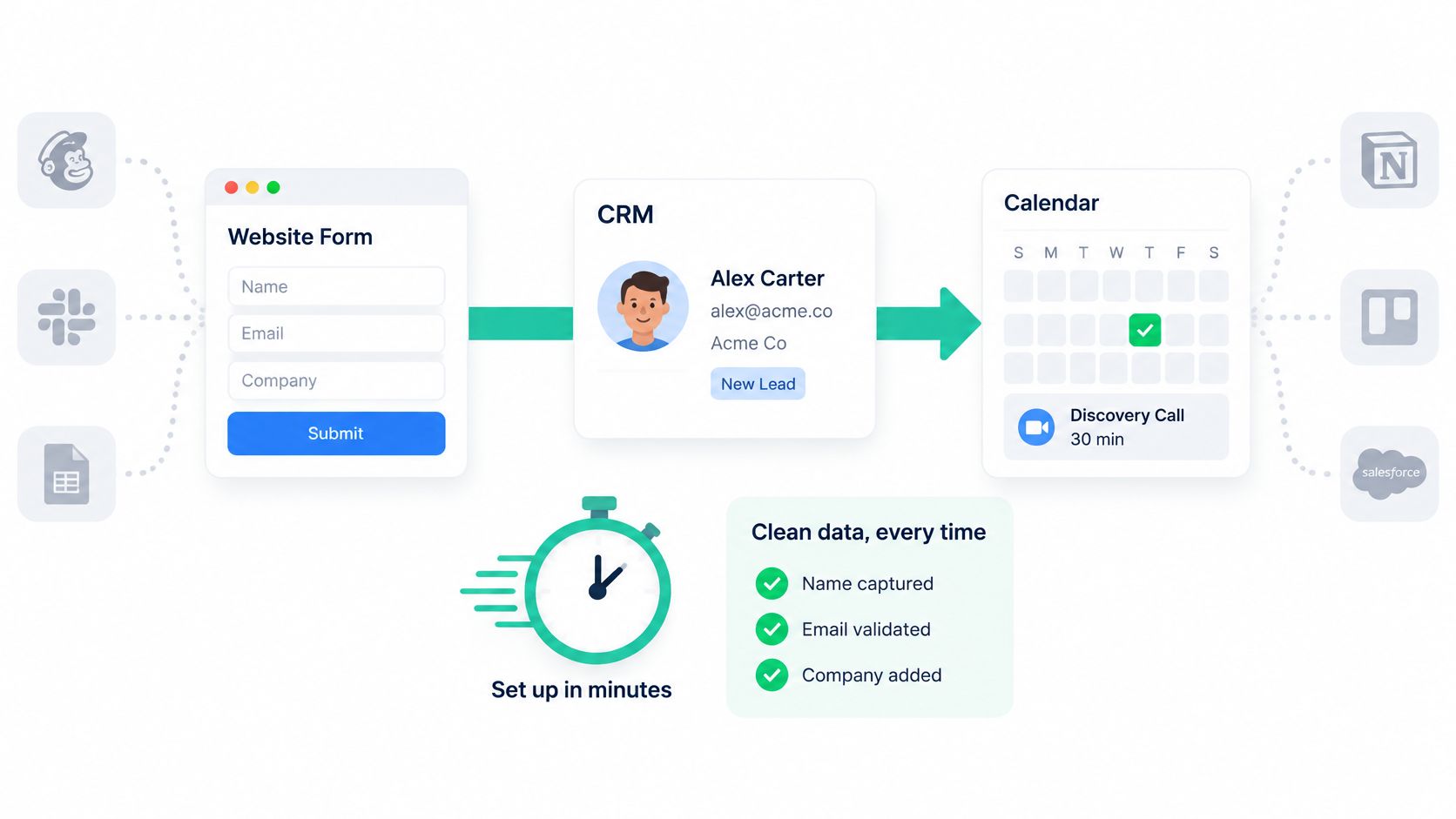
Apply a simple two-part test before starting. If a slow or missed handoff costs pipeline every week and your contact fields are already tidy, build that connection first. If your CRM is packed with duplicate accounts and conflicting owners, pause the connector rollout and clean up matching keys and field governance first. Otherwise, you will copy the same confusion into every downstream system on day one.
Three Moves to Ship Your First Flow Fast
You do not need a long engineering sprint to get an inbound website-to-CRM workflow running. Break your first build into three manageable moves:
- Connect the CRM and calendars first: Turn on native calendar syncing so every booked call attaches cleanly to the matching contact and opportunity without manual logging.
- Add one website tracking snippet or native connector: Capture visitor intent and conversations directly from high-value pages instead of relying solely on static contact forms.
- Filter which intent signals trigger a rep alert: Send live notifications only when a visitor matches your target criteria, visits pricing, or books time, so reps trust every ping.
Captiwate syncs natively with HubSpot and Salesforce, so conversations, identified companies, intent signals, and meeting bookings flow into the CRM automatically. Setup takes one JavaScript snippet on the customer’s site, then connecting the calendar and CRM, after which the site is live. Triggers, segments, and routing are configured inside the app without a developer for day-to-day use. Getting started follows three clear steps: book a demo and integrate the script, start revealing and scoring visitors by intent, then start turning them into pipeline.
Keep scope realistic as you expand. Rule-level adjustments on a two-way HubSpot or Salesforce connection rarely need developer hours, and a snippet plus calendar and CRM sync can go live the same day. Most customers are live the same day after implementation, and no engineering team is required. Once a workflow spans three or more platforms, such as tying an ERP, a billing engine, and a data warehouse into your CRM, bring engineering in early to review rate limits, authentication, and error handling.
This short walkthrough shows how a live CRM integration connects day-to-day workflows end to end.
Five Questions for Your Next Planning Meeting
Walk into your kickoff meeting with a single page answering these five items to keep the project on track:
- Object in scope: Which exact record type moves first, contacts, meetings, opportunities, or orders?
- System of record: Which single platform holds the authoritative value if two tools disagree?
- Matching key: Which stable identifier links records across systems before any fallback rule runs?
- Success metric: Which commercial number, such as speed-to-lead or meeting-booking rate, proves the flow paid off?
- Schema approver: Which named individual signs off before anyone adds, renames, or retires a synced field?
If you want website traffic, live conversations, and calendar bookings flowing into HubSpot or Salesforce without heavy engineering work, Captiwate combines visitor identification, 24/7 AI qualification, live in-browser video, and native CRM sync through a single script. Visit Captiwate to see how teams connect high-intent website visits with governed CRM records and booked pipeline the same day.