I've built product-led sales teams at two fast-scaling companies—SEON (€0 to €20M ARR) and TestGorilla (PLG to sales-assisted). I've coached dozens of startups through their PLS implementations.
Here's the pattern I see everywhere:
Founders spend months perfecting their PQA scoring model. Usage thresholds, feature adoption signals, behavioral triggers—all dialed in. The Slack alerts fire. The dashboard looks beautiful.
And then conversion rates stay flat.
The problem isn't the scoring. It's what happens after the score triggers.
Most product-led sales motions fail at the engagement layer, not the qualification layer. You've identified the right accounts at the right time—but by the time your sales team reaches out, the moment is gone.
This isn't a theoretical problem. I've watched companies with identical PQA models get wildly different results. The difference? Speed to lead.
What Product-Led Sales Actually Is (Brief Refresher)
If you're reading this, you probably already know what PLS is. But let's get aligned on definitions.
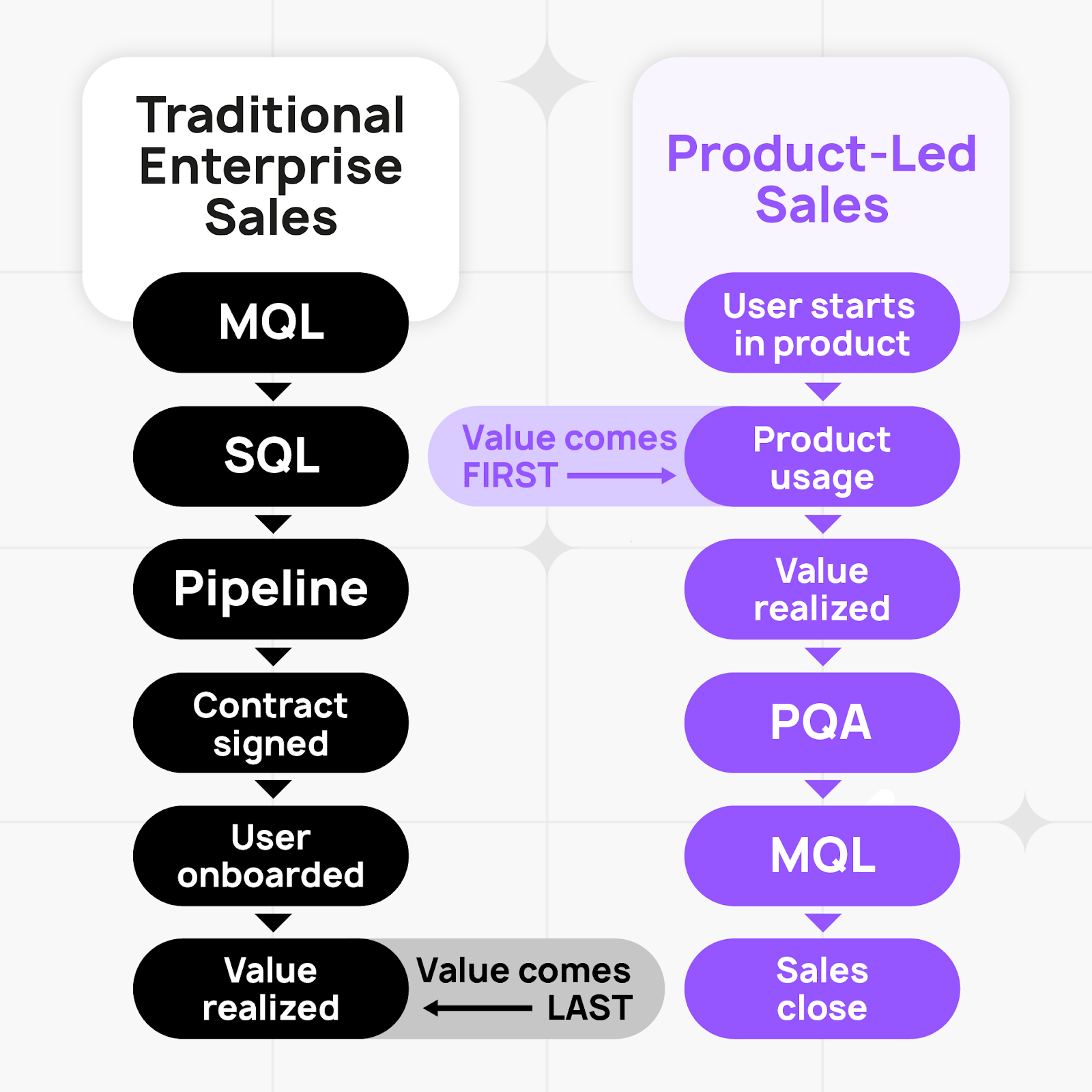
Traditional Enterprise Sales:
Marketing → MQL → SQL → Demo → Proposal → Contract → Product usage
Product-Led Sales:
Product usage → PQA → Sales engagement → Expansion
The key difference: the user has already experienced value before sales gets involved. You're not convincing them the product works. You're helping them buy more of what they already want.
Why PLS Works (When It Works)
- Higher conversion rates: Users are pre-qualified by actual product usage, not marketing engagement
- Shorter sales cycles: They've already tried it—you're not starting from zero
- Better retention: They know exactly what they're buying because they've used it
Where PLS Works Best
SMB (1-100 employees): Usually stays pure self-serve. Contract values are too low to justify sales involvement, and these buyers prefer to move fast without talking to anyone.
Mid-Market (101-1000 employees): This is the PLS sweet spot. Users have permission to try products, companies aren't overly regulated yet, and contract values ($10-50K) justify sales involvement while still benefiting from product-led qualification.
Enterprise (1000+ employees): Traditional sales-led motion still dominates. Budget control is centralized, security requirements gate adoption, and end-users often aren't motivated to solve enterprise-wide problems. But companies like Figma, Miro, and Notion have proven you can enter through end-users and expand into six-figure contracts—it just requires patience.
For a deeper dive on PLS fundamentals, Elena Verna's Product-Led Sales Guide is the definitive resource.
The Standard PLS Playbook (And Where It Breaks)
Here's what every PLS implementation guide tells you to do:
Step 1: Build a PQA scoring model
Track product usage signals—feature adoption, usage volume, velocity, behavioral indicators (pricing page visits, security doc downloads). Assign a score that predicts likelihood to convert.
Step 2: Set a threshold
When an account crosses, say, 80/100, they're "sales-ready."
Step 3: Alert your sales team
Slack notification, CRM task, email digest—whatever gets it in front of reps.
Step 4: Sales reaches out
Email, LinkedIn, phone call. Start the conversation.
This is what 90% of PLS implementations look like.
And it fails in two predictable ways:
Failure Mode 1: Over-Eager Automation
Some companies overcorrect by automating everything.
The typical workflow:
- New user signs up for free trial
- 10 minutes later: automated email #1 ("Welcome! Here are some tips")
- 2 hours later: automated email #2 ("Have you tried [feature]?")
- Day 2: automated email #3 ("Teams like yours use us for...")
- Day 4: automated email #4 ("Ready to upgrade?")
- Day 7: automated email #5 ("Your trial expires soon!")
The user hasn't even had time to use the product, but your automation is already treating them like a qualified lead.
Result: They unsubscribe, mark you as spam, or mentally tune out. When they actually do become sales-ready three weeks later, they've already learned to ignore you.
The meme of "new free user gets asked 'ARE YOU READY TO BUY ENTERPRISE?' 10 minutes after signup" exists because so many companies do this.
Failure Mode 2: Too Slow to Engage
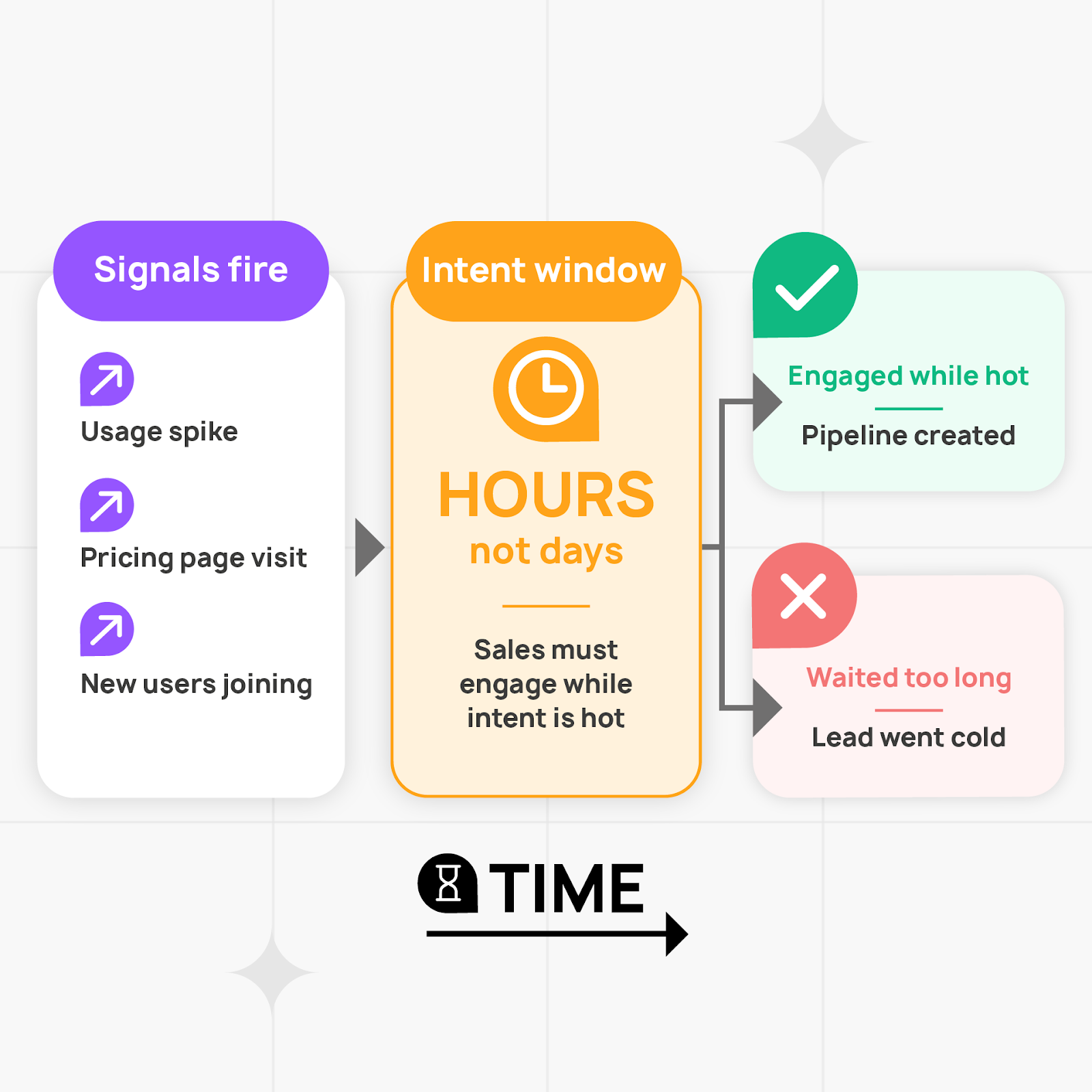
Most companies avoid the automation trap but fall into the opposite problem: engaging too late.
Here's the typical timeline:
- Tuesday, 2:00pm: User from Acme Corp hits PQA threshold (score: 85)
- They're on your pricing page right now
- They've been using your product for two weeks
- Their team just hit the seat limit
- They're actively evaluating Team vs. Enterprise plans
- Tuesday, 2:03pm: Slack alert fires to #sales-pqa channel
- Tuesday, 4:15pm: Sales rep finishes their current call, sees the alert in a sea of Slack messages
- Tuesday, 5:30pm: Rep adds Acme Corp to their CRM queue, plans to reach out tomorrow
- Wednesday, 10:00am: Rep drafts personalized email referencing product usage
- Wednesday, 11:00am: Email sent: "Hi Sarah, noticed your team's been exploring our platform..."
- Wednesday, 2:00pm: No response
- Thursday: Follow-up email
- Friday: LinkedIn connection request
- Next Tuesday: "Just checking in..."
What actually happened:
The user was on your pricing page on Tuesday at 2pm. They were actively evaluating. They had questions about seat limits, annual vs. monthly pricing, and whether you integrate with their CRM.
They opened three competitor tabs. Two of them had chatbots (unhelpful). One had a "Book a Demo" form (they didn't want to wait 3 days).
So they Googled their questions, found partial answers on Reddit, made a decision based on incomplete information, and moved on.
By the time your rep sent that email 21 hours later, Sarah had:
- Evaluated two competitors
- Been pulled into three other work priorities
- Moved "evaluate sales tools" from "urgent" to "I'll revisit this next month"
The moment passed.
Both failure modes have the same root cause: you're engaging outside the window where the user actually cares.
The Intent Window (And Why Every Second Counts)
After building PLS motions at SEON and TestGorilla, I started tracking something most teams ignore: how quickly intent decays after a high-intent signal.
Here's what the data showed:
The Intent Window:
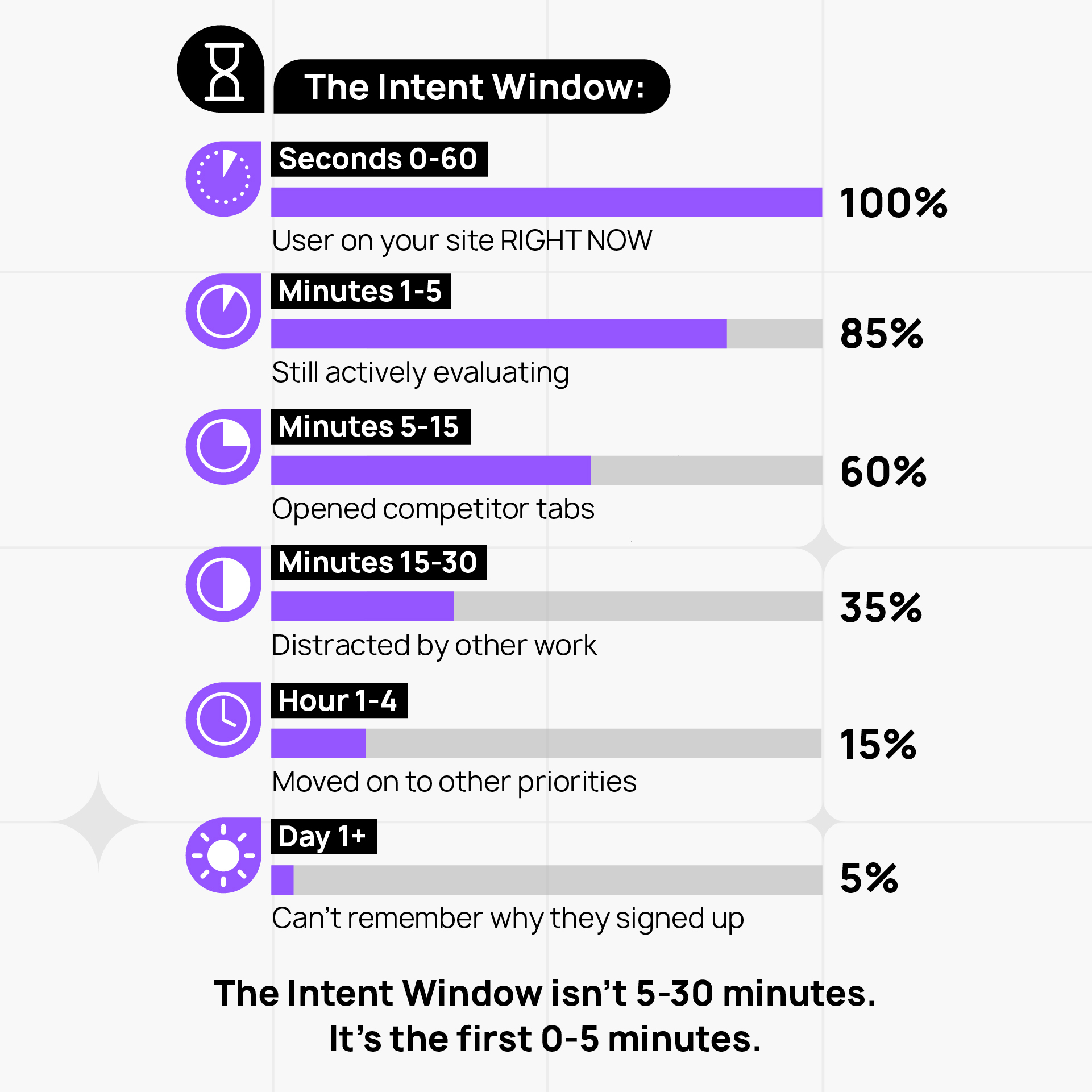
The Intent Window isn't 5-30 minutes. It's the first 0-5 minutes.
Every second you wait, conversion probability drops.
When I show this data to founders, they're skeptical. "Really? It decays that fast?"
Yes. And here's why:
Why Intent Decays So Fast
1. Context switching
B2B buyers aren't sitting around waiting to hear from you. They're juggling a dozen priorities. The moment they close your tab, they're onto something else. Getting them back into "evaluation mode" three days later requires re-selling them on the problem.
2. Competitive evaluation
They're not just looking at you. They've got three other tabs open with competitors. Whichever vendor helps them make a decision right now wins.
3. Decision fatigue
The longer they wait, the less urgency they feel. "I'll revisit this next week" becomes "I'll revisit this next quarter" becomes "we're fine with our current solution."
This is why companies that implement real-time engagement see conversion rate improvements of 2-3x, even with identical PQA scoring.
It's not that their leads are better qualified. It's that they're engaging while users still care using intent signals.
What Real-Time PLS Engagement Actually Looks Like
Let me show you the difference.
Scenario: Sarah, VP of Sales at a Mid-Market SaaS Company
Context:
- Using your product for two weeks (free tier)
- Team just hit 8/10 seat limit
- Currently on your pricing page, comparing Team vs. Enterprise plans
- PQA score: 87
Traditional PLS Response:
What happens:
- Slack alert fires
- Sales rep sees it 3 hours later
- Sends email next morning: "Hi Sarah, saw your team's been exploring our platform. Would love to connect and discuss how we can help you scale..."
Sarah's experience:
- Gets the email on Wednesday
- Thinks: "Oh yeah, I was looking at that. But I already decided to go with [competitor] yesterday because they had better documentation on integrations."
- Deletes email without responding
Conversion: ❌
Real-Time PLS Response:
What happens:
Tuesday, 2:00pm - Sarah lands on pricing page
The system detects:
- High PQA score (87)
- Current behavior: viewing pricing page
- Context: 8 active users, exploring Team plan, visited pricing 3x this week
Tuesday, 2:01pm - Sales rep gets alert
Alert includes:
- Who: Sarah Johnson, VP Sales at Acme Corp
- Score: 87 (high intent)
- Know when your trial user is active and on pricing page right now
- Usage context: 8/10 seats used, active for 2 weeks, power users in sales and marketing
Tuesday, 2:02pm - Engagement options appear for Sarah
She sees a subtle notification:
💬 Questions about pricing?
Chat with our team • Quick call • Browse on your own
Tuesday, 2:03pm - Sarah clicks "Chat with our team"
Sarah: "Hey! I'm trying to figure out if we should go with Team or Enterprise. We're at 8 users now but might grow to 15-20 by end of quarter. What's the difference in seat pricing?"
Rep (who can see her usage context): "Good question! With your current usage pattern, Team plan would work fine for now. The main difference is Enterprise includes SSO and advanced permissions, which most teams your size don't need until 25+ users. Want me to show you exactly how the seat scaling works?"
Sarah: "Yeah, that'd be helpful. Also, do you integrate with Salesforce?"
Rep: "We do. Let me show you—can I share your screen for 30 seconds?"
(Rep uses co-browsing to navigate Sarah to the integrations page, shows Salesforce connector)
Sarah: "Perfect. Okay, I think Team plan makes sense. Can I start today and upgrade later if needed?"
Rep: "Absolutely. And if you do upgrade within 6 months, we'll credit your Team plan payment toward Enterprise. Let me send you a link to get started."
Tuesday, 2:15pm - Deal closed
Sarah upgrades to Team plan. 10-minute conversation. No follow-up emails. No "checking in." She had questions, got answers, made a decision.
Conversion: ✅
The Difference
Sarah had the same questions in both scenarios.
In the first scenario, she found answers elsewhere—competitor website, Google, Reddit, a colleague who uses a different tool.
In the second scenario, she got answers immediately from someone who could actually help.
Same lead. Same qualification. Different timing.
This is what I mean by real-time engagement.
How This Actually Works (The Technical Side)
The scenario above isn't hypothetical. It's how Captiwate works, and it's why I built it after running PLS teams at SEON and TestGorilla.
Here's what's happening under the hood:
1. Real-Time Visitor Intelligence
When Sarah lands on the pricing page, the system:
- Identifies her (matched to existing user account)
- Pulls her PQA score and usage context
- Detects high-intent behavior (pricing page view)
- Checks if she's from a target account segment
2. Instant Alert to Sales
Sales rep gets notified immediately:
🔔 High-intent visitor on pricing page
Sarah Johnson - VP Sales, Acme Corp
PQA Score: 87 | Status: Active on site
Usage context:
• 8/10 seats used
• 2 weeks active
• Pricing page: 3rd visit this week
• Exploring: Team vs Enterprise comparison
[Chat now] [View full profile]
3. Engagement Options for the User
Sarah isn't forced into a conversation. She sees options:
- Chat with our team (opens live chat with context-aware rep)
- Quick call (instant video call, no scheduling)
- Browse on your own (dismisses notification)
The user controls the experience. Sales is available if helpful, invisible if not.
4. Co-Browsing for Contextual Help
When Sarah asks about Salesforce integration, the rep doesn't say "let me send you a link."
They use co-browsing to navigate directly to the integrations page on Sarah's screen, showing her exactly what she needs.
No screen sharing software. No "can you see my screen?" No tab-switching. Just immediate, contextual help.
5. Conversation Happens While Intent is Hot
The entire interaction—question, answer, decision—happens in 10 minutes.
Not 10 days. Not 10 emails. Ten minutes.
Because Sarah is on the site right now, and she's ready to make a decision right now.
Why Most PLS Stacks Can't Do This
The typical PLS tech stack looks like this:
Product Analytics (Amplitude, Mixpanel, Heap)
↓
PQA Scoring (Pocus, Endgame, Correlated)
↓
Alerts (Slack, CRM tasks)
↓
❌ GAP ❌
↓
Email Outreach (Salesloft, Outreach, manual emails)
The gap: there's no way to engage users while they're still on your site.
Sales gets an alert. They review the account. They craft an email. They send it 6 hours later.
By then, the user is gone.
What's Missing:
✅ Real-time visibility - See when high-intent users are on your site right now (not yesterday's report)
✅ Behavioral context - Know what they're looking at (pricing, case studies, integrations)
✅ Instant engagement - Chat or call while they're still active
✅ User control - Let them choose how to engage (or dismiss and browse alone)
✅ Co-browsing - Guide confused buyers without clunky screen shares
You could theoretically build this by duct-taping together:
- Visitor identification (Clearbit, 6sense)
- Live chat (Intercom, Drift)
- Video calls (Calendly + Zoom)
- Screen sharing (separate tool)
- CRM integration (custom Zapier workflows)
But by the time you've integrated all of that, configured the alerts, trained sales on the workflow, and debugged why the Slack notification isn't firing...
...you've spent 3 months and $50K on a Frankenstein system that still doesn't work as well as it should.
This is why we built Captiwate.
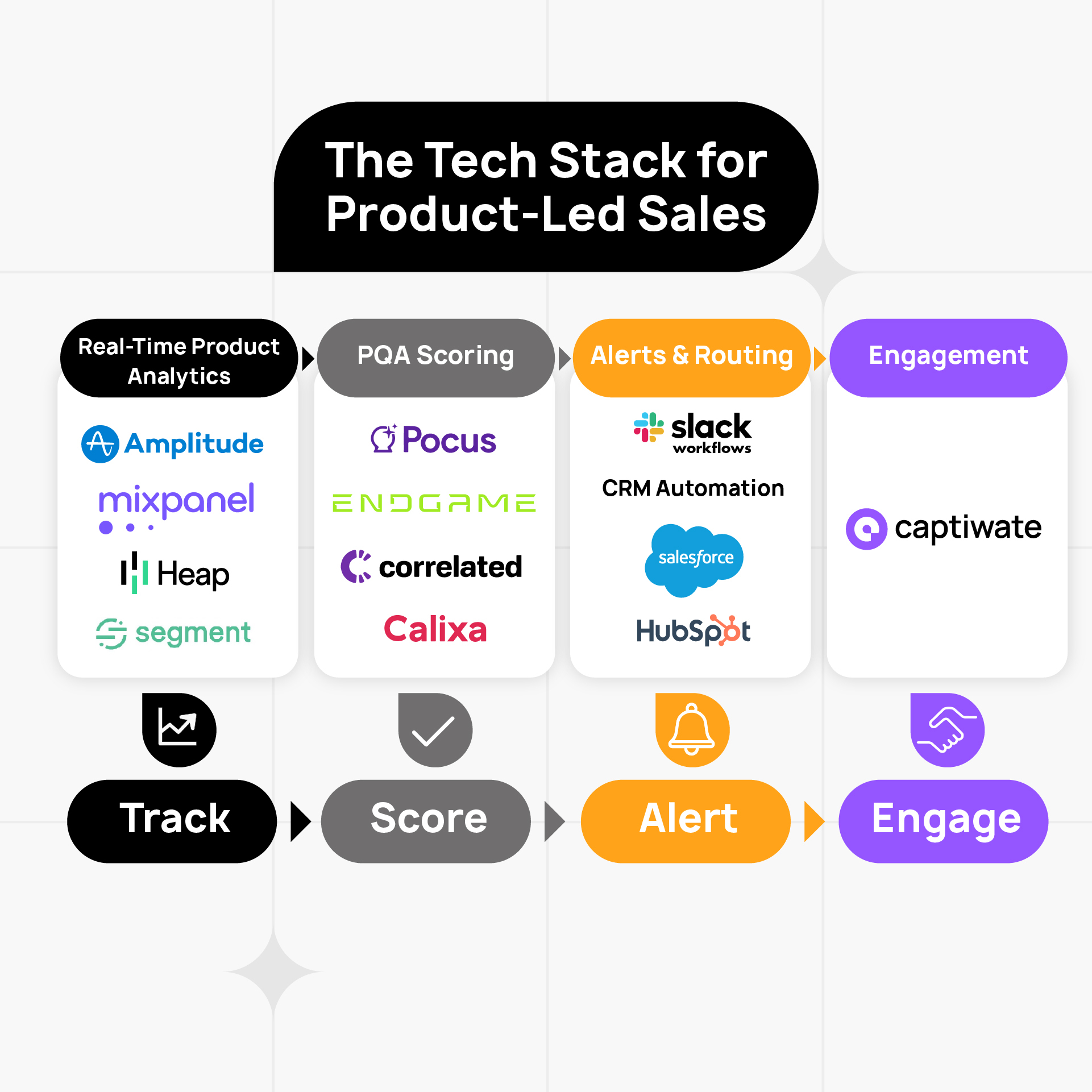
After running PLS teams at SEON and TestGorilla, I kept hitting the same problem: great scoring, slow engagement. We had all the pieces scattered across different tools, but no single system that could detect intent and enable engagement in the same moment.
Captiwate closes that gap:
- Visitor identification + PQA scoring integration
- Real-time alerts when high-intent users are on-site
- Live chat and video call options (user-controlled)
- Co-browsing for contextual assistance
- All in one tool, purpose-built for the PLS motion
You get the alert. You see the context. You engage immediately. The user gets help while they need it.
This is the engagement layer that was missing.
How to Fix Your PLS Motion (Practical Steps)
If your PLS motion is generating PQAs but not converting them, here's how to fix it:
Step 1: Audit Your Engagement Speed
Pull data on your last 50 PQAs and answer these questions:
- How long between PQA trigger and first sales touchpoint?
- What % were engaged within the first 5 minutes? First hour? First day?
- What was the conversion rate for <5 min engagement vs. >24 hour engagement?
If you're averaging 4+ hours to first touchpoint, you're missing the Intent Window.
This is your baseline. Everything else builds on this.
Step 2: Shorten the Alert → Action Loop
Goal: sub-5-minute response time when a high-intent signal fires.
This means:
Real-time alerts (not daily digest emails)
Slack/Teams notifications that fire instantly when a PQA hits threshold or exhibits high-intent behavior.
Clear ownership
Which rep handles which account? No "I thought someone else was taking that."
Contextual alerts
Don't just say "Acme Corp hit PQA 85." Say "Sarah from Acme Corp is on pricing page right now, 3rd visit this week, 8/10 seats used."
Pre-built response frameworks
Reps shouldn't be crafting emails from scratch. They should have templates for common scenarios:
- User on pricing page → "Saw you were exploring plans, happy to walk through options"
- User exploring integrations → "Questions about how we work with [their stack]?"
- User at seat limit → "Noticed you're hitting capacity—want to discuss team plans?"
But honestly? If you're still relying on email outreach after a PQA trigger, you're already too slow.
The real unlock is enabling engagement while they're still on your site.
Step 3: Add Real-Time Engagement Capability
This is the critical piece most PLS stacks are missing.
It's what the real-time sales framework can deliver for sales assisted PLG companies.
You need a tool that lets sales:
✅ See when PQA users are on your site right now
Not "visited yesterday." Not "active this week." Currently browsing.
✅ Understand context
What page are they on? What have they been exploring? What's their usage pattern?
✅ Engage immediately
Chat, video, or let the user browse independently. Their choice.
✅ Provide contextual help
Co-browsing to guide them to the right page, answer questions in real-time, remove friction.
This is where Captiwate fits.
We built it specifically for this use case: detect high-intent behavior, alert sales instantly, enable engagement while the user is still active.
If you want to see how it works in practice, book a demo and we'll show you the exact workflow from the Sarah scenario above.
Step 4: Train Sales on Contextual Engagement
Real-time engagement only works if sales knows how to use it properly.
Bad approach:
- User lands on pricing page
- Sales immediately pops up: "HEY! WANT TO BOOK A DEMO?"
- User closes tab
Good approach:
- User lands on pricing page, exploring Enterprise tier
- Sales waits 30 seconds to see if they're browsing or lingering
- If they linger (scrolling, comparing plans), offer help:
"Saw you were checking out our Enterprise plan—most teams at your scale have questions about seat limits and integrations. Happy to walk through it if helpful?" - User either engages or dismisses (both are fine)
The conversation should feel like helpful assistance, not a sales ambush.
Key principles:
Wait for real signals
Don't jump on every page view. Wait for behavior that indicates they're stuck or evaluating (repeat visits, long dwell time, hovering over CTAs).
Lead with value, not pitch
Your first message should help them get more value from the product, not ask for a meeting.
Know who you're talking to
Individual contributors want tips and tricks. Buyers want ROI conversations. Don't confuse them.
Respect the self-serve journey
Some users will never want to talk to sales, and that's fine. Don't force it.
Step 5: Measure What Actually Matters
Don't measure sales on PQA volume. Measure on:
PQA → Engaged %
Are they actually reaching out to high-intent accounts, or are alerts getting ignored?
Time to First Engagement
How fast are they moving? Sub-5-minutes should be the target for users actively on-site.
Engagement → Pipeline Conversion %
Are engaged PQAs converting at higher rates than email outreach? (They should be 2-3x higher.)
Expansion ARR, Not Just New Logo Land
In PLS, you often acquire accounts at lower initial contract values (a team of 5, not an enterprise-wide deployment). The revenue comes from growing with the account over time.
If your comp plan incentivizes reps to oversell on the initial contract, they'll disrupt the natural product-led expansion journey.
Reward speed and expansion, not just deals closed.
The Bottom Line
Product-led sales works—when you can engage users at their moment of highest intent.
Most PLS implementations fail not because of bad scoring, but because of slow engagement. You've identified the right accounts at the right time, but by the time sales reaches out, the user has moved on.
The Intent Window is real. And it's narrow—0-5 minutes, not hours or days.
If you're building a PLS motion, don't just optimize for PQA accuracy. Optimize for engagement speed.
Because the difference between a user who converts and one who ghosts you isn't whether they're qualified.
It's whether you talked to them while they were still ready to talk.
Krisz Berecz
Founder & CEO, Captiwate
I built product-led sales teams at SEON (€0 → €20M ARR) and TestGorilla before building Captiwate to solve the engagement timing problem. If you're running a PLS motion and want to see how real-time engagement changes conversion rates, book a demo here.